
Chapter Relevance
Project Relevance: ★☆☆ (Acts as a concluding summary and checklist for your final submission across projects 1, 2, 3, and 4, but contains no new technical requirements.)
Foundation: ★★★ (Brings all best practices together into the envisioned academic and professional standard for computational science.)
Time to Read: 5 minutes
In a nutshell: Review the core pillars of reproducible spatial science to ensure your final workflow is transparent, runnable, and scientifically trustworthy.
Skip this if: You are just looking for new coding techniques, as this chapter serves as a high-level conceptual recap of the module’s core philosophy.
In the previous chapters, you learned how to write readable Python, organize larger workflows, code defensively, capture software environments, and document your spatial projects clearly. Each of these practices improves the quality of your code on its own. In this final chapter, we make the scientific connection explicit.
Together, these practices are the building blocks of reproducible research.
In computational spatial analysis, reproducibility is not just an abstract academic ideal; it is a practical, baseline property of a trustworthy workflow. If your repository contains the data, the code, the environment, and enough documentation for another person to recreate your outputs without guessing, your workflow is reproducible. If not, critical parts of your science remain hidden.
This matters immensely because geospatial workflows are complex. A final map or summary statistic is rarely the result of a single operation. It depends on a deep stack of computational choices:
loading and reprojecting vector data to a common CRS
clipping, masking, and filtering rasters
choosing spatial aggregation methods and thresholds
calculating trends and extracting geometries
exporting final figures and tables
If these intermediate steps cannot be rerun and verified by another researcher, the final result becomes impossible to trust.
This chapter brings the whole lesson together. You will learn what reproducibility means in computational research, how it differs from replicability, why it should be treated as a minimum standard, where it most often breaks down, and what a realistic reproducibility standard looks like for SDS210 projects.
1. What reproducibility means
In computational research, reproducibility has a very specific definition. According to The Turing Way, a foundational handbook for data science, reproducibility means that if someone else takes your exact original data and your exact original code, they should be able to generate your exact original results.
That definition sounds simple, but it is worth taking seriously. A workflow is not reproducible merely because:
the notebook file exists on your laptop
the Python code looks readable
a final figure was exported and saved once
the repository was made public on GitHub
A workflow is only reproducible when another person can actually run it again and obtain the exact same outputs.
The four core ingredients
True reproducibility requires sharing the entire computational context. This involves four pillars, which correspond exactly to the themes you have developed across this module:
Code: The analytical steps and defensive checks must be available and readable.
Data: The raw inputs must be available, unmodified, and clearly accessible via relative paths.
Environment: The relevant software setup and package versions must be recorded.
Documentation: The workflow must be understandable enough to rerun without guesswork.
A geospatial example
Suppose you build a notebook that extracts elevation values from a 25 m DEM at various climate station locations, then maps the result.
A reproducible version of that project makes it possible to load the same station layer, load the same DEM, reproject the data in the same way, run the extraction again, and regenerate the exact same map down to the pixel.
If the notebook only works because of a hidden CSV file, an undeclared package installed on your laptop, or manual preprocessing you did in QGIS before opening Python, the workflow is not reproducible. Furthermore, if the script runs but the map looks slightly different because a newer library handled a projection differently, the research is also not reproducible.
This point is critical. Reproducibility is not primarily about archiving code as a static object. It is about recovering the result.
Interactive Explorer: Reproducibility Stress Test.
Select common threats such as absolute paths, manually edited raw data, hidden notebook state, missing environment files, unfixed randomness, or vague documentation to see which pillar breaks and how a reproducible workflow repairs it. For improved visibility of the explorer, follow this link.
2. Reproducibility vs. replicability
The terms reproducibility and replicability are often used interchangeably, but in modern science, they mean two distinct things. Understanding the difference is critical.
A helpful way to think about the distinction is through this simple formula:
Reproducible: Same data + same code = same result.
Replicable: New data + same methods = consistent finding.
A spatial example
Imagine you publish a project showing that proximity to urban parks in Zurich correlates with lower summer land surface temperatures.
Reproducibility asks: “If I download your Zurich data and run your Python notebook, do I get the exact same correlation coefficient?” This tests the integrity of your computational workflow.
Replicability asks: “If I collect new Landsat data for Geneva and apply your overall methodology, do I find the same cooling effect from parks?” This tests the scientific validity of your underlying hypothesis.
The dependency between them
A study can be reproducible without being replicable. For example, the code might run perfectly, but the cooling effect may apply only to Zurich’s specific climate.
However, it is almost impossible to replicate a study if it is not first reproducible. If another researcher cannot figure out exactly how you calculated the temperatures in Zurich, they cannot confidently apply your methods to Geneva.
Why this distinction matters
For your SDS210 projects, reproducibility is the immediate and achievable target. It is the baseline level of scientific reliability that you can directly control within your own repository.
Replicability is the broader goal of science, but it usually requires a larger research design, new data collection, and independent investigation that extends beyond a single semester project.
Concept Check: Reproduce or Replicate?
You share your Zurich urban heat notebook with a classmate. They download the same input files, create the same environment, run the same notebook, and check whether they obtain your exact map and correlation coefficient. Which scientific question are they testing?
A. Reproducibility, because they are using the same data and same code to recover the same result.
B. Replicability, because a different person is running the workflow.
C. Neither, because reproducibility only applies to published journal articles.
Check your understanding
Answer: A This is reproducibility because the test uses the same data and same code to recover the same output. Replicability would require new data or a new case study, such as applying the same method to Geneva.
3. Why reproducibility is a standard
As outlined in the PLOS Ten Simple Rules for Reproducible Computational Research, reproducibility is not the ultimate goal of science. The ultimate goal is discovering the truth. However, reproducibility is the minimum standard for judging computational work.
In a traditional scientific paper, a reader must trust the author’s written description of the methods. In computational science, the code is the method. Once your method is formalized as a script, there is no good reason for the workflow to remain mysterious or irrecoverable.
What reproducibility makes possible
A reproducible workflow allows collaborators and reviewers to:
inspect exactly how results were generated
verify intermediate steps and spatial transformations
test how sensitive the results are to different parameter choices
identify hidden bugs or accidental data drops
build upon the work more confidently
Without reproducibility, the final result is much harder to evaluate scientifically.
A geospatial case
Suppose you produce a map of snow cover trends across Switzerland. If the workflow is reproducible, another person can inspect the input raster stack, check how the annual summaries were computed, verify the chosen CRS, rerun the trend calculation, and confirm that the exact same map appears.
If the workflow is not reproducible, the final map becomes much harder to assess. A reviewer cannot check if an outlier was dropped accidentally, or if a CRS reprojection silently distorted the area calculations. The map may still be correct, but the scientific trust in the result is much weaker because the analytical path cannot be fully recovered.
Reproducibility is not perfection
It is important to keep this grounded. Reproducibility does not guarantee that the science is excellent. A workflow can be fully reproducible and still be based on weak assumptions, poor data, or flawed statistical methods.
By making your work reproducible, you are not claiming your science is flawless. You are simply allowing others to verify, trust, and evaluate your computational process.
4. Common threats to reproducibility
Even well-intentioned data scientists often fall into traps that break reproducibility. Most reproducibility failures are not dramatic, catastrophic errors. They are usually ordinary workflow habits that seem harmless in the moment but create invisible problems later.
This section brings together the most common threats you have encountered throughout this module.
Modifying raw data
One of the most fatal habits is performing important preprocessing steps manually, outside of the code. Opening a CSV file in Excel to delete a few “bad” rows, or clipping a layer interactively in QGIS and overwriting the original input file, breaks reproducibility immediately. There is no record of what was changed, making it impossible for anyone else to reproduce your work from the true raw data.
Hidden notebook state
A notebook may only work on your machine because you ran the cells in a specific, hidden order. For example, you may define a variable at the bottom, then scroll up to use it at the top. When someone else opens your file and clicks “Run All”, the notebook immediately crashes.
A strong notebook must pass a simple test: restart the kernel, run all cells from top to bottom, and recover the final outputs without any manual intervention.
Fragile file paths
Using absolute paths guarantees the code will fail on any other computer. As soon as the project is shared or moved, a path like this breaks the workflow:
gpd.read_file("C:/Users/Hendrik/Desktop/SDS210/data/raw/stations.gpkg")Environment drift
A notebook may run perfectly today because your laptop happens to have the right packages installed. Without an environment.yml or requirements.txt file recording the exact package versions, your software setup remains a hidden assumption. This leads to silent failures when a geospatial library inevitably updates how it handles an algorithm in the future. This problem is called version drift.
Magic numbers and silent assumptions
Some of the most important analytical choices are often hidden inside the code without explanation:
choosing a specific working CRS
defining a buffer distance as
500setting a cloud cover threshold of
< 20%dropping polygons smaller than
100square meters
If you hard-code these magic numbers without an inline comment explaining why you chose them, the workflow may still run, but the scientific reasoning becomes impossible to interpret.
Unfixed randomness
Many spatial data science workflows include random processes, such as the stochastic initialization of a machine learning model, train/test data splits, or the random sampling of points. If the random seed is not fixed, the workflow will produce slightly different outputs on every single run.
Fixing the seed makes the randomness controlled and repeatable:
import numpy as np

# Fixing the seed guarantees the exact same "random" numbers every time
np.random.seed(42)
random_values = np.random.rand(5)
print(random_values)
The accumulated fragility of spatial workflows
Consider a project that samples random points inside a study area, extracts land cover classes, and trains a classifier. Reproducibility may fail because the raw raster was manually edited, the file paths are absolute, the environment is undocumented, the random seed is left unfixed, and the notebook only works after a specific hidden cell order.
None of these issues alone is unusual. Together, they make the workflow impossible to trust.
5. Version control as a reproducibility tool
At the beginning of this course, you were introduced to Git as a way to keep track of changes. While Git is often viewed merely as a convenient backup tool or a “never-forget undo button”, it is actually a cornerstone of reproducible science. In fact, The Turing Way puts version control at the very front of reproducible research practice.
Version control is not just about saving files; it is a permanent record of how your spatial analysis evolves over time.
Commits as meaningful research milestones
In spatial data science, projects rarely work perfectly on the first try; they develop through trial and error. Instead of relying on confusing filenames like final_final_v3.ipynb, Git saves your project as a timeline of discrete, recoverable states.
Each of these save points, or commits, requires a short message explaining what changed and why. By writing helpful commit messages, such as “Add NDVI calculation for Landsat 8 imagery”, you turn your Git history into a traceable, readable log of your scientific development.
Tracking code, not large raw data
A common pitfall in spatial projects is trying to version control everything. Git works best when tracking code and documentation, not heavy spatial data. Large datasets like .tif or .csv files should be kept out of your repository’s history.
You can enforce this by creating a .gitignore file and adding your data/ folder to it. This ensures your repository remains a lightweight, shareable record of your methods, rather than becoming bloated with massive raw inputs.
Linking version control to collaboration and transparency
When you link your local Git repository to an online platform like GitHub, it acts as a shared, central copy of your project. This links version control directly to scientific transparency. Anyone reviewing your work can see not just the final map, but the step-by-step evolution of the code that produced it, allowing collaborators to inspect changes and experiment safely on parallel branches without overwriting your work.
6. What you can realistically achieve
In professional data engineering or large-scale academic labs, reproducible research often involves more complex infrastructure: Docker containers, continuous integration and deployment (CI/CD) pipelines, and automated testing suites.
Because your projects are usually manageable in scope, involving a handful of vector and raster inputs, a few notebooks, and a modest number of dependencies, practical reproducibility is entirely within reach.
A strong student project should aim for this lightweight, high-quality standard:
Organization: Files are logically structured into
data,notebooks, andoutputsfolders.Data integrity: Raw data is kept separate and untouched; all processing happens via code.
Portability: There are no hard-coded absolute file paths.
Robustness: Code is readable, random seeds are fixed, and defensive checks protect important assumptions.
Environment: Dependencies are captured in an
environment.ymlorrequirements.txtfile.Version control: Project history is tracked via Git, ignoring large data files.
Documentation: A clear README.md explains the project, and notebooks tell a coherent narrative.
Execution: The main notebook runs successfully from top to bottom on a fresh kernel.
This approach requires only a little extra discipline, but it elevates your work from a fragile script to a robust, trustworthy piece of science.
Honest limits
At the same time, spatial projects are often constrained by real-world limitations. You might face:
data access restrictions, such as proprietary municipal data
massive file sizes, such as terabytes of raw satellite imagery
external APIs that change over time
computational limits on a standard student laptop
Being reproducible does not mean pretending these issues do not exist. It means documenting them honestly. If your raw data is too large (>100 MB) to host in your repository, your README should explicitly state where and how to download it. Make the workflow as rerunnable as possible within your actual constraints.
7. A reproducibility checklist
One of the best ways to turn reproducibility into a realistic habit is to use a checklist. Before submitting your final project, sharing code with a collaborator, or publishing your first scientific paper, run through these practical questions.
If you can answer “yes” to all of these, your project is in excellent shape.
The checklist
Is the raw data untouched and unmodified?
Are there zero hard-coded absolute file paths?
Does the notebook run successfully from top to bottom (Restart & Run All) on a fresh kernel?
Are all dependencies captured in an
environment.ymlorrequirements.txtfile?Is the project history tracked using Git with meaningful commit messages?
Are large data files safely excluded from version control using a
.gitignorefile?Are random seeds explicitly set for any probabilistic operations?
Are variables named clearly and consistently?
Are complex custom functions properly documented with docstrings?
Are spatial assumptions (CRS choices, buffer distances, thresholds) explained in inline comments or Markdown?
Are figure titles and captions informative, including provenance notes?
Does the README.md act as a standalone guide explaining the objective, the data, and how to run the code?
Why this helps
A checklist turns a broad scientific principle into specific, actionable steps. You can look at the list and ask, “Which concrete condition is still missing?” That makes improvement much easier and far less intimidating.
8. Exercise
Below is a deliberately weak project scenario. Your task is to evaluate its reproducibility based on the principles discussed throughout this module.
Project scenario
A student submits a geospatial project on urban heat that:
loads input vector and raster files using absolute paths
does not use version control, relying on
v1,v2, andfinalfilenames insteadcontains no
environment.ymlorrequirements.txtfilebegins with Python code immediately, providing no Markdown context
includes a random point sampling step to extract temperatures, without setting a seed
saves the processed municipal boundary layer directly over the original input shapefile
produces a final exported map titled
Map
Task
Identify at least four threats to reproducibility in this project.
Suggest a concrete improvement for each one.
Decide whether the project is:
reproducible
partly reproducible
not yet reproducible
Write two short sentences explaining your judgment.
Your workspace
Threat 1:
Improvement:

Threat 2:
Improvement:

Threat 3:
Improvement:

Threat 4:
Improvement:

Overall judgment:
Reasoning:
Sample solution
Threat 1:
Absolute file paths make the project machine-specific.
Improvement:
Replace them with relative paths using the `pathlib` library.

Threat 2:
There is no environment file, so the software dependencies are an invisible assumption.
Improvement:
Export and include an `environment.yml` file.

Threat 3:
The project does not use version control, making it impossible to trace how the analysis evolved.
Improvement:
Initialize a Git repository and commit changes with meaningful messages instead of manually renaming files.

Threat 4:
The notebook includes random point sampling without a fixed seed.
Improvement:
Set an explicit random seed (e.g., `np.random.seed(42)`) before the sampling step.

Threat 5:
The processed layer overwrites the raw input.
Improvement:
Keep raw data untouched in `data/raw/` and write derived outputs to `data/processed/`.

Threat 6:
The notebook has no introduction or narrative context.
Improvement:
Add a short Markdown introduction explaining the scientific purpose, inputs, and expected outputs.

Threat 7:
The final figure title is vague and lacks provenance.
Improvement:
Use a specific title (e.g., "Summer Land Surface Temperatures in Zurich, 2024") and add a caption explaining the data source.

Overall judgment:
Not yet reproducible.

Reasoning:
While the code might run on the original author's computer, absolute file paths guarantee it will crash immediately on a collaborator's machine. Furthermore, overwriting the raw data corrupts the starting point, making it impossible to confidently rerun the workflow from scratch.9. Summary
Reproducible research means that a workflow can be rerun—and the exact results recovered—using the same code, data, and environment.
In this chapter, you learned that:
It is a minimum standard: Reproducibility does not guarantee perfect science, but it is the practical core of verifiable, trustworthy computational work.
It differs from replicability: Reproducibility tests the integrity of the workflow (same data, same methods); replicability tests the validity of the science (new data, same methods).
Threats are ordinary: Most reproducibility failures come from small, invisible habits, such as manual data edits or absolute paths, not dramatic coding errors.
Git is a core tool: Version control is not just a backup, but a traceable record of your scientific process that provides transparency for collaborators.
It is achievable: Students can achieve meaningful reproducibility by applying a concrete checklist of clear, lightweight practices.
Most importantly, reproducibility is not a single task added at the very end of a project. It is the cumulative result of many good choices made throughout the workflow.
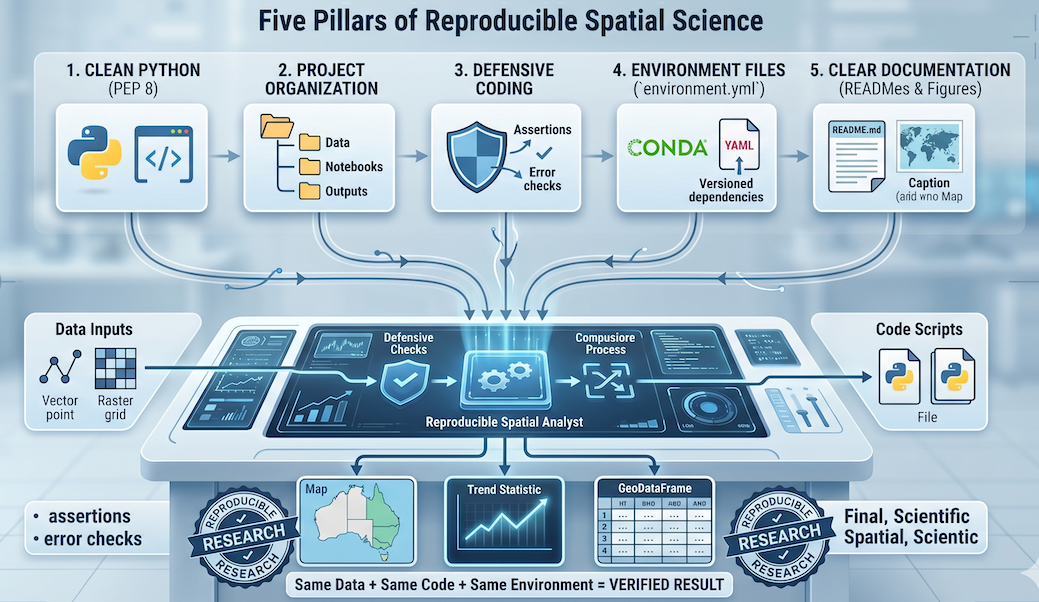
Figure 1:The pillars of reproducible spatial science. A unified view showing how clean code, logical project organization, defensive coding, locked environments, and clear documentation flow together into a computational process to produce verified, reproducible results.
10. Looking back at the lesson
This lesson has taken you on a journey from basic code quality to professional scientific workflow quality.
You learned how to:
Write readable Python: using PEP 8, clear naming conventions, and modular functions.
Organize projects: moving beyond one long, messy notebook to structured directories and separated logic.
Track progress securely: using Git and GitHub to record the evolution of your project safely.
Code defensively: making spatial workflows robust against hidden failures, mismatched CRSs, and invalid geometries.
Record software environments: using
environment.ymlto lock down complex geospatial dependencies and prevent version drift.Document workflows: writing strong READMEs, informative docstrings, and self-explanatory scientific figures.
Practice reproducible research: combining all these elements into a workflow that another human being can actually rerun and trust.
These are not just software engineering skills. They are fundamental research skills.
As you move into larger semester projects, your master’s thesis, or collaborative analysis in the professional world, these habits will matter more and more. In many cases, the clarity and reliability of your workflow will matter just as much as the analytical method itself.