
Chapter Relevance
Lab Relevance: ★★★ (Standard library modules like os, pathlib, and math are essential for almost every spatial lab)
Project Relevance: ★★☆ (Required for handling Web APIs and building robust file structures in projects)
Foundation: ★★★ (Core Python knowledge that prevents you from reinventing the wheel)
Time to Read: 10 minutes
In a nutshell: Learn how to leverage Python’s built-in modules for advanced math, robust file system navigation, and JSON parsing without downloading external tools.
Skip this if: You are already comfortable importing standard modules, using pathlib for file paths, and unpacking nested responses using the json module.
In the previous section, you learned how to write and import your own custom scripts. While building your own tools is a vital skill, you rarely need to invent everything from scratch.
When you install Python, it automatically comes pre-packaged with the Python Standard Library. This is a substantial collection of highly optimized, ready-to-use modules. Whether you need to run complex statistical math, generate random coordinate samples, or navigate your computer’s file system, the tools are already sitting on your machine. You do not need to download or install anything extra.
You just have to unlock them using the import command.
1. Importing modules
To use a module from the Standard Library, you must import it at the top of your script or notebook. Once imported, you can access all the functions inside it by typing the module name, a dot, and the function name.
import math

# Use the square root function from the math module
result = math.sqrt(25)
print(result)
5.0
If you only need a specific tool, you can import just that part. This allows you to use the tool directly without typing the module name every time.
from math import pi

print(f"The value of pi is approximately {pi:.44f}")
The value of pi is approximately 3.14159265358979311599796346854418516159057617
2. Advanced math and statistics
The math module provides access to advanced mathematical functions and constants. A great spatial data science example is calculating the exact distance between two coordinates on the spherical Earth using the Haversine formula.
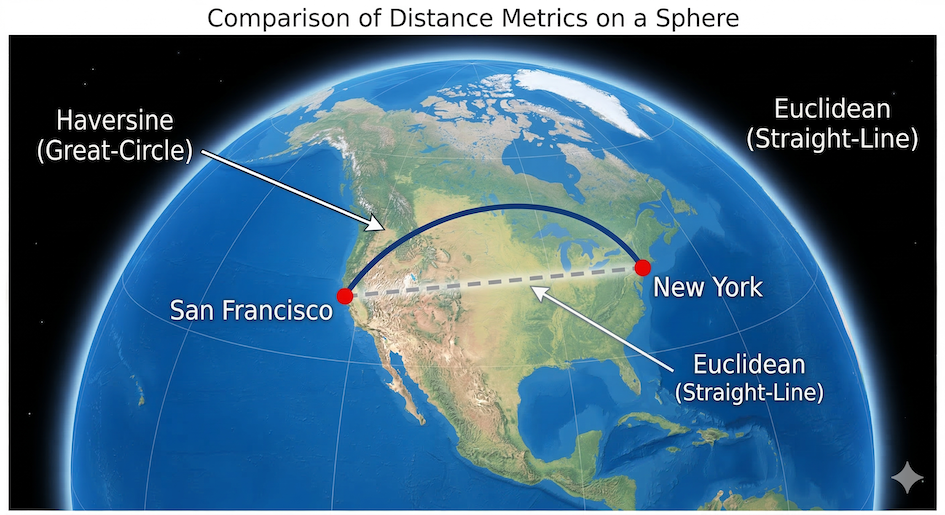
The Haversine formula calculates the shortest distance between two points across the spherical surface of the Earth (great-circle distance), rather than a straight line through it.
import math

san_francisco = (37.77, -122.41)
new_york = (40.66, -73.94)


def haversine_distance(origin, destination):
    """Calculates spherical distance between two coordinates in meters."""
    lat1, lon1 = origin
    lat2, lon2 = destination
    radius = 6371000  # Earth radius in meters

    dlat = math.radians(lat2 - lat1)
    dlon = math.radians(lon2 - lon1)

    a = (
        math.sin(dlat / 2) ** 2
        + math.cos(math.radians(lat1))
        * math.cos(math.radians(lat2))
        * math.sin(dlon / 2) ** 2
    )
    c = 2 * math.atan2(math.sqrt(a), math.sqrt(1 - a))

    return radius * c


dist = haversine_distance(san_francisco, new_york)
print(f"Distance: {dist / 1000:.1f} km")
Distance: 4135.1 km
Useful tools in the math module
While the math module contains dozens of functions, you will likely rely on this core set for most spatial and data science workflows:
| Function / Constant | Description |
|---|---|
| Rounding & Absolute Values | |
math.ceil(x) | Rounds x up to the nearest integer. |
math.floor(x) | Rounds x down to the nearest integer. |
math.trunc(x) | Cuts off the fractional part of x, leaving just the integer. |
math.fabs(x) | Returns the absolute (positive) value of x. |
| Geometry & Distances | |
math.sqrt(x) | The square root of x. |
math.pow(x, y) | x raised to the power of y (similar to x ** y). |
math.dist(p, q) | Calculates the Euclidean distance between two coordinate points p and q. |
math.hypot(x, y) | Calculates the length of a hypotenuse (Euclidean norm). |
| Angles & Trigonometry | |
math.radians(x) | Converts angle x from degrees to radians. |
math.degrees(x) | Converts angle x from radians to degrees. |
math.sin(x), math.cos(x) | Sine and cosine of x (where x is in radians). |
math.atan2(y, x) | Arc tangent of y/x, often used to find the angle/bearing between points. |
| Important Constants | |
math.pi | The mathematical constant π (3.14159...). |
math.nan | “Not a Number”, often used to represent missing data in datasets. |
math.inf | Positive infinity. |
Tip: You can view the complete list of mathematical functions anytime by visiting the official Python documentation.
If you need to analyze lists of numbers, the statistics module is incredibly useful. It provides functions for calculating the mean, median, and mode of your data without writing loops yourself.
import statistics

elevations = [450, 1200, 890, 2300, 1200, 500]

print(f"Average: {statistics.mean(elevations)} m")
print(f"Median: {statistics.median(elevations)} m")
Average: 1090 m
Median: 1045.0 m
Useful tools in the statistics module
The statistics module provides robust functions for calculating mathematical statistics of numeric data. Here are the most common functions you will use when analyzing datasets:
| Function | Description |
|---|---|
| Averages & Central Location | |
statistics.mean(data) | Calculates the arithmetic mean (“average”) of the data. |
statistics.median(data) | Returns the middle value of the data (half the values are above, half are below). |
statistics.mode(data) | Returns the single most common data point from the dataset. |
statistics.multimode(data) | Returns a list of the most frequently occurring values (useful if there’s a tie). |
| Measures of Spread | |
statistics.stdev(data) | Calculates the sample standard deviation (a measure of how spread out the numbers are). |
statistics.variance(data) | Calculates the sample variance. |
statistics.quantiles(data) | Divides continuous data into equal-probability intervals (e.g., quartiles or percentiles). |
Tip: You can view the complete list of statistical functions anytime by visiting the official Python documentation.
Concept Check: Up or Down?
Predict the result of the two common rounding operations below. Remember to think about what “up” and “down” mean on a number line.
up_round = math.ceil(-5.2)
down_round = math.floor(-5.2)
A) -5 and -6
B) -6 and -5
C) -5 and -5
D) -6 and -6
Check your understanding
Answer: A
math.ceil always rounds towards positive infinity (“up”). The nearest integer greater than -5.2 is -5.
math.floor always rounds towards negative infinity (“down”). The nearest integer less than -5.2 is -6.
3. Adding unpredictability
The random module is used to generate random numbers and make random selections. This is especially useful in spatial sampling, simulations, or creating dummy data for testing.
import random

# Pick a random integer between 1 and 10
random_number = random.randint(1, 10)
print(f"Random number: {random_number}")

# Pick a random item from a list
cities = ["Zurich", "Geneva", "Basel", "Bern"]
random_city = random.choice(cities)
print(f"Randomly selected city: {random_city}")
Random number: 4
Randomly selected city: Basel
Useful tools in the random module
The random module offers many ways to generate random numbers and make random selections. Here are the most common functions for spatial analysis and data science:
| Function | Description |
|---|---|
| Generating Numbers | |
random.random() | Returns a random float number between 0.0 and 1.0. |
random.randint(a, b) | Returns a random integer between a and b (inclusive). |
random.uniform(a, b) | Returns a random float number between a and b. |
| Selecting & Shuffling | |
random.choice(seq) | Returns a single randomly selected item from a list. |
random.choices(seq, k=n) | Returns a list of n items chosen from seq with replacement (duplicates allowed). |
random.sample(seq, k=n) | Returns a list of n unique items chosen from seq without replacement (no duplicates). |
random.shuffle(seq) | Shuffles the items in a list randomly in place. |
| Reproducibility | |
random.seed(value) | Sets a starting seed. Using the same seed guarantees you get the exact same sequence of “random” numbers every time you run your script. |
Tip: You can view the complete list of random functions anytime by visiting the official Python documentation.
Concept Check: Unique Selections
We need to pick two test sites from a list. Predict which method guarantees you will select two unique cities.
import random
cities = ["Zurich", "Geneva", "Basel", "Bern"]

# Method A (requires two function calls)
site_1 = random.choice(cities)
site_2 = random.choice(cities)

# Method B (requires one function call)
sites_group = random.sample(cities, k=2)
A) Method A
B) Method B
C) Both methods guarantee unique cities.
Check your understanding
Answer: B
Method B guarantees two unique cities because random.sample() performs sampling without replacement. Once a city is picked, it cannot be picked again in that same call. Method A uses random.choice() twice, representing sampling with replacement. There is a 1-in-4 chance that site_2 will randomly pick the exact same city as site_1.
4. Navigating your computer
When working with local data, you often need to know exactly which folder your Python code is running in, or you need to build paths to your data files. The os module (Operating System) and the pathlib module help you interact with your computer’s file system.
While os is the older, traditional way to handle paths using text strings, modern Python developers prefer pathlib because it treats paths as smart objects that automatically handle the messy differences between Windows and Mac/Linux folders.

Pathlib allows you to navigate directory trees programmatically, intelligently joining parent folders to file names using the / operator.
import os
from pathlib import Path

# Using OS to get the current working directory
current_folder_os = os.getcwd()
print(f"OS Path: {current_folder_os}")

# Using Pathlib to do the same thing, but creating a smart Path object
current_folder_pathlib = Path.cwd()
print(f"Pathlib Object: {current_folder_pathlib}")

# Pathlib makes joining folders to file names incredibly easy using the / operator
data_file = current_folder_pathlib / "data" / "elevations.csv"
print(f"Looking for data at: {data_file}")
OS Path: /Users/wulf/Documents/Documents_work/SDS/02_teaching/01_courses/SDS210/26FS_SDS210/06_jupyter_book/sds210-jb/book/07_L05_libraries
Pathlib Object: /Users/wulf/Documents/Documents_work/SDS/02_teaching/01_courses/SDS210/26FS_SDS210/06_jupyter_book/sds210-jb/book/07_L05_libraries
Looking for data at: /Users/wulf/Documents/Documents_work/SDS/02_teaching/01_courses/SDS210/26FS_SDS210/06_jupyter_book/sds210-jb/book/07_L05_libraries/data/elevations.csv
Useful tools in the os module
The os module and its submodule os.path provide essential tools for navigating folders and managing files. Here are the most common functions you will use when organizing your spatial data projects:
| Function | Description |
|---|---|
| Directories & Folders | |
os.getcwd() | Returns the Current Working Directory (the folder Python is currently looking in). |
os.chdir(path) | Changes the current working directory to the specified path. |
os.listdir(path) | Returns a list of all files and folders inside the specified path. |
os.mkdir(path) | Creates a new single folder at the specified path. |
os.makedirs(path) | Creates a new folder and any missing parent folders along the path. |
| Working with Paths | |
os.path.join(path, *paths) | Intelligently joins folder and file names together using the correct slash (\ or /) for your operating system. |
os.path.exists(path) | Returns True if the file or folder at the given path actually exists. |
os.path.basename(path) | Returns the final file name from a long path (e.g., returns data.csv from C:/folder/data.csv). |
os.path.dirname(path) | Returns the directory name from a long path (e.g., returns C:/folder from C:/folder/data.csv). |
| File Operations | |
os.rename(src, dst) | Renames or moves a file or folder from the source (src) to the destination (dst). |
os.remove(path) | Deletes a file. |
Tip: You can view the complete list of OS functions anytime by visiting the official Python documentation.
Useful tools in the pathlib module
The pathlib module provides an object-oriented approach to file systems. Instead of passing messy text strings around, you work with Path objects. Here are the most common properties and methods:
| Method / Property | Description |
|---|---|
| Creating Paths | |
Path.cwd() | Returns the Current Working Directory as a Path object. |
Path.home() | Returns the user’s home directory. |
path_obj / "folder" | The division operator (/) magically joins Path objects and strings together to build safe file paths. |
| Path Properties | (Assume p = Path('C:/data/map.tif')) |
p.name | Returns the final file name with its extension (map.tif). |
p.stem | Returns the file name without the extension (map). |
p.suffix | Returns the file extension (.tif). |
p.parent | Returns the logical parent directory (C:/data). |
| Checking Status | |
p.exists() | Returns True if the path actually exists on your computer. |
p.is_file() | Returns True if the path points to a regular file. |
p.is_dir() | Returns True if the path points to a directory. |
| File & Folder Operations | |
p.mkdir(parents=True, exist_ok=True) | Creates the directory. Using parents=True creates any missing folders along the way, and exist_ok=True prevents crashes if the folder already exists. |
p.glob(pattern) | Searches the directory for files matching a pattern (e.g., p.glob('*.csv')). |
p.rglob(pattern) | Same as glob(), but searches recursively through all subfolders. |
Tip: You can view the complete list of object-oriented path operations anytime by visiting the official Python documentation.
Concept Check: Smart object or flat string?
Examine how the / operator works in pathlib. Assume our working directory is C:/project/data/. Predict the output type of the final_path variable.
from pathlib import Path
my_folder = Path.cwd()

final_path = my_folder.parent / "output" / "map.tif"
A) A simple string: "C:/project/data/../output/map.tif"
B) A <Path> object pointing to C:/project/output/map.tif
C) Python throws a TypeError for trying to divide a path by a string.
Check your understanding
Answer: B
The variable final_path is a <Path> object containing the resolved path C:/project/output/map.tif. The / operator intelligently handles parent navigation (the .parent property moved the path one folder “up” to C:/project/ before joining). Because the result is still a smart object, you can immediately chain methods like final_path.exists().
5. Formatting data with JSON
JSON (JavaScript Object Notation) is a lightweight text format used to store and transport data. It looks almost exactly like Python dictionaries and lists. The json module allows you to convert text data into usable Python objects.
This is a critical skill for working with Web APIs, which almost always return data in JSON format.
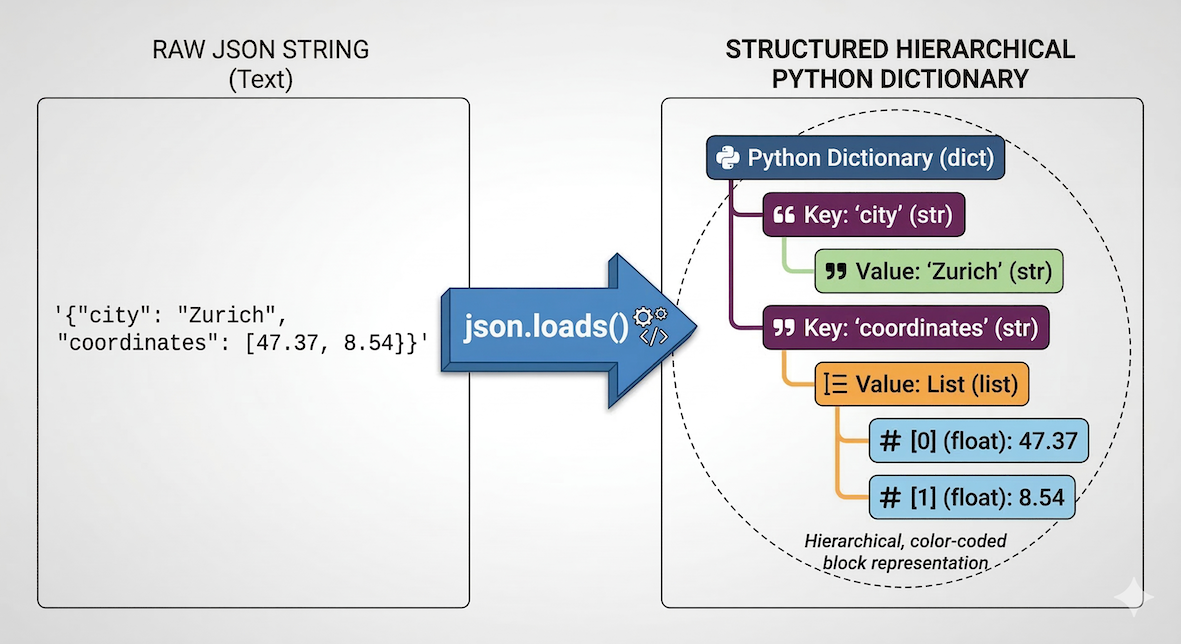
The json.loads() function translates a flat string of text into a structured, hierarchical Python dictionary that you can navigate using keys.
import json

# A string of text formatted as JSON
api_response_text = (
    '{"city": "Zurich", "coordinates": [47.37, 8.54], "population": 415000}'
)

# Convert the text string into a real Python dictionary
data = json.loads(api_response_text)

# Now we can access it using standard dictionary keys
print(data["city"])
print(data["coordinates"])
Zurich
[47.37, 8.54]
Useful tools in the json module
The json module provides straightforward functions for reading and writing JSON data. Here are the core functions you will use when interacting with APIs or saving your data:
| Function | Description |
|---|---|
| Reading JSON (Decoding) | |
json.loads(string) | Parses a JSON-formatted text string into a Python dictionary or list. |
json.load(file) | Reads JSON data directly from an opened file and converts it into a Python object. |
| Writing JSON (Encoding) | |
json.dumps(obj) | Converts a Python object (like a dictionary) into a JSON-formatted text string. |
json.dump(obj, file) | Writes a Python object directly into an opened file in JSON format. |
| Helpful Parameters | |
indent=4 | Used inside dumps() or dump() to “pretty-print” the JSON with 4 spaces of indentation, making it much easier for humans to read. |
Tip: You can view the complete documentation anytime by visiting the official Python documentation.
Concept Check: JSON Drill Down
You have successfully used json.loads() to convert an API response into a Python dictionary named data. Examine the raw JSON structure below. Which code snippet correctly extracts the longitude (the first value in the coordinates list)?
{
  "properties": {
    "name": "Eiffel Tower",
    "location": {
      "city": "Paris",
      "coordinates": [2.29, 48.85]
    }
  }
}
A) data["properties"]["location"]["coordinates"][0]
B) data["properties", "location", "coordinates", 0]
C) data.properties.location.coordinates[0]
Check your understanding
Answer: A
To drill down into a nested dictionary, you must chain bracket notation for every level. data["properties"] accesses the main dictionary, ["location"] accesses the nested dictionary, and ["coordinates"] returns the list [2.29, 48.85]. Finally, [0] extracts the first item in that list (2.29). Option C is dot notation, which is used for objects, not dictionaries.
Drill down!
The correct path is:
longitude_val = data["properties"]["location"]["coordinates"][0]
Explain the hierarchy:
data["properties"]: Gets you into the main dictionary.data["properties"]["location"]: Gets you into the nested location dictionary.data["properties"]["location"]["coordinates"]: Returns the list[2.29, 48.85].data["properties"]["location"]["coordinates"][0]: Extracts index 0, the very first item in that list, which is the longitude2.29.
Interactive Explorer: JSON Drill-Down.
Click the highlighted keys in the Raw API Response to visualize how bracket notation builds a path into nested data. Try making a mistake to see what happens when you access a level out of order! For improved visibility of the explorer, follow this link.
6. Exercises
To practice using the Standard Library, complete the following tasks.
Exercise 1: Random coordinates
Using the random module, write a loop that generates 3 random coordinate pairs (representing latitude and longitude). Assume the latitude must be a decimal between 45.0 and 47.0, and the longitude must be a decimal between 6.0 and 9.0. Print each pair rounded to 4 decimal places.
# Write your code here
Sample solution
import random

for i in range(3):
    # Use random.uniform to generate floating-point numbers
    lat = random.uniform(45.0, 47.0)
    lon = random.uniform(6.0, 9.0)

    # Note: latitude display is rounded (.4f) while longitude is not,
    # to highlight the difference between rounded and full-precision coordinates
    # You can adjust it, as you like.
    print(f"Coordinate {i+1}: [{lat:.4f}, {lon}]")
Key idea:
While randint generates whole numbers, uniform generates floating-point numbers, which is perfect for creating realistic, randomized geographic coordinates.
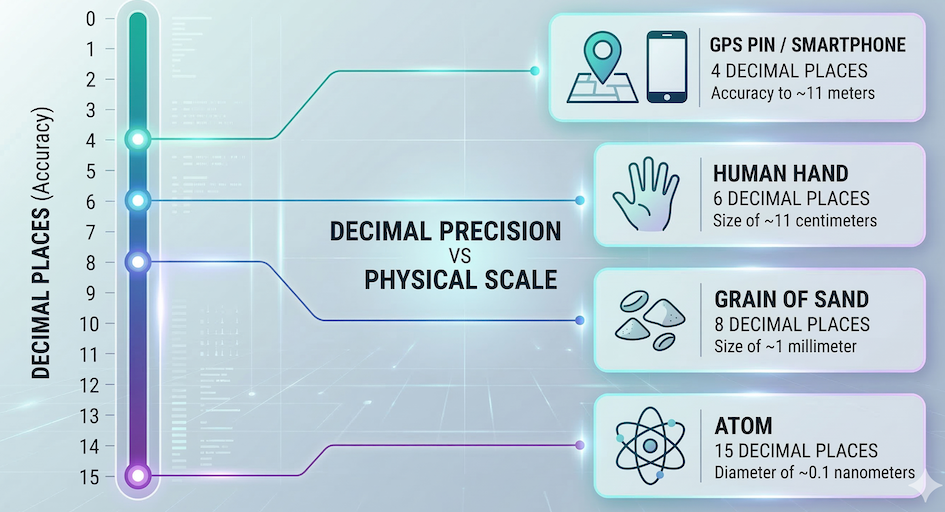
The relationship between the number of decimal places in a geographic coordinate and the physical distance it represents on the ground.
Exercise 2: Parsing JSON
You downloaded a small JSON string representing a feature collection. Use the json module to parse it into a Python dictionary, then print the name of the feature.
geojson_string = '{"type": "Feature", "properties": {"name": "Matterhorn"}, "geometry": {"type": "Point", "coordinates": [7.65, 45.97]}}'
Sample solution
import json

geojson_string = '{"type": "Feature", "properties": {"name": "Matterhorn"}, "geometry": {"type": "Point", "coordinates": [7.65, 45.97]}}'

# Parse the string into a dictionary
parsed_data = json.loads(geojson_string)

# Extract the nested value
mountain_name = parsed_data["properties"]["name"]
print(mountain_name)
Key idea:
json.loads() converts a raw text string into a standard Python dictionary. Once converted, you can chain brackets [][] to access nested information.
7. Summary
In this section, you learned how to leverage the Python Standard Library to solve common programming tasks without installing external tools. You discovered how to:
Import entire modules (
import math) or specific tools (from math import pi).Use
mathandstatisticsfor complex calculations and data summaries.Use
randomto generate unpredictable numbers and selections.Use
osto check your current working directory.Use
jsonto parse structured text strings into usable Python dictionaries.
What comes next?
The Standard Library is powerful, but it has its limits. What if you need to calculate highly accurate spatial distances across the Earth’s curved surface, or add visual progress bars to a massive loop?
Instead of writing that complex code from scratch, you can tap into the massive open-source community. In the next section, Third Party Modules, we will explore how to find, install, and use external packages to extend Python’s capabilities far beyond its built-in tools.