
Chapter Relevance
Lab Relevance: ★☆☆ (Debugging scope and mutable defaults can be helpful some lab assignments)
Project Relevance: ★★☆ (Relevant for writing reliable, bug-free spatial pipelines)
Foundation: ★★★ (Advanced foundational knowledge that separates beginners from professionals)
Time to Read: 15 minutes
In a nutshell: Learn how to manage variable scope, set optional parameters correctly, and avoid the notorious mutable default trap to write safe, bug-free functions.
Skip this if: You already deeply understand local vs. global scope and know exactly why you should never use [] or {} as a default parameter in Python.
In the previous section, we built our first functions. Now, we will look at how functions actually behave in your computer’s memory. This section covers critical design concepts that may save you hours of debugging when building more complex spatial data pipelines.
1. Scope and Namespaces
A common point of confusion for new programmers is understanding how variables defined inside functions relate to those defined elsewhere in their notebooks.
Think of your main Python script as a giant “White Room.” When you define a function, you are building a smaller, soundproof room inside it.
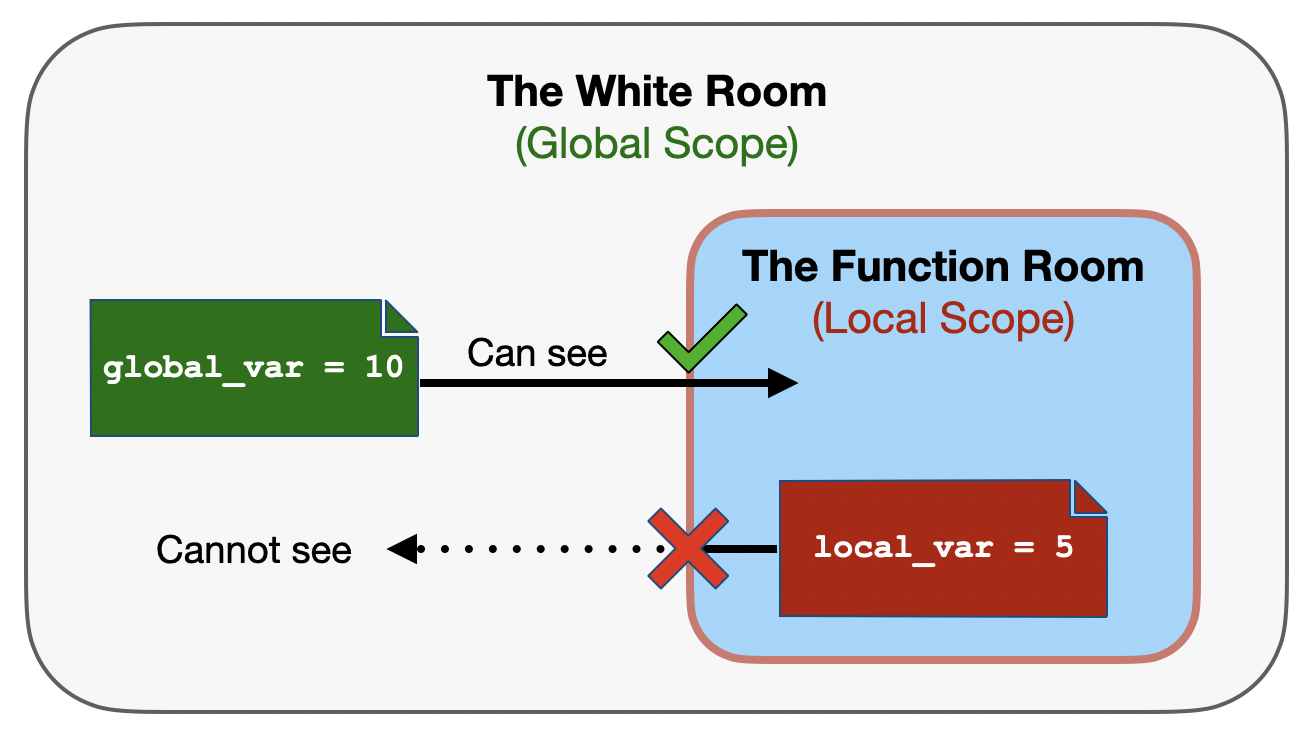
A visual analogy of scope: a function creates a “soundproof” local scope inside the main global scope. Variables inside the function can “see” out to the global scope, but the global scope cannot “see” into the function.
Local Variables Stay Local
When you create a variable inside a function, it is a local variable. It only exists within that specific function’s scope. Once the function finishes running, the room is demolished, and the variable disappears.
def calculate_area():
    # This variable only exists inside this function
    area = 1500
    return area

# We call the function
calculate_area()

# Guess the output if we try to print the variable from the main script...
print(area)
Output:
NameError: name 'area' is not defined
This is actually a brilliant feature! It means you can use simple variable names like area, distance, or x inside your functions without worrying about accidentally overwriting variables with the same names in your main script.
The Danger of Global Variables
Python searches for variables from the inside out. If it cannot find a variable inside the function (local scope), it will peek outside into the main script (global scope) to see if it exists there.
This can lead to dangerous bugs. Look at this example:
# A global variable defined at the top of our notebook
base_elevation = 1500


def calculate_relative_elevation(elevation):
    # BAD: This function uses a global variable instead of a parameter!
    return elevation - base_elevation


print(calculate_relative_elevation(2000))
500
This code works, but it is poor software design. The function calculate_relative_elevation is no longer a standalone tool. It secretly relies on base_elevation existing elsewhere in the notebook. If you copy this function into a new script, or if you accidentally change base_elevation in a different cell, your pipeline will break, and it might be hard to figure out why.
Concept Check: The Locked Room
You define a function to process some wind speed data:
def process_wind_data():
    max_speed = 120
    return max_speed * 1.5

process_wind_data()
print(max_speed)
What will happen when you run this code?
A) It prints 180.
B) It prints 120.
C) It crashes with a NameError.
Check your understanding
Answer: C
Because max_speed was defined inside the function, it is a local variable. It ceases to exist the moment the function finishes running. The global script cannot see inside the function’s “soundproof room,” so attempting to print max_speed directly results in a NameError.
2. Required vs. Optional Parameters
Up to this point, every parameter we have created has been a required parameter. If the user forgets to provide an argument, the program crashes.
However, we can design our tools to be much more flexible by providing optional parameters with default values.
Setting Default Values
Imagine a function that checks if a GPS point is within a certain accuracy threshold. Most of the time, our acceptable threshold is 5 meters. We can set that as the default!
# 'threshold' is now an optional parameter with a default of 5
def check_accuracy(point_accuracy, threshold=5):
    if point_accuracy <= threshold:
        return True
    else:
        return False
Now, the user has a choice:
# Option 1: Provide one argument. Python uses the default threshold (5).
check_accuracy(3)

# Option 2: Override the default by providing a second argument.
check_accuracy(3, threshold=2)
FalseThe Ordering Rule
There is a strict grammatical rule in Python regarding defaults: Required parameters must always come before optional parameters in the function definition.
# GOOD: Required comes first
def create_buffer(geometry, buffer_size=50):

# ERROR: Required comes after an optional default
def create_buffer(buffer_size=50, geometry):
Concept Check: Identifying Syntax Errors
You are building a spatial modeling tool and attempt to write the following function definition:
def model_habitat(elevation, precipitation=1000, land_cover):
    pass
What will happen when you try to run this cell?
A) Python successfully creates the function.
B) Python assigns 1000 to both precipitation and land_cover.
C) Python throws a SyntaxError: non-default argument follows default argument.
Check your understanding
Answer: C
Because precipitation is an optional parameter (it has a default value), every parameter listed after it must also be optional. Since land_cover is a required parameter placed at the end, it breaks the strict ordering rule, and Python will refuse to define the function.
Interactive Explorer: Parameter Ordering Visualizer.
Click the available parameters to build a function signature. Click "Check Syntax" to see if your order is valid. Try placing a blue "Required" parameter after a green "Optional" parameter to visually trigger the exact SyntaxError Python throws when the ordering rule is broken. For improved visibility of the explorer, follow this link.
3. The Mutable Default Trap
This is a high-value moment. Understanding this concept separates beginners from professional data scientists.
We just learned that we can set default values (like threshold=5). But what happens if we set a default value to a mutable object, like an empty list ([])?
Let’s write a function that takes a new GPS waypoint and adds it to a route list. If no route list is provided, it should default to an empty list.
# THE DANGEROUS WAY
def add_waypoint(waypoint, route=[]):
    route.append(waypoint)
    return route
Watch what happens when we use it to track two different animals:
track_bear = add_waypoint("Point A")
print(f"Bear Track: {track_bear}")

track_wolf = add_waypoint("Point X")
print(f"Wolf Track: {track_wolf}")
Bear Track: ['Point A']
Wolf Track: ['Point A', 'Point X']
What happened?! The wolf is somehow inheriting the bear’s GPS points!
When you define a function, Python evaluates the default arguments only once. It creates that single empty list [] and stores it in memory. Every time you call the function without providing a route, it grabs that exact same list. The state carries over (a “side effect”), destroying the reproducibility of your data.
The Fix: Use None
To fix this, we must use None as our default value, and create the fresh list inside the function block.
# THE SAFE WAY
def add_waypoint(waypoint, route=None):
    if route is None:
        route = []  # Creates a brand new, empty list every time it runs!

    route.append(waypoint)
    return route
Click here for a more detailed breakdown of the Mutable Default Trap
1. The Core Problem: Definition vs. Execution
In Python, a function’s default arguments are evaluated only once, at the exact moment the def statement is read by the computer (the “definition phase”). They are not evaluated every time you call the function (the “execution phase”).
When Python reads this line of code:
def add_waypoint(waypoint, route=[]):It says: “Okay, I’m creating a new function. The default value for route is an empty list. I will create a single, empty list in my memory right now, and attach it to this function permanently.”
Let’s use a “Shared Backpack” analogy:
When the function is defined, Python creates a single backpack (the default list
[]) and leaves it at the door of the function.The Bear’s turn: You call
add_waypoint("Bear Point")without providing a list. Python says, “Use the default backpack!” The function puts the bear’s GPS point inside the backpack. The backpack now contains["Bear Point"].The Wolf’s turn: You call
add_waypoint("Wolf Point")without providing a list. Python says, “Use the default backpack!” It hands the wolf the exact same backpack from step 1. But wait—the bear’s GPS point is still inside it! The function adds the wolf’s point, and the backpack now contains["Bear Point", "Wolf Point"].
Because lists are mutable (they can be changed in place), any changes made to the default list are permanent. Every subsequent call to the function uses that exact same, increasingly contaminated list.
2. Why doesn’t this happen with numbers or strings?
You might wonder why we don’t have this problem when we set defaults to numbers, like buffer=5.
Numbers, strings, and booleans (True/False) are immutable in Python. You cannot alter them in place. If you change a number, Python actually throws the old number away and creates a brand-new number in memory. Therefore, they cannot accumulate “state” or carry over contamination from previous function calls.
Because lists ([]) and dictionaries ({}) are mutable, they can be modified without losing their original identity in memory.
3. How the None Fix Actually Works
To fix the shared backpack problem, we need to force Python to create a brand-new list every single time the function runs, rather than just once when the function is defined.
Here is the safe code again:
def add_waypoint(waypoint, route=None):
    if route is None:
        route = []  # Creates a brand new, empty list every time it runs!

    route.append(waypoint)
    return route
Let’s look at how memory handles this:
Definition phase: Python reads
route=None.Noneis an immutable placeholder. It just means “nothing.” Python attachesNoneto the function permanently.The Bear’s turn: You call
add_waypoint("Bear Point"). TherouteisNone. Theifstatement triggers:route = []. Because this line is inside the function body, it runs during the execution phase. Python creates a brand new list in memory, adds the bear’s point, and returns it. Once the function finishes, that specific[]creation step is over.The Wolf’s turn: You call
add_waypoint("Wolf Point"). Theroutedefaults back toNone. Theifstatement triggers again:route = []. Python creates a second, entirely separate new list in memory. It adds the wolf’s point and returns it.
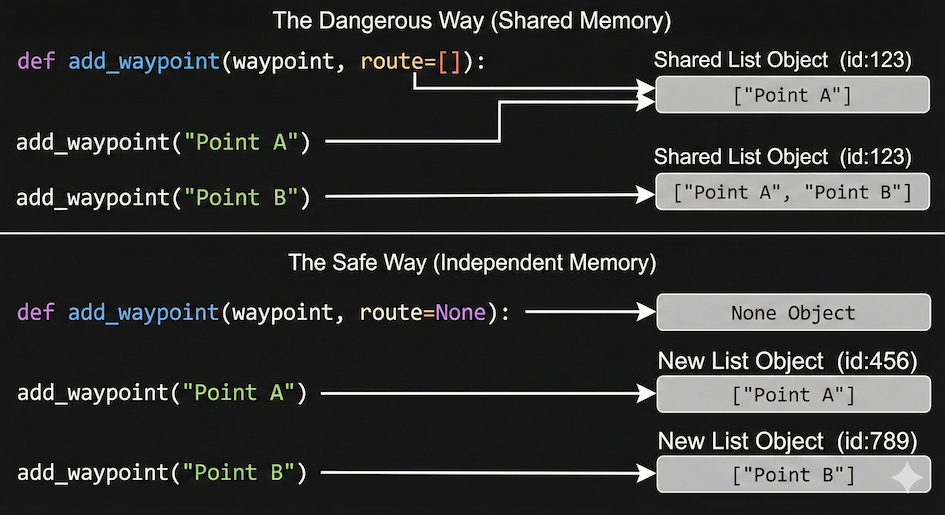
Visualizing the “Mutable Default Trap.” Using [] as a default argument creates a single, shared list object in memory (top), leading to unintended data leakage between function calls. Using None and creating a new list inside the function ensures independent lists are created for each call (bottom).
Interactive Explorer: The Mutable Default Trap.
Click the buttons to simulate calling the function twice in a row. Notice how the dangerous approach (left) binds a single, permanent list object to the function definition, causing the Wolf's data to mix with the Bear's. The safe approach (right) uses None to delay list creation until execution, ensuring clean, independent memory allocation for each call. For improved visibility of the explorer, follow this link.
Summary
By using None as the default argument, you are delaying the creation of the list. Instead of creating the list when the function is defined (which creates a single shared object), you create the list when the function is executed (which creates a fresh, independent object every time).
4. Exercises
Test your understanding of function design and scope!
Exercise 1: The Scope Bug (Core)
A junior analyst wrote the following code to convert a list of elevations from feet to meters. When they try to run print(converted), Python throws a NameError.
Your Task: Without running the code, explain why the error occurs, and fix the code so it properly prints the result.
def feet_to_meters(elevation_ft):
    converted = elevation_ft * 0.3048
    return converted

feet_to_meters(5000)
print(converted)
Sample solution
Why it fails: The variable converted is a local variable. It was created inside the feet_to_meters room, so it ceases to exist the moment the function finishes running.
The Fix: You must catch the returned data in the global scope (the main script) by assigning the function call to a variable!
def feet_to_meters(elevation_ft):
    converted = elevation_ft * 0.3048
    return converted

# Catch the returned data in a new variable in the main script!
final_elevation = feet_to_meters(5000)
print(final_elevation)
Exercise 2: The Bounding Box (Stretch)
In spatial analysis, a common operation is to draw a square “bounding box” around a coordinate.
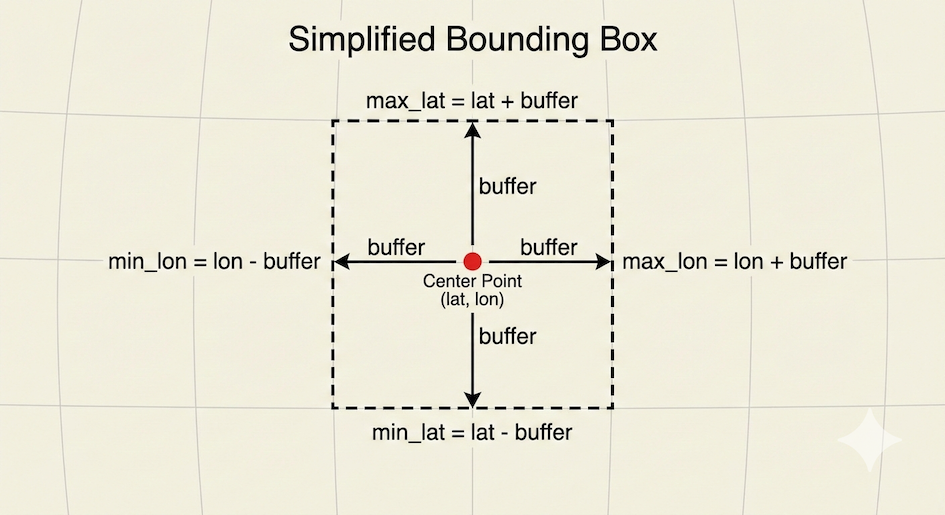
Calculating a simplified bounding box. By adding and subtracting a buffer value from a center point’s latitude and longitude, you can define the minimum and maximum coordinates of a square area.
Your Task: Write a function create_bbox(lat, lon, buffer) that calculates a simplified bounding box around the point coordinates.
Make
latandlonrequired parameters.Make
bufferan optional parameter with a default value of0.5degrees.The function should return a dictionary containing
min_lat,max_lat,min_lon, andmax_lon. (Hint:min_latislat - buffer,max_latislat + buffer, etc.)
# Write your code here
Sample solution
def create_bbox(lat, lon, buffer=0.5):
    # Calculate the boundaries
    min_lat = lat - buffer
    max_lat = lat + buffer
    min_lon = lon - buffer
    max_lon = lon + buffer

    # Return them all packaged neatly in a dictionary
    return {
        "min_lat": min_lat,
        "max_lat": max_lat,
        "min_lon": min_lon,
        "max_lon": max_lon
    }

# Test 1: Using the default buffer
small_box = create_bbox(34.0, -118.0)
print(f"Default box: {small_box}")

# Test 2: Overriding the default buffer
large_box = create_bbox(34.0, -118.0, buffer=5.0)
print(f"Large box: {large_box}")
Exercise 3: The Contaminated River (Challenge)
You are writing a code pipeline to track pollution sampling sites along different rivers. Look at the code below.
Your Tasks: 1. Run the code in your head. What will the output look like? 2. Why is this happening? 3. Rewrite the function using best practices so that the Isar and the Inn get their own independent lists of samples.
def log_sample(ph_level, river_samples=[]):
    river_samples.append(ph_level)
    return river_samples


# We take two samples from the Isar
isar_data = log_sample(7.2)
isar_data = log_sample(7.4, isar_data)

# We take one sample from the Inn
inn_data = log_sample(6.8)

print(f"Isar: {isar_data}")
print(f"Inn: {inn_data}")
Isar: [7.2, 7.4, 6.8]
Inn: [7.2, 7.4, 6.8]
Sample solution
1. The Output:
Isar: [7.2, 7.4, 6.8]
Inn: [7.2, 7.4, 6.8]
2. Why it happens:
Because river_samples=[] is a mutable default parameter, Python only created one list in memory when the function was defined. Because we didn’t pass an existing list for the Inn, it defaulted to using the same list the Isar was using! The Inn data is contaminated with the Isar data.
3. The Fix:
# Use None as the default!
def log_sample(ph_level, river_samples=None):
    # Initialize the empty list INSIDE the function
    if river_samples is None:
        river_samples = []

    river_samples.append(ph_level)
    return river_samples

isar_data = log_sample(7.2)
isar_data = log_sample(7.4, isar_data)

inn_data = log_sample(6.8)

print(f"Isar: {isar_data}")
print(f"Inn: {inn_data}")
# Now prints correctly:
# Isar: [7.2, 7.4]
# Inn: [6.8]
5. Summary
In this section, we moved from writing functional code to writing safe code:
Scope: Variables created inside a function are destroyed when the function finishes. Do not rely on global variables; always use parameters.
Defaults: Optional parameters make your tools flexible, but they must always be listed after required parameters.
The Mutable Trap: Never use
[]or{}as default values. UseNone, and create the object inside the function block to prevent state leakage and side effects.
What comes next?
You now know how to build perfectly constrained, safe tools. But Python functions have one more superpower. Next, we will learn how to use *args and kwargs to handle an infinite, unpredictable amount of spatial data inputs!