
Chapter Relevance
Lab Relevance: ★★★ (Frequently used in advanced data parsing and cleaning tasks)
Project Relevance: ★★☆ (Useful for building robust custom tools, though not strictly necessary for simple scripts)
Foundation: ★★☆ (Core Pythonic idioms common in intermediate spatial code)
Time to Read: 10 minutes
In a nutshell: Learn how to use *args, **kwargs, and lambda functions to create adaptable tools that handle unpredictable spatial data inputs.
Skip this if: You already know how to pack and unpack arguments using the * and ** operators, and are comfortable writing and passing anonymous lambda functions.
Up to now, our functions have had a rigid structure: a fixed number of inputs, each with a predefined name. But what if you need to write a function that can accept any number of coordinates? Or a function that processes spatial features with a completely unpredictable set of attributes?
In this section, we will unlock the power of flexible function interfaces and anonymous functions.
1. Collecting Positional Arguments with *args
Imagine you want to write a function that calculates the average elevation from a set of GPS points. You don’t know in advance if the user will provide 3 points, 10 points, or 100 points.
You could force the user to put all the points into a single list before passing them to the function. But Python offers a cleaner way: the unpacking operator (*).
When you place an asterisk before a parameter name in a function definition, Python collects an arbitrary number of positional arguments into a tuple. By convention, we name this parameter *args.
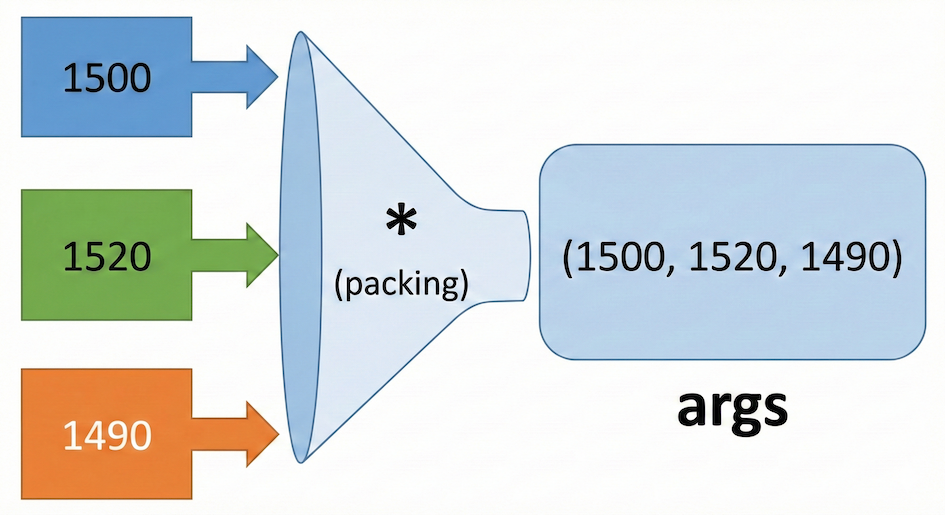
Visualizing *args: Multiple individual inputs are collected and packed into a single tuple.
def average_elevation(*args):
    """Calculates the average of an arbitrary number of elevations."""
    # args is just a tuple containing all the inputs!
    if len(args) == 0:
        raise ValueError("At least one elevation must be provided.")

    total = sum(args)
    num_items = len(args)
    return total / num_items


# We can pass any number of arguments!
avg_1 = average_elevation(1500, 1520, 1490)
print(f"Average 1: {avg_1} meters")

avg_2 = average_elevation(100, 105, 102, 98, 110, 101, 99)
print(f"Average 2: {avg_2} meters")
Average 1: 1503.3333333333333 meters
Average 2: 102.14285714285714 meters
2. Collecting Keyword Arguments with kwargs
Just as *args collects unknown positional arguments, kwargs collects an arbitrary number of keyword arguments.
This is incredibly useful in spatial data science when dealing with metadata. A geographic point must have a latitude and longitude, but it might also have an elevation, a Coordinate Reference System (CRS), a name, or a category.
When you place a double asterisk before a parameter name (conventionally kwargs), Python collects any remaining keyword-value pairs into a dictionary.
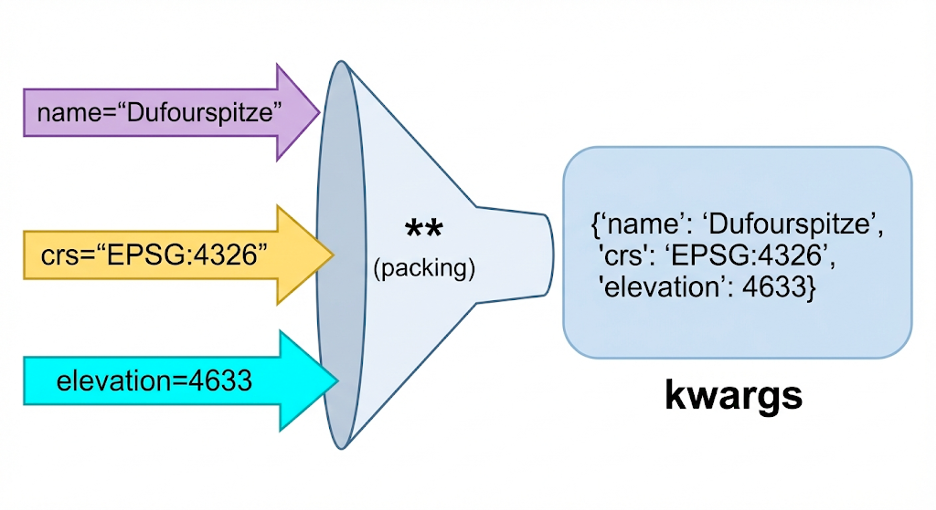
Visualizing kwargs: Multiple keyword-value pairs are collected and packed into a single dictionary.
def describe_point(lat, lon, **kwargs):
    """Prints a point's coordinates and any associated metadata."""
    print(f"Point Coordinates: {lat} N, {lon} E")

    # kwargs is a dictionary, so we can loop through its items!
    if kwargs:
        print("Metadata:")
        for key, value in kwargs.items():
            print(f"  - {key}: {value}")
    print("-" * 20)


# Call 1: Just the required coordinates
describe_point(45.936928, 7.866760)

# Call 2: Coordinates PLUS arbitrary metadata
describe_point(
    45.936928,
    7.866760,
    name="Dufourspitze",
    crs="EPSG:4326",
    elevation=4633,
    country="Switzerland",
)
Point Coordinates: 45.936928 N, 7.86676 E
--------------------
Point Coordinates: 45.936928 N, 7.86676 E
Metadata:
  - name: Dufourspitze
  - crs: EPSG:4326
  - elevation: 4633
  - country: Switzerland
--------------------
3. Unpacking Collections
The asterisk operators can also be used outside of function definitions to do the opposite: unpacking a collection into separate variables.
Consider a bounding box stored as a list of four coordinates:
[min_x, min_y, max_x, max_y].
If you have a function that expects four separate arguments, you can use the * operator to unpack the list directly into the function call.
def calculate_area(min_x, min_y, max_x, max_y):
    """Calculate the area of a rectangular bounding box."""

    width = max_x - min_x
    height = max_y - min_y
    return width * height


# Our data is stored inside a list
bbox = [2634400, 1137300, 2652000, 1159800]

# WITHOUT unpacking (Messy):
area = calculate_area(bbox[0], bbox[1], bbox[2], bbox[3])

# WITH unpacking (Clean):
area = calculate_area(*bbox)

print(f"The area of the bounding box is {area} square meters")
The area of the bounding box is 396000000 square meters
Unpacking Dictionaries with ``
You can use the double asterisk (``) to unpack a dictionary directly into a function’s keyword arguments. For this to work, the keys in your dictionary must match the parameter names in the function exactly.
Imagine you have a function to style and plot a map marker, and your styling data is stored in a dictionary:
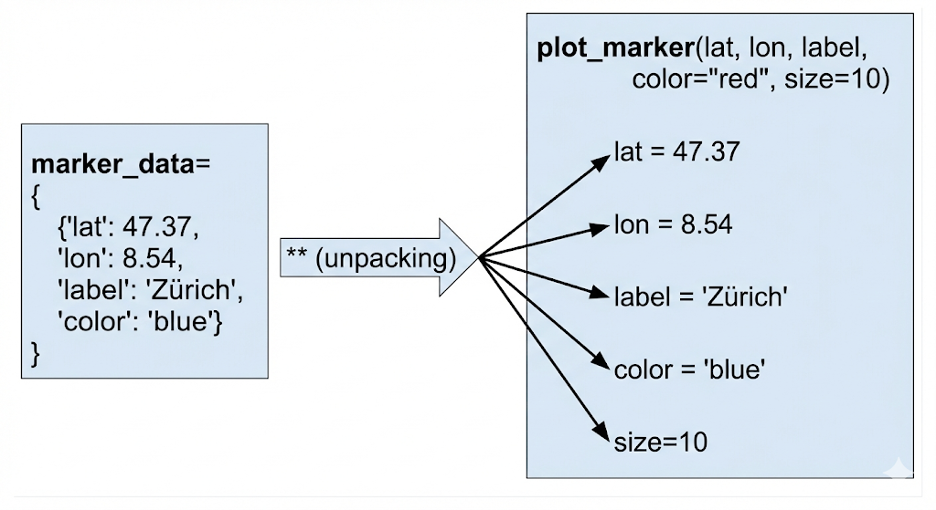
Visualizing dictionary unpacking: A dictionary’s key-value pairs are unpacked and match the function’s parameter names.
def plot_marker(lat, lon, label, color="red", size=10):
    print(f"Plotting {label} at ({lat}, {lon}) | Color: {color}, Size: {size}")


# Our data is trapped in a dictionary
marker_data = {"lat": 47.37, "lon": 8.54, "label": "Zürich", "color": "blue"}

# WITHOUT unpacking (repetitive):
plot_marker(
    lat=marker_data["lat"],
    lon=marker_data["lon"],
    label=marker_data["label"],
    color=marker_data["color"],
)

# WITH unpacking (elegant):
plot_marker(**marker_data)
Plotting Zürich at (47.37, 8.54) | Color: blue, Size: 10
Plotting Zürich at (47.37, 8.54) | Color: blue, Size: 10
Notice how Python automatically matches the "lat" key in the dictionary to the lat parameter in the function!
Advanced Unpacking
You can also use the asterisk to elegantly split lists into variables. Notice how the *rest variable below scoops up everything in the middle of the list:
# Unpacking a route into start, middle, and end waypoints
first, *rest, last = ["Point A", "Point B", "Point C", "Point D", "Point E"]

print(f"Start: {first}")
print(f"Middle segments: {rest}")
print(f"End: {last}")
Start: Point A
Middle segments: ['Point B', 'Point C', 'Point D']
End: Point E
Concept Check: The Unpacking Explosion
You have a mapping function plot_station(name, lat, lon, elevation) and a dictionary containing your metadata:
station_data = {"name": "Zugspitze", "lat": 45.93, "lon": 7.86, "elevation": 4600}
How do you pass this dictionary to the function so that each key automatically maps to the correct parameter?
A) plot_station(*station_data)
B) plot_station(station_data)
C) plot_station(station_data)
Check your understanding
Answer: B
Using the double asterisk (**) unpacks the dictionary, taking its key-value pairs and passing them as explicit keyword arguments (e.g., name="Zugspitze", lat=45.93, etc.). Option A would only unpack the keys (the strings), leaving the values behind. Option C would pass the entire dictionary as a single argument (assigned to name), which would likely crash the function.
The Dual Nature of Asterisks
The hardest part about * and `` is that they do the exact opposite depending on where you use them.
When DEFINING a function (Packing): If you put an asterisk in the
defstatement (e.g.,def my_func(*args)), it acts like a vacuum. It sucks up many loose arguments and packs them tightly into a single tuple (or dictionary for ``).When CALLING a function (Unpacking): If you put an asterisk in the function call (e.g.,
my_func(*my_list)), it acts like an explosion. It takes a packed collection (like a list or dictionary) and blows it apart into many separate, loose arguments.
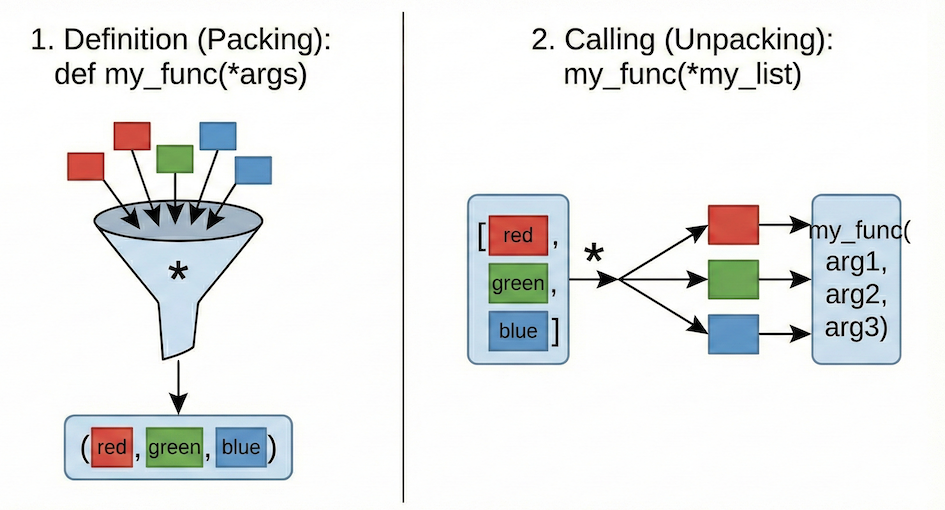
The dual nature of asterisks: They pack arguments when defining a function and unpack collections when calling a function.
Interactive Explorer: Asterisk Packing vs. Unpacking.
Click "Simulate Asterisk (*)" to visually experience the dual nature of this operator. Notice how placing it in a function definition (def) acts like a vacuum, packing loose data into a single tuple. Conversely, placing it in a function call acts like an explosion, shattering a packed list (like the 4-coordinate bounding box) into individual arguments. For improved visibility of the explorer, follow this link.
4. The Lambda Function
Sometimes you need a tiny, single-use function for a quick operation (like extracting a value or formatting text). Defining a full function block with def and return can feel like overkill if you are only going to use it once.
For these situations, Python offers lambda functions. A lambda function is a small, anonymous function (a function without a name) written in a single line. It evaluates an expression and automatically returns the result.
The syntax is: lambda arguments: expression
Because they are nameless, you should not assign a lambda to a variable. Instead, lambdas shine brightest when you pass them directly into other functions or methods that require a function as an argument.
A perfect example is sorting a list of dictionaries. If you have a list of metadata dictionaries, you can use a lambda function to quickly sort them by a specific key in just one line.
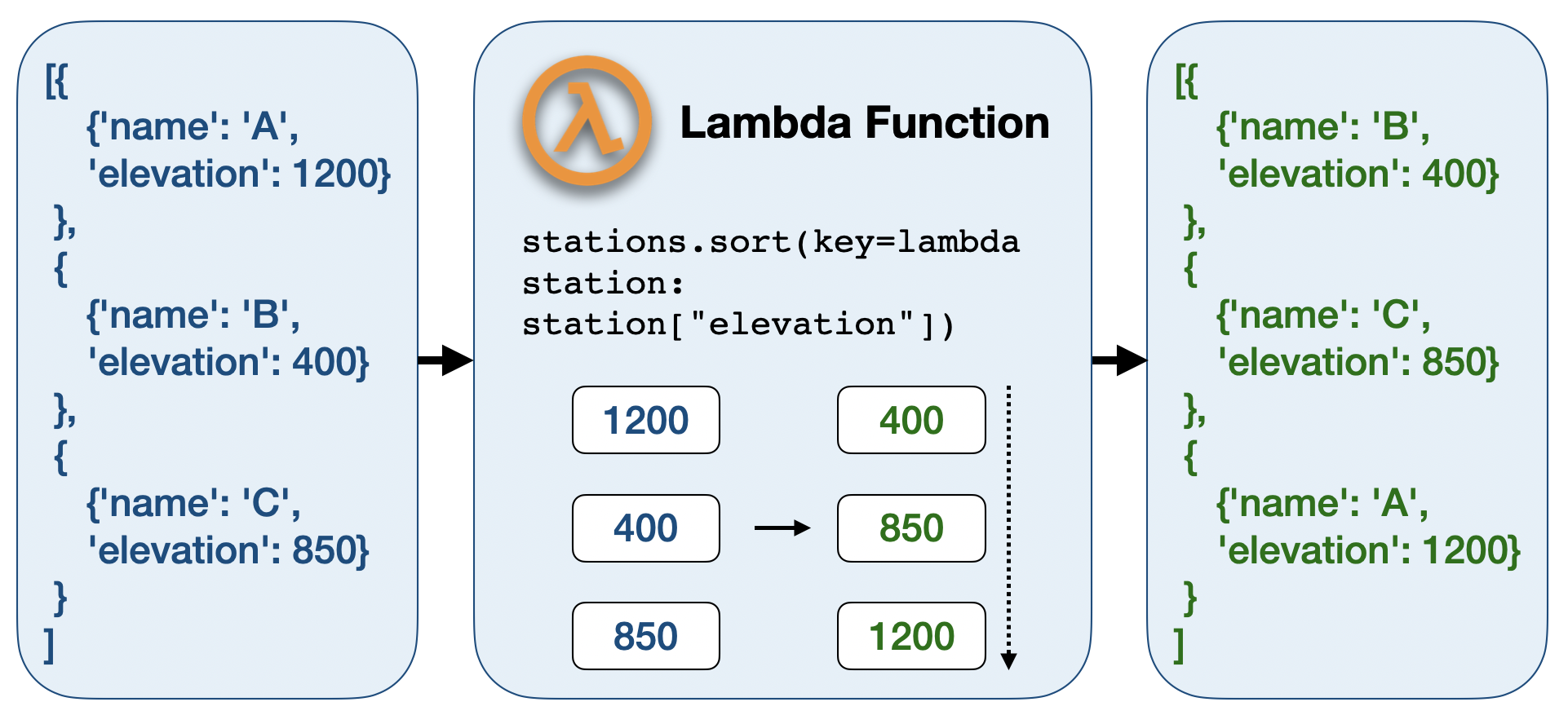
Visualizing lambda sorting: The lambda function extracts a specific value (e.g., ‘elevation’) from each item, which is then used to determine the sort order of the original list.
stations = [
    {"name": "Station A", "elevation": 1200},
    {"name": "Station B", "elevation": 400},
    {"name": "Station C", "elevation": 850},
]

# Sort the list based on the "elevation" value of each dictionary
# The lambda function is created and consumed right here in one line!
stations.sort(key=lambda station: station["elevation"])

print(stations)
[{'name': 'Station B', 'elevation': 400}, {'name': 'Station C', 'elevation': 850}, {'name': 'Station A', 'elevation': 1200}]
Click here for a more detailed breakdown of this lambda example.
1. The Problem with Sorting Dictionaries
If you have a simple list of numbers, Python knows exactly how to sort them:
numbers = [1200, 400, 850]
numbers.sort()
# Result: [400, 850, 1200]
But in our spatial example, stations is not a list of numbers. It is a list of dictionaries:
stations = [
    {"name": "Station A", "elevation": 1200},
    {"name": "Station B", "elevation": 400},
    {"name": "Station C", "elevation": 850}
]
If you just type stations.sort(), Python will crash. It will say: “I don’t know how to compare two dictionaries! Should I sort them alphabetically by their names? Or numerically by their elevations?”
2. The key Parameter (The Referee)
To fix this, the .sort() method has a special optional parameter called key.
Think of the key parameter as a referee. You must hand the referee a function. The referee will then apply that function to every single item in the list to extract a simple value (like a number or string) that it can sort.
If we didn’t use lambda, we would have to write a full, named function to act as our extractor:
# 1. We write a function that takes ONE dictionary and returns its elevation
def get_elevation(station_dict):
    return station_dict["elevation"]

# 2. We hand that function to the sort method
stations.sort(key=get_elevation)
3. What the lambda Function Does (The Shortcut)
Writing a full def block just to extract a single dictionary value is tedious. This is exactly where lambda functions shine. They allow us to write that extractor function directly inside the .sort() parentheses in a single line.
Let’s look at our line again:
stations.sort(key=lambda station: station["elevation"])Here is exactly what the lambda function is doing:
lambda: “I am creating a quick, nameless function right here.”station:: “This function takes one argument. Let’s call itstation. (During the sort, Python will pass each dictionary into this variable one by one).”station["elevation"]: “I will look inside that dictionary, grab the value attached to the ‘elevation’ key, and return it to the sorting referee.”
Step-by-Step: What happens behind the scenes?
When Python executes that line, it does a multi-step process in a fraction of a millisecond:
It looks at the first item:
{"name": "Station A", "elevation": 1200}.It passes this to the lambda. The lambda returns
1200.It looks at the second item:
{"name": "Station B", "elevation": 400}.It passes this to the lambda. The lambda returns
400.It looks at the third item:
{"name": "Station C", "elevation": 850}.It passes this to the lambda. The lambda returns
850.Now that it has a list of simple numbers (
1200, 400, 850), Python sorts them from lowest to highest (400, 850, 1200).Finally, it rearranges the original dictionaries to match that new order!
Final Output:
[
    {'name': 'Station B', 'elevation': 400},
    {'name': 'Station C', 'elevation': 850},
    {'name': 'Station A', 'elevation': 1200}
]
Interactive Explorer: Python Lambda Key Extractor.
Change the "Sort Key" and click "Run Key Extraction" to visualize the sorting process. Notice how Python iterates through the dictionaries sequentially, applying the nameless lambda function (λ) to extract just the specific value (e.g., 'Genève', 201800, etc.). These extracted values populate the "Internal Referee" panel. Finally, Python reorders the original dictionaries to match the sorted order of these extracted values. For improved visibility of the explorer, follow this link.
5. Exercises
Test your understanding of flexible interfaces!
Exercise 1: The Trail Aggregator (Core)
Write a function called total_trail_distance() that accepts any number of trail segment lengths (in kilometers) using *args. It should return the total summed distance of the trail.
# Write your code hereSample solution
def total_trail_distance(*segments):
    # 'segments' is a tuple of all provided arguments
    return sum(segments)

# Testing the function with 4 segments
print(total_trail_distance(5.2, 3.1, 4.0, 1.5))
Exercise 2: Building GeoJSON Properties (Stretch)
In web mapping, spatial features use a format called GeoJSON, which stores data in a "properties" dictionary.
Write a function create_feature(name, kwargs) that takes a required name and any number of keyword arguments. It should return a dictionary formatted like this:
{"name": name, "properties": {all_the_kwargs}}
# Write your code hereSample solution
def create_feature(name, **kwargs):
    # kwargs is automatically a dictionary containing the extra arguments
    feature = {
        "name": name,
        "properties": kwargs
    }
    return feature

# Testing the function
site = create_feature("Site 42", status="active", soil_type="clay", ph=6.5)
print(site)
Exercise 3: Lambda Sorting (Challenge)
You have a list of coordinate pairs: coords = [[8.54, 47.37], [6.14, 46.20], [7.44, 46.94]].
Using the .sort() method and a lambda function, sort this list based only on the latitude (the second item in each pair, index 1).
# Write your code hereSample solution
coords = [[8.54, 47.37], [6.14, 46.20], [7.44, 46.94]]

# The lambda takes one item (a coordinate pair like [8.54, 47.37])
# and returns index 1 (the latitude) to use as the sorting key
coords.sort(key=lambda pair: pair[1])

print(coords)
# Output should be ordered by latitude: Geneva, Bern, Zürich
6. Summary
In this section, you learned how to break free from rigid function definitions:
*args: Collects an arbitrary number of positional arguments into a tuple.kwargs: Collects an arbitrary number of keyword arguments into a dictionary, perfect for flexible metadata.Unpacking (
*): Extracts items from lists or dictionaries directly into function arguments or separate variables.Lambda functions: Provide a concise, one-line syntax for simple operations, often used as arguments inside other functions.
What comes next?
Next, we will look at how to construct Professional Functions by focusing on standard documentation (docstrings), introspection (help()), and learning how to avoid the most common function-related bugs in data science pipelines.