
Chapter Relevance
Lab Relevance: ★★☆ (Essential for dynamically filtering tracking strings or iterating dynamically over spatial streams)
Project Relevance: ★☆☆ (Crucial when reading environmental profiles or threshold sensor logs of variable sizes)
Foundation: ★★☆ (A non-negotiable core structural pillar alongside standard for-loops)
Time to Read: 7 minutes
In a nutshell: Shift from running code over fixed lists to driving adaptive routines that process data flexibly until an explicit condition triggers cessation.
Skip this if: You can explain fluently how a control variable scales, what constructs an infinite loop, and how flags handle dynamic conditional updates inside a loop body.
So far, your programs have repeated actions over lists or fixed ranges.
Now we introduce a different idea:
Repetition can continue until a condition changes, not just until a collection runs out.
This makes while loops especially useful when you do not know in advance how many times something needs to repeat. They complement for loops by shifting the programming focus from what to loop over to when to stop looping.
1. When a for loop is not enough
Up to now, loops have repeated over:
a list with a known number of values
a fixed range of numbers
In these cases, the exact number of repetitions is known before the loop even starts.
Sometimes, however, this is not possible. You may not know in advance how many times an action needs to be repeated. Common situations include:
waiting until a user enters a valid input
processing data until a specific threshold is reached
searching through a dataset until a specific condition becomes true
In these cases, repetition must be controlled by a condition, not by a fixed collection of values. This is exactly where a while loop is needed.
2. The idea of a while loop
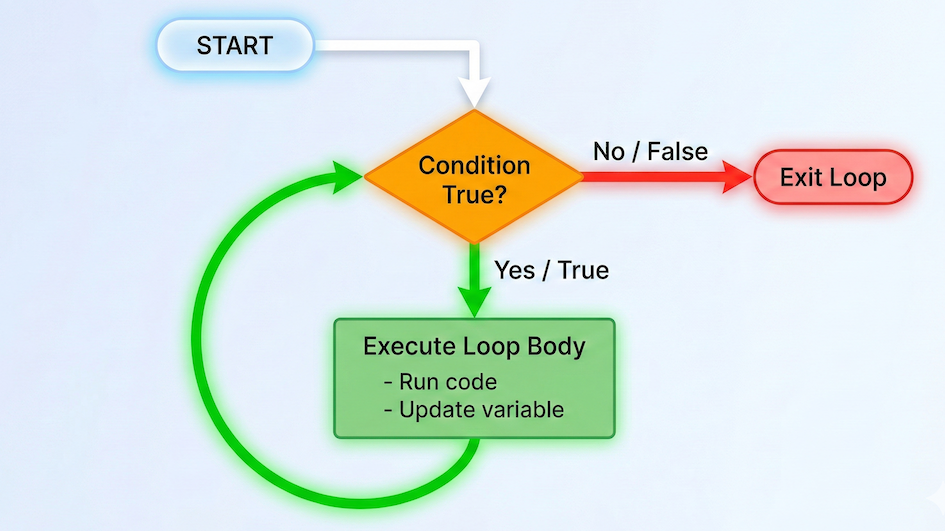
A while loop repeats a block of code as long as a condition evaluates to True.
while condition:
    do_something()
Read this line as a plain English sentence:
“While the condition remains true, keep doing this.”
If the loop body does not actively change the state of the program (like updating a counter or a flag), the condition will never evaluate to False, trapping your program in an infinite loop.
The key difference from a for loop is when and how the condition is checked. Before every single repetition, Python follows this process:
Check the condition.
If the condition is
True, run the loop body.If the condition is
False, skip the loop body and move on.
If the condition is already false at the very beginning, the loop body does not run at all.
The condition is not just a gate at the start; it is checked again and again to decide whether another repetition should happen. It is the central control mechanism for the loop’s lifespan.
3. Control variables and termination
The control variable
Most while loops rely on a control variable to make progress toward stopping.
This variable:
is created before the loop starts
appears inside the loop condition
is updated inside the loop body
It represents the part of the program state that determines whether the condition stays true or becomes false.
Example:
counter = 1

while counter <= 5:
    print(counter)
    counter += 1  # This is the update step!
Here, Python repeatedly performs the same cycle:
Check if
counter <= 5Run the loop body (
print)Update
counter(+= 1)Cycle back and check the condition again
The update step is essential. It changes the program’s state so that the condition will eventually become false. Without this change, the loop would never progress.
Concept Check: The Gatekeeper Mechanics
Suppose you are executing the code block below to parse elements from an automated weather logger track:
index = 0
while index < 4:
    print(f"Reading sample element index: {index}")
    index += 1
Which statement correctly maps the internal logic of Python as it evaluates this block?
A) Python checks the gate condition index < 4 continuously during line execution, stopping instantly in the middle of printing if an index crosses bounds.
B) Python evaluates index < 4 exactly once at the absolute start of execution; it never verifies it again after entering the loop.
C) Python tests index < 4 before every iteration; if it holds True, it executes the entire loop block completely before evaluating the criteria boundary again.
Check your understanding
Answer: C Python evaluates the condition strictly as an execution gate at the beginning of each planned iteration block. Once validated as True, the block runs uninterrupted to completion, after which the state loops back up to process the conditional gate test once again.
Termination matters
Every while loop must have a clear path to termination.
If nothing inside the loop affects the condition, the condition will never change. The loop will then run forever. This is called an infinite loop.
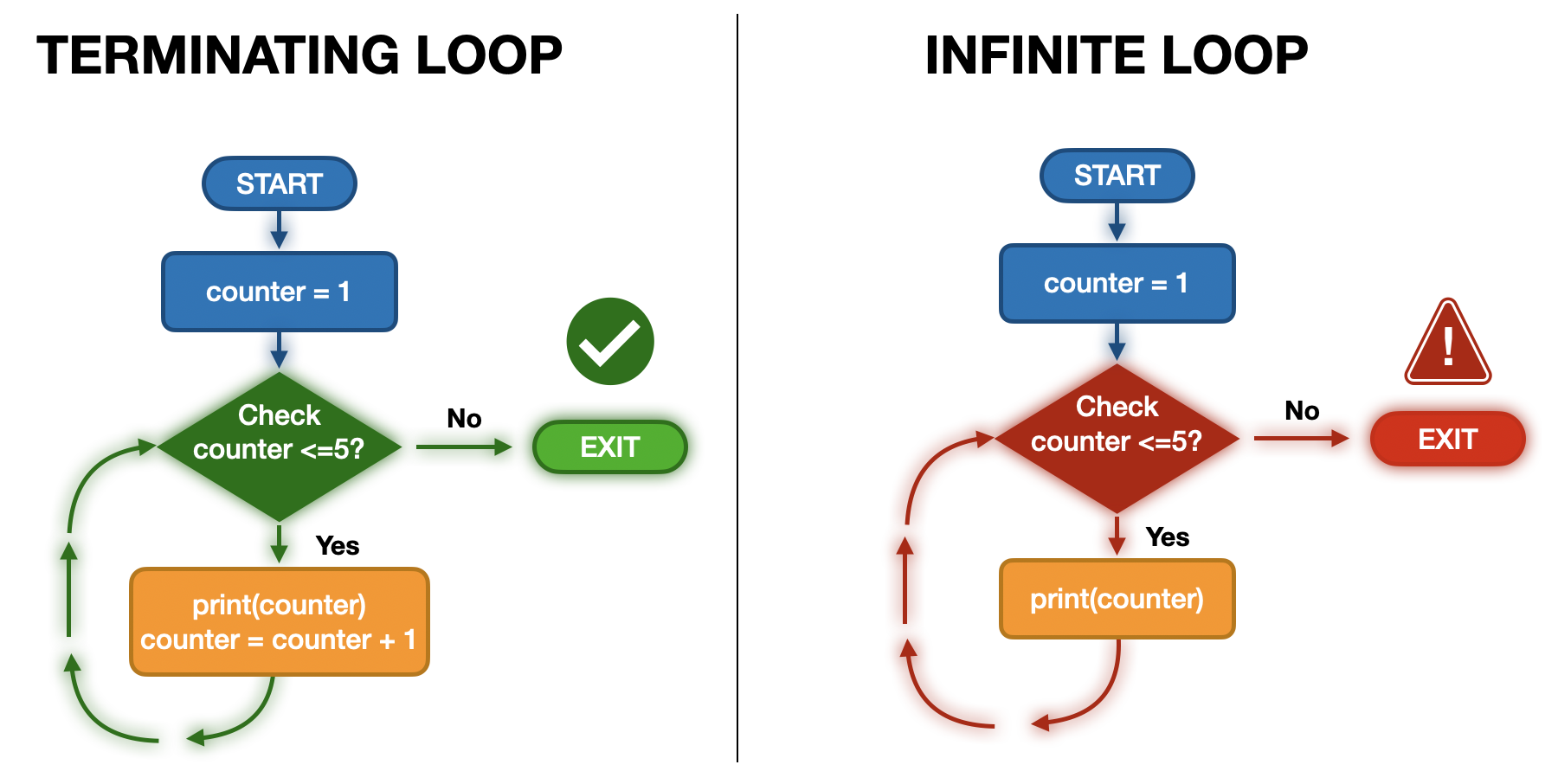
If the loop body does not actively change the state of the program (like updating a counter or a flag), the condition will never evaluate to False, trapping your program in an infinite loop.
Infinite loops usually happen when:
the control variable is completely forgotten and not updated
the update does not actually affect the condition being checked
the condition logic is written incorrectly (e.g., checking
counter > 0while adding1to it)
When writing while loops, always ask yourself:
Which exact line inside this loop moves the condition toward
False?
Being explicit about this step is the difference between a correct while loop and a program that freezes.
4. While loops with decisions
Combining while and if
A while loop can also be combined with an if statement to control when repetition should stop. This is often called using a “flag variable.”
This pattern is common whenever repetition depends on a condition that changes dynamically over time.
Consider the following example:
values = [3, 7, 12, 0, 9]
index = 0
keep_running = True  # This is our flag

while keep_running:
    current_value = values[index]
    print(current_value)

    if current_value == 0:
        keep_running = False  # Lower the flag to stop the loop!

    index += 1
Here, two different roles are clearly separated:
the
whileloop condition (keep_running) dictates whether repetition continuesthe
ifstatement inside the loop decides when to trigger the stop
How this loop works
This loop processes values one by one from the list. The logic is:
Take the next value from the list using the index.
Print the value.
Check whether it equals
0.If it does equal
0, change the flag toFalse.Update the index to move to the next value.
As soon as the value 0 is encountered, keep_running becomes false. The loop finishes its current cycle, checks the condition again, sees False, and ends.
Interactive Explorer: While Loop Execution Visualizer.
Click 'Next Step' to see exactly how Python advances line-by-line through a sequential while loop evaluation framework. Trace how values alter the internal variables and see how the execution engine steps completely past code blocks as soon as the flag evaluation flips to False. For improved visibility of the explorer, follow this link.
5. A practical example
In spatial data science, you rarely process data just for the sake of it. You often process data until a physical or quality criterion is satisfied.
A common example is working with elevation profiles. Imagine you have elevation values sampled along a transect. You want to walk along this transect and stop at the first point above 2500 m.
elevations = [1800, 1950, 2100, 2350, 2600, 2750]
threshold = 2500

index = 0
found = False

while not found:
    elevation = elevations[index]
    print(f"Checking elevation: {elevation} m")

    if elevation >= threshold:
        found = True
        print(f"--> Threshold reached at index {index}!")

    index += 1
Conceptually, this loop:
moves step-by-step through spatially ordered data
checks a physical threshold at every step
stops exactly when the condition is satisfied
You do not know in advance where the threshold will be crossed. You only know the rule for when to stop.
6. Exercise
You are given a time-ordered record of daily mean temperatures (in °C). Some values may be unrealistic due to sensor errors.
temperatures = [3, 5, 7, 6, -42, 8, 9, 58, 10]
Assume the following plausible range for this environment:
minimum realistic temperature: −20 °C
maximum realistic temperature: 40 °C
Your task is to:
Check the temperatures one by one.
Stop as soon as an outlier is found so it can be fixed.
Print each checked value using a readable message.
Print a clear warning when an outlier is detected.
Use:
a
whileloopconditional logic (
if)an f-string for clear output
Before coding, think about:
What condition keeps the loop running?
What condition signals an outlier?
Which line will cause the loop to eventually stop?
Sample solution
temperatures = [3, 5, 7, 6, -42, 8, 9, 58, 10]
min_temp = -20
max_temp = 40

index = 0
outlier_found = False

# We add 'index < len(temperatures)' as a safety net in case
# the list has no outliers, preventing an IndexError!
while not outlier_found and index < len(temperatures):
    temp = temperatures[index]
    print(f"Checking day {index + 1}: {temp} °C")

    if temp < min_temp or temp > max_temp:
        print(f"--> Outlier detected on day {index + 1}: {temp} °C is outside the valid range.")
        outlier_found = True

    index += 1
What this code does:
processes the environmental record in time order
reports each checked value clearly
reacts immediately to invalid data
stops safely as soon as the first problem is found
7. Summary
In this section, you learned how to use the while loop to control repetition based on conditions, rather than fixed collections.
Key ideas
a
whileloop repeats as long as a condition evaluates to True - the condition is checked as a gatekeeper before every repetitioncontrol variables are required to move the loop toward termination
every
whileloop must have a clear stopping condition to avoid infinite loopswhileloops are the ideal tool when the total number of required repetitions is unknown
For vs. While loops
for loop   → “Repeat for every single value in this collection.”
while loop → “Repeat until this specific condition changes.”
Typical guidance:
use
forwhen iterating over a known dataset or fixed range.use
whilewhen waiting for a condition to be met (like a threshold or user input).
Neither loop is “better” than the other. They just solve different structural problems. Choosing the right loop makes your code cleaner, safer, and much easier to read.
What comes next
So far, loops have always run to completion once they start.
Next, you will learn how to control loop execution manually:
stopping a loop early from the inside (
break)skipping individual iterations without stopping the whole loop (
continue)reacting immediately to special edge cases
These tools will give you fine-grained control over exactly how and when your spatial data processing happens.