
Chapter Relevance
Lab Relevance: ★☆☆ (Indispensable for processing noisy data streams, filtering missing data points, and optimizing search operations)
Project Relevance: ★★☆ (Essential for error-handling blocks, handling missing data entries safely, and halting endless spatial lookups)
Foundation: ★★☆ (Core architectural logic commands that give you explicit internal management over any running iteration block)
Time to Read: 6 minutes
In a nutshell: Gain fine-grained control over execution structures by learning to actively alter loop lifespans dynamically from the inside out.
Skip this if: You can accurately contrast how pass, break, and continue alter the execution stack, and how continue changes behavior inside a while loop versus a for loop.
So far, loops have followed a strict and predictable pattern: start, repeat, and stop only when the main loop condition is met or the data runs out.
Now we add a powerful new capability:
You can control the loop’s flow from inside the loop body.
This is incredibly useful for data checking, quality control, and making your processing more efficient.
1. Placeholders with pass
Why pass exists
Sometimes you want to sketch out the structure of your code before you actually know what the logic should be.
However, Python relies on indentation. If you create a for loop or an if statement and leave the indented block completely empty, Python will throw an error.
pass is a placeholder statement that literally does nothing. It simply tells Python, “I know a block of code belongs here, just ignore it for now.”
for i in range(5):
    pass  # Keeps the code valid while you are drafting
This loop runs perfectly, but performs no action.
When to use pass
Use pass when you:
sketch out a loop you will complete later
create a temporary placeholder while debugging
need a code block that is syntactically required but intentionally empty
2. Exiting a loop with break
Stopping early
The break statement is an emergency exit. It ends the loop immediately. Control flow jumps completely out of the loop and continues with the first line of code after the loop block.
This is useful when your goal has been reached and continuing the loop would just be wasted work.
Example: Stop when an outlier is found
temperatures = [3, 5, 7, 6, 8, 9, 10, 111, 11]
min_temp = -20
max_temp = 40

for day, temp in enumerate(temperatures, start=1):
    print(f"Day {day}: {temp} °C")

    if temp < min_temp or temp > max_temp:
        print(f"⚠️ Outlier detected on day {day}: {temp} °C. Stopping analysis!")
        break

print("Finished checking the record.")
Day 1: 3 °C
Day 2: 5 °C
Day 3: 7 °C
Day 4: 6 °C
Day 5: 8 °C
Day 6: 9 °C
Day 7: 10 °C
Day 8: 111 °C
⚠️ Outlier detected on day 8: 111 °C. Stopping analysis!
Finished checking the record.
As soon as the break statement is triggered on the 111 °C outlier, the loop is abandoned. The remaining temperature (11 °C) is never checked.
Why use break?
Without break, the loop would uselessly keep checking values even after the problem was found. With break, the loop stops early, saving time and processing power.
This is a common pattern when:
searching for the very first occurrence of a feature
detecting the onset of an environmental event
safely stopping a process when an error condition is met
3. Skipping an iteration with continue
Skip the rest of this round
While break stops the entire loop, continue only stops the current iteration. It skips the remaining code in the loop body and immediately jumps back to the top to start the next iteration.
This is perfect when some values should be ignored, but you still want to process the rest of the dataset.
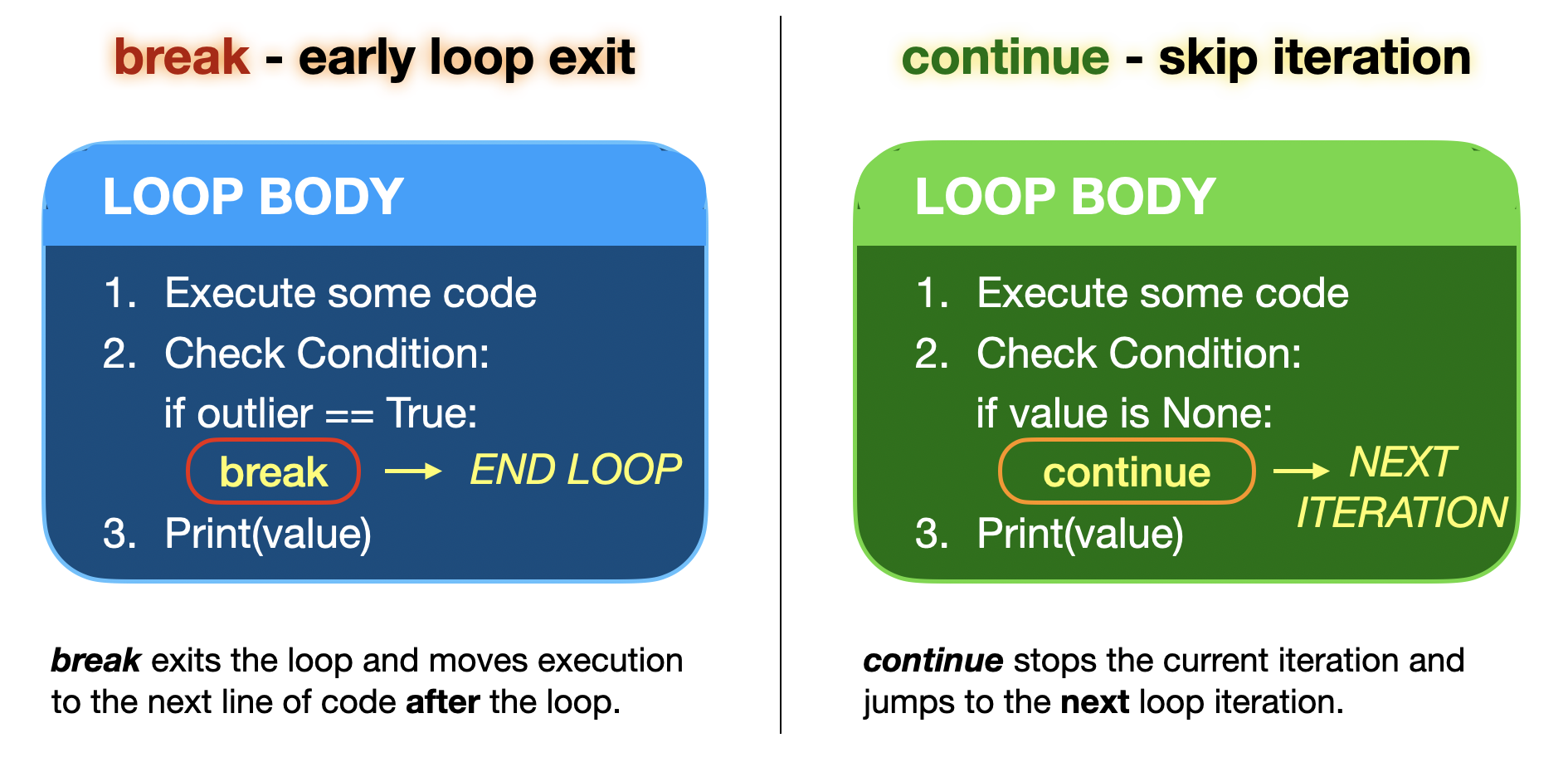
Notice the difference in the escape paths: break shatters the loop entirely and moves on. continue acts like a reset button for the current iteration, sending Python straight back to the top to grab the next value.
Example: Ignore missing values
temperatures = [3, None, 7, 6, None, 9]

for temp in temperatures:
    if temp is None:
        continue  # Skip to the next temperature

    print(f"Valid value: {temp} °C")
Valid value: 3 °C
Valid value: 7 °C
Valid value: 6 °C
Valid value: 9 °C
Here, the loop skips the None entries without breaking the loop, ensuring the valid temperatures (7, 6, 9) are still printed.
What is None?
In Python, None represents the absence of a value. It is commonly used to indicate:
missing data
unavailable measurements
placeholders where no valid value exists
None is not zero, not an empty string, and not False. It is a distinct data type with a special meaning. Because of this, it is usually checked explicitly using the is operator.
A common coding pattern
Often, continue is used as a “guard” at the very top of a loop:
for value in dataset:
    if value is None:
        continue

    # main, complex processing happens down here
This acts as a filter, keeping the main logic less indented and much easier to read.
4. continue and while loops
Why continue can be risky
In a for loop, Python automatically fetches the next value from the list when continue is called. So, continue is very safe to use.
In a while loop, you are responsible for updating the control variable (like index += 1). If continue skips the line of code that updates your variable, the loop will evaluate the exact same condition again and again, trapping your program in an infinite loop.
Example of the risk
values = [3, None, 7]
index = 0

while index < len(values):
    value = values[index]

    if value is None:
        continue  # DANGER: We skip the index update!

    print(value)
    index += 1    # This line is never reached for None
This code prints 3, and then gets permanently stuck on the None value because index remains 1 forever.
The safe pattern
If you use continue in a while loop, make sure your control variable is updated before the continue statement is reached.
values = [3, None, 7]
index = 0

while index < len(values):
    value = values[index]
    index += 1  # Update happens FIRST

    if value is None:
        continue

    print(value)
3
7
Now the loop safely progresses to the end of the list.
Interactive Explorer: Loop Control Flow Simulator (Break vs. Continue).
Click 'Next Step' to visualize the loop's execution frame line-by-line. Observe how triggering a continue statement routes execution paths instantly back to the top of the loop block, while a break statement terminates evaluation cycles immediately. For improved visibility of the explorer, follow this link.
Concept Check: The Execution Pipeline Shunt
Suppose you are tracking spatial telemetry nodes with a loop designed to skip offline gaps or completely abort on an emergency status code indicator:
dataset = [12, None, 15, -999, 18]

for val in dataset:
    if val is None:
        continue
    if val == -999:
        break
    print(val)
What is the exact outcome generated by the execution track of this code?
A) It prints 12, skips None, prints 15, prints -999, and then halts.
B) It prints 12, skips None, prints 15, and stops tracking completely at -999 without evaluating 18.
C) It prints 12, prints 15, prints 18, and filters out both None and -999 quietly.
Check your understanding
Answer: B The continue statement causes Python to bypass the remaining block layout specifically for the None item. When the pointer encounters -999, the break command shatters the loop completely, skipping line processing for the trailing element 18 entirely.
5. Exercises
Exercise 1: Drafting a data check with pass
You are planning to write a quality check for a dataset, but you are not yet sure what the check should do.
Create a loop that iterates over the indices of a dataset and prints the index number.
Leave the body of the loop empty for now using pass.
data = [12, 15, 18, 21, 24]Why might this be useful while developing code?
Sample solution
data = [12, 15, 18, 21, 24]

for i in range(len(data)):
    pass
Explanation:
the loop structure is correct
the body is intentionally empty
logic can be filled in later without breaking the code
Exercise 2: Stop at the first invalid measurement
You are checking daily temperature measurements. Values below −20 °C or above 40 °C are invalid.
temperatures = [5, 7, 9, 11, 13, 45, 14, 16]
Write a loop that:
Iterates over the list using an index
Prints each day and temperature
Stops immediately when an invalid value is found
Prints a clear warning using an
f-string
Sample solution
temperatures = [5, 7, 9, 11, 13, 45, 14, 16]
min_temp = -20
max_temp = 40

for i in range(len(temperatures)):
    temp = temperatures[i]
    print(f"Day {i + 1}: {temp} °C")

    if temp < min_temp or temp > max_temp:
        print(f"⚠️ Invalid measurement on day {i + 1}")
        break
Explanation:
indexing makes the day number explicit
breakstops the loop as soon as the decision is madethe loop’s intent is detecting the first error
Exercise 3: Skip missing values but keep counting
You are processing sensor data where some measurements are missing (None).
temperatures = [3, None, 6, 7, None, 9]
Write a loop that:
Iterates over the list
Skips missing values
Prints only valid temperatures
Includes the position in the output
Sample solution
temperatures = [3, None, 6, 7, None, 9]

for i in range(len(temperatures)):
    temp = temperatures[i]

    if temp is None:
        continue

    print(f"Valid value at position {i}: {temp} °C")
Explanation:
continueignores invalid entriesindexing preserves positional information
output stays readable and informative
Exercise 4: Decide whether to break or continue
Consider the following dataset:
values = [10, 12, None, 15, -999, 18]
Assume:
Nonemeans missing and should be skipped-999means corrupted and should stop processing
Write a loop that:
skips
Nonevaluesstops entirely when
-999is encounteredprints all valid values before stopping
Think carefully about where to use continue
and where to use break.
Sample solution
values = [10, 12, None, 15, -999, 18]

for i in range(len(values)):
    value = values[i]

    if value is None:
        continue

    if value == -999:
        print(f"⚠️ Corrupted value at position {i}")
        break

    print(f"Value at position {i}: {value}")
Explanation:
continueskips missing valuesbreakstops processing when data is corrupteddifferent control statements express different intent
6. Summary
passis a placeholder that does nothing.breakexits a loop entirely and immediately.continueskips the remainder of the current iteration and moves to the next one.
break and continue are most useful when processing real-world data, because they allow your program to react dynamically to missing, corrupted, or target values.
What comes next
Next, you will combine everything you have learned:
repetition with
forandwhiledecisions with
if,elif,elseloop control with
pass,break, andcontinue
This gives you a complete toolkit for writing programs that can automate spatial logic and react to real data in a controlled, intelligent way.