
Chapter Relevance
Lab Relevance: ★★☆ (Crucial for filtering and transforming data in any lab)
Project Relevance: ★★☆ (Required for custom logic, handling missing values, classifying data)
Foundation: ★★★ (Core programming logic)
Time to Read: 10 minutes
In a nutshell: Conditions allow your loops to make decisions, transforming static repetition into dynamic, data-driven workflows like filtering and classification.
Skip this if: You are fully comfortable with if, elif, else statements, logical operators (and, or, not), and using them inside for loops to filter and transform lists.
So far, every loop you have written executed the same instructions for every value.
Now we take the next step:
We still repeat actions, but we allow the program’s behaviour to change depending on the data it encounters.
1. Conditions as questions
When repetition needs decisions
A condition is simply a question that the computer can answer with yes or no.
In Python, these answers are represented by the Boolean values:
TrueFalse
When conditions are used inside a loop, they allow the program to decide what to do for each individual value. The loop still steps through the data, but the behavior can change from one value to the next.
Reading conditions in plain language
Conditions are easiest to write and understand when you read them as questions:
Is this value greater than 10?
Is this city contained in the list of capitals?
Is this index equal to zero?
Each condition controls whether a specific block of code is allowed to execute.
2. Operators for evaluating conditions
Comparison operators
Comparison operators are used to compare two values against each other.
Comparison operators in Python
| Operator | Description | Comparison example | Result |
|---|---|---|---|
== | Equal to | "apples" == "oranges" | False |
!= | Not equal to | "apples" != "oranges" | True |
< | Less than | 2 < 1 | False |
> | Greater than | 2 > 1 | True |
<= | Less than or equal to | 2 <= 2 | True |
>= | Greater than or equal to | 2 >= 4 | False |
Each comparison produces a Boolean result: either True or False. These operators are the most common way to express mathematical or textual conditions in code.
Identity operators
Identity operators check whether two variables refer to the exact same object in memory, not just whether they contain the same values.
a is b
a is not b
Here is a conceptual example:
a = [1, 2, 3]
b = a  # b points to the exact same list as a
c = [1, 2, 3]  # c is a brand new list with identical values
Now compare them:
print(a is b)
True
Both a and b point to the same list.
print(a is c)
False
Even though a and c contain the exact same numbers, they are different objects in the computer’s memory.
Membership operators
Membership operators test whether a specific value exists inside a collection (like a list or a string).
x in y
x not in y
For example:
cities = ["Lima", "Quito", "Bogotá"]

print("Lima" in cities)

print("Santiago" in cities)
True
False
Membership operators also work seamlessly with strings to check for substrings:
print("a" in "data")
True
3. Logical operators (and, or, not)
Combining conditions
Logical operators allow you to combine multiple conditions into a single decision.
The three logical operators in Python are:
and(both conditions must be true)or(at least one condition must be true)not(reverses the condition)
They are often used to make highly precise decisions.
Simple examples
Consider a numeric value:
value = 42

print(value > 0 and value < 100)
True
Both conditions are true, so the whole expression is true.
Now consider membership:
cities = ["Lima", "Quito", "Bogotá"]
capitals = ["Lima", "Buenos Aires"]

print("Quito" in cities or "Quito" in capitals)
True
Only one of the conditions needs to be true for an or statement to evaluate to True.
Using not simply flips the Boolean result:
value = 0
print(not value == 0)
False
Reading logic in words
It helps to read logical expressions aloud:
andmeans both conditions must be trueormeans at least one condition must be truenotmeans the opposite of the condition
For example:
“The value is greater than zero and less than one hundred.”
Parentheses and clarity
When combining several conditions, it is best practice to use parentheses to make the logic clear.
(a < b and b < c) or (a > b)
FalseParentheses:
improve readability
prevent logic mistakes
make the order of evaluation explicit
Concept Check: Evaluating Logic
Predict the Boolean result without running the code:
x = 5
result = (x > 3 and x < 10) or x == 0
Is result True or False?
Check your understanding
Answer: True
The first part (x > 3 and x < 10) evaluates to True because 5 is between 3 and 10. Because the logical operator linking the two sides is or, the fact that the first half is True makes the entire expression True, completely regardless of whether the x == 0 part is true or false.
4. Conditional execution (if, elif, else)
Choosing what happens
So far, conditions have been used purely as questions. Now we will use them to choose between actions.
Python provides three related keywords for control flow:
iffor a single decisionif … elsefor a two-way splitif … elif … elsefor multiple paths
A single decision with if
Use if when you want code to run only if a condition is true.
temperature = 5

if temperature > 0:
    print("Above freezing")
Above freezing
If the condition is false, nothing happens. The program skips the indented block and continues.
Two paths with if and else
Use else when there are exactly two outcomes. It acts as a catch-all for when the if condition is false.
temperature = -2

if temperature > 0:
    print("Above freezing")
else:
    print("Freezing or below")
Freezing or below
Exactly one of the two blocks will run. Never both.
Multiple paths with if, elif, and else
When more than two cases are possible, use elif (short for “else if”).
Python checks conditions from top to bottom. As soon as one condition evaluates to True, it runs that block and skips the rest of the chain.
temperature = -3

if temperature > 0:
    print(f"{temperature} degrees is above freezing")
elif temperature == 0:
    print(f"{temperature} degrees is at the freezing point")
else:
    print(f"{temperature} degrees is below freezing")
-3 degrees is below freezing
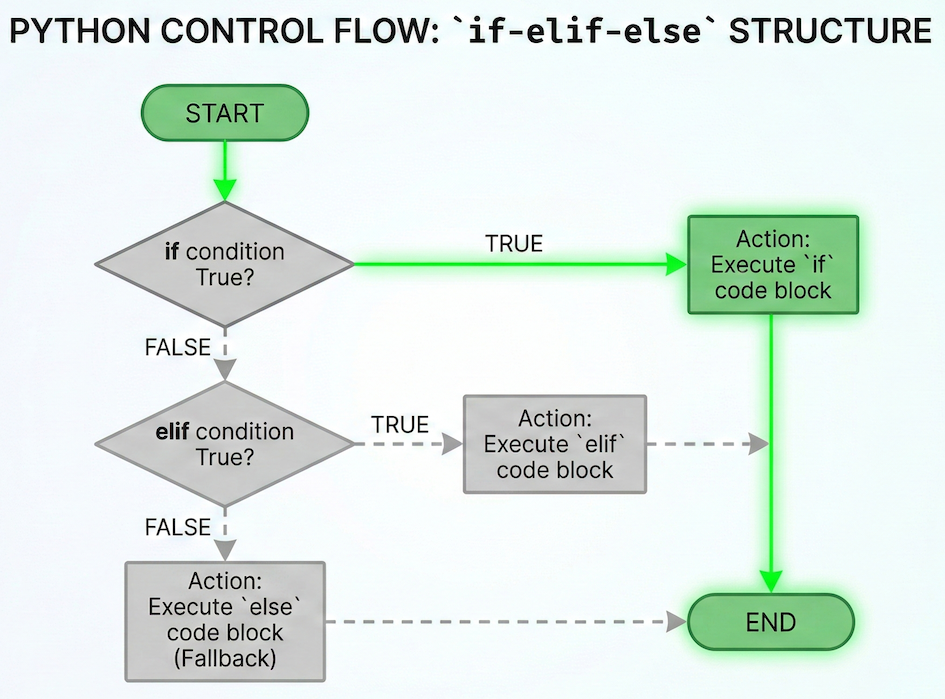
An if-elif-else chain acts like a filter. Python checks conditions sequentially; once it finds a match (True), it executes that code block and immediately exits the chain, ignoring all remaining conditions.
Reading conditional chains
It helps to read the logic like a checklist:
Is the first condition true
If not, try the next one
If none match, use the fallback (
else)
This makes conditional execution predictable and easy to debug.
Concept Check: The Execution Order
Predict the output before running the code:
yesterday = 14
today = 10
tomorrow = 13

if yesterday <= today:
    print("A")
elif today != tomorrow:
    print("B")
elif yesterday > tomorrow:
    print("C")
elif today == today:
    print("D")
Check your understanding
Answer: B
yesterday <= today(14 <= 10) → False. Python moves to the next.today != tomorrow(10 != 13) → True. Python prints “B”.Because a
Truecondition was found, Python skips the rest of the block entirely. It never even looks at “C” or “D”, even thoughyesterday > tomorrowandtoday == todayare both technically True. Only the first True block in anif-elifchain executes.
5. Decisions inside loops
Using if inside a loop
Conditions become very powerful when placed inside loops.
values = [3, 12, 7, 25]

for v in values:
    if v > 10:
        print(v)
12
25
The loop still processes every value in the list. However, only values that satisfy the condition (v > 10) are printed.
The loop controls how often the code runs.
The condition controls what happens for each specific value.
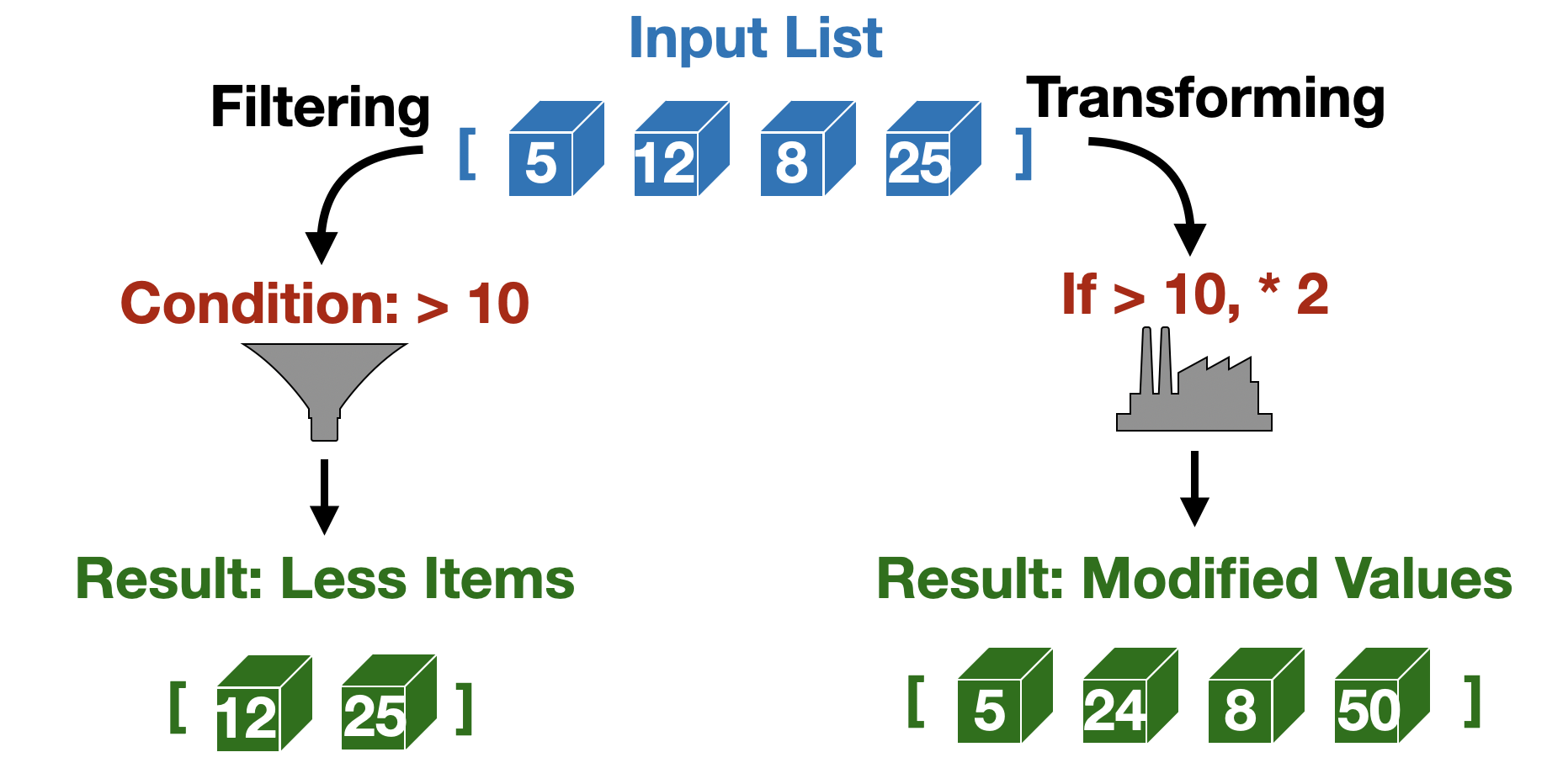
Filtering creates a smaller subset of data based on a rule. Transforming alters the content of the data while maintaining the overall structure and size.
Filtering values
Filtering means selecting some values and ignoring the rest.
In the previous example, values greater than 10 are printed, while smaller values are skipped. Filtering is a core data science pattern used to:
select spatial data above or below an elevation threshold
remove invalid or missing coordinate entries
focus analysis on a specific country or region
Transforming values
Transforming means changing values depending on a condition.
for v in values:
    if v > 10:
        print(v * 2)
    else:
        print(v)
3
24
7
50
Here:
values greater than 10 are doubled
other values are printed unchanged
Unlike filtering, transforming generally produces an output for every value, but the output itself depends on the condition.
Interactive Explorer: Filtering vs. Transforming.
Click the action buttons to watch the values flow through the loop. Notice how "Filtering" ignores elements that fail the condition resulting in a shorter final list, while "Transforming" evaluates every element and creates an altered list of the exact same length. For improved visibility of the explorer, follow this link.
Concept Check: Identify the Operation
Before running the code below, look at the logic structure:
values = [5, 15, 8]

for v in values:
    if v > 10:
        print(v + 1)
    else:
        print(v - 1)
Is this an example of filtering or transforming? What will the printed output be?
Check your understanding
Answer: Transforming (Output: 4, 16, 7) This is transforming because every single value from the input list produces a modified output value (the list length is maintained).
5is not > 10, so it hitselseand becomes4.15is > 10, so it hitsifand becomes16.8is not > 10, so it hitselseand becomes7.
6. Exercises
The following exercises help you practise how conditions and loops work together.
Focus on understanding when a condition is checked and what effect it has inside the loop.
Exercise 1: Filtering values
You are given a list of temperatures:
temperatures = [5, 12, 18, 3, 25]
Write a loop that prints only temperatures above 10.
Write the loop.
Predict which values will be printed before running it.
Sample solution
for t in temperatures:
    if t > 10:
        print(t)
Printed values:
12
18
25
Key idea: The loop runs for all values, the condition controls which values produce output.
Exercise 2: Transforming values
You are given a list of distances (in kilometres):
distances = [2, 10, 4, 5]
Write a loop that:
doubles distances greater than or equal to 5
leaves smaller distances unchanged
Print the result for each value.
Sample solution
for d in distances:
    if d >= 5:
        print(d * 2)
    else:
        print(d)
Output:
2
20
4
10
Key idea: Transforming changes values, but still processes every item.
Exercise 3: Using membership inside a loop
You are given a list of cities and a list of capitals:
cities = ["Lima", "Quito", "Santiago", "Bogotá"]
capitals = ["Lima", "Bogotá"]
Write a loop that prints only the cities that are also capitals.
Sample solution
for city in cities:
    if city in capitals:
        print(city)
Output:
Lima
Bogotá
Key idea: Membership operators work naturally inside loops.
Exercise 4: Predict before you run
Without running the code, predict the output:
values = [1, 4, 7, 13, 18]

for v in values:
    if v % 2 == 0:
        print("even")
    else:
        print("odd")
odd
even
odd
odd
even
Write down the expected output line by line.
Sample solution
odd
even
odd
odd
even
Key idea: Conditions are evaluated separately for each loop iteration.
7. Summary
In this section, you learned how repetition and decisions work together.
Key ideas
Loops control how often code runs.
Conditions control what happens for each value.
Conditions evaluate to
TrueorFalse.Operators allow values (
==), objects (is), and collections (in) to be tested.Logical operators (
and,or,not) combine conditions.Placing
ifinside a loop enables core data workflows like filtering and transforming.
What comes next
So far, your decisions have happened inside a loop that already knows how long it will run. Next, you will learn a new kind of repetition: a loop that continues until a condition changes. You will meet the while loop, which is useful when you do not know in advance how many repetitions are needed. The key shift is this:
for loops focus on what to loop over
while loops focus on when to stop