
Chapter Relevance
Lab Relevance: ★★★ (Essential for automating tasks across multiple files or coordinates)
Project Relevance: ★★★ (Data processing at scale is impossible without loops)
Foundation: ★★★ (Core grammar of Python)
Time to Read: 10 minutes
In a nutshell: The for loop allows you to write an instruction once and have Python automatically repeat it for every item in a dataset.
Skip this if: You are fully comfortable iterating over lists directly, using range() for indexed loops, and writing nested loops.
Programs become powerful when they can repeat work automatically. Loops are the main tool for expressing repetition in Python.
This section focuses only on repetition, not on decisions. Every example does the same thing each time the loop runs.
1. The idea of a loop
One value at a time
A loop processes values one after another.
Instead of writing the same instruction many times, we describe a pattern:
Take one value, do something, move on to the next value.
This idea applies to many situations, such as:
printing all values in a lists
performing the same calculation repeatedly
stepping through a sequence in order
The number of repetitions is controlled by the data, not by you.
Consider a simple list of values:
values = [3, 7, 12]
When a loop runs over this list, it does not see the list all at once. Instead, it works like this:
first, it sees
3then, it sees
7finally, it sees
12
At each step, the exact same instructions are executed again.
The loop variable
Each loop introduces a temporary variable.
This variable:
holds exactly one value at a time
changes automatically on each repetition
exists while the loop is running
The name of the loop variable is chosen by you and should be descriptive.
How loops run
Conceptually, a loop always follows the same steps:
Take the next value from the sequence
Assign it to the loop variable
Execute the loop body
Repeat until no values remain
Understanding this execution model is more important than memorising syntax.
2. The for loop
Iterating over collections
The most common loop in Python is the for loop. It is used to iterate over collections such as lists.
for item in collection:
    do_something(item)
This line tells Python to take one value from the collection at a time and run the same instructions for each value. Read it like a sentence:
For each
itemin thecollection, do something with it.
The loop continues until the collection has no values left.
A concrete example
Consider a simple list of city names:
cities = ["Accra", "Berlin", "Chennai", "Damascus"]
Now run the following loop:
for city in cities:
    print(city)
Accra
Berlin
Chennai
Damascus
Python executes the same print(city) instruction four times. Each time, city refers to a different value from the list.
The code itself does not change. Only the value of city changes.
How Python executes this loop
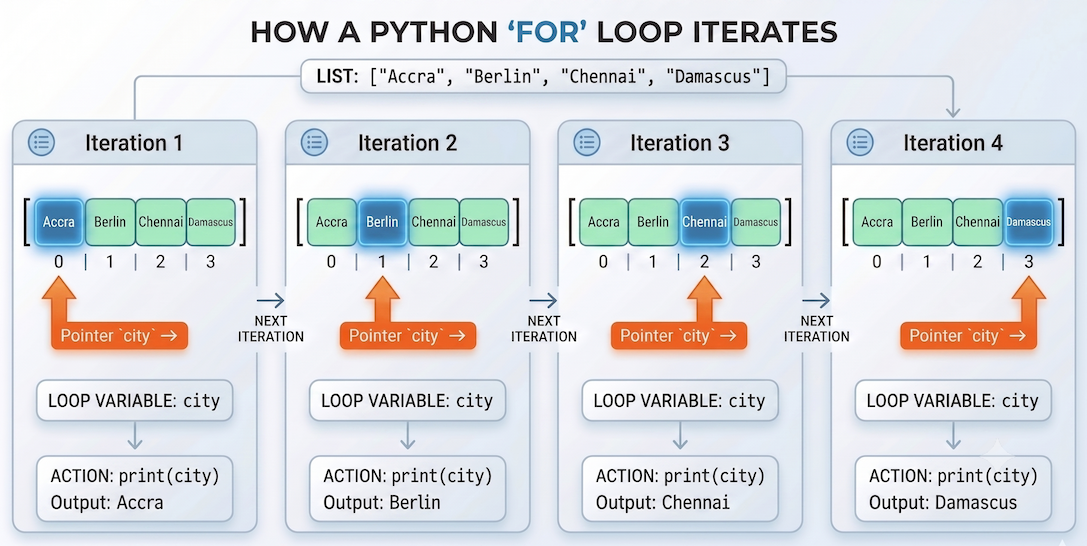
The loop variable acts as a temporary container. It holds the first value, executes the code, and then automatically moves to the next value until the list is empty.
Internally, Python proceeds step by step:
Assigns
"Accra"tocityand runs the loop bodyAssigns
"Berlin"tocityand runs the loop bodyAssigns
"Chennai"tocityand runs the loop bodyAssigns
"Damascus"tocityand runs the loop bodyStops because no values remain
At any moment, the loop variable holds exactly one value.
Loop body and indentation
Everything indented below the for statement belongs to the loop.
for city in cities:
    print(city)
    print("---")
Accra
---
Berlin
---
Chennai
---
Damascus
---
Both print statements are part of the loop body, so both run once for each city.
When the indentation ends, the loop ends. Python does not use an explicit “end loop” keyword. Structure is defined entirely by indentation.
Loop variable lifetime
The loop variable is a normal variable. It is assigned a new value on each repetition.
After the loop finishes:
the variable still exists
it contains the last value from the collection
You can verify this directly:
print(city)
Damascus
This behaviour can be surprising at first, so it is important to be aware of it.
Interactive Explorer: For-Loop Mechanics Visualizer.
Click "Next Step" to trace exactly how Python executes a loop. Pay close attention to how the temporary loop variable grabs one item from the collection at a time, allowing the exact same line of code (the print statement) to produce different results. For improved visibility of the explorer, follow this link.
3. Looping with range
Repeating a fixed number of times
Sometimes you do not want to loop over a list. You simply want to repeat an action a known number of times.
This is what range() is for.
for i in range(5):
    print(i)
0
1
2
3
4
The loop runs five times. On each repetition, the loop variable takes on the next number in the sequence.
How range works
When range() is given a single number, it produces a sequence of integers:
range(5) # Conceptually produces: 0, 1, 2, 3, 4
range(0, 5)Important details:
the sequence always starts at
0(unless specified otherwise)the final value is not included (it stops before 5)
the length of the sequence matches the number you provide (5 numbers total)
This “start at zero, stop before the end” behaviour is the standard in Python.
Start, stop, step
The range() function can take one, two, or three arguments.
range(stop)
range(start, stop)
range(start, stop, step)
For example:
for i in range(2, 9, 3):
    print(i)
2
5
8
Read this as:
Start at 2, increase by 3 each time, stop before reaching 9.
What would be the output of range(4, 15, 3)?
4 7 10 13
Using these arguments gives you precise control over how many repetitions occur.
You can learn a bit more about range by typing help(range).
help(range)
Help on class range in module builtins:

class range(object)
 |  range(stop) -> range object
 |  range(start, stop[, step]) -> range object
 |
 |  Return an object that produces a sequence of integers from start (inclusive)
 |  to stop (exclusive) by step.  range(i, j) produces i, i+1, i+2, ..., j-1.
 |  start defaults to 0, and stop is omitted!  range(4) produces 0, 1, 2, 3.
 |  These are exactly the valid indices for a list of 4 elements.
 |  When step is given, it specifies the increment (or decrement).
 |
 |  Methods defined here:
 ...
4. Looping with index values
When values are not enough
So far, you have looped directly over the values in a list. In many cases, this is exactly what you want.
Sometimes, however, you also need to know where a value appears in a list. This is where index values become useful.
Accessing values by index
Recall that list elements are accessed using an index. The first element has index 0.
We can combine this idea with range() and len().
cities = ["Buenos Aires", "São Paulo", "Lima", "Bogotá", "Santiago"]

for i in range(len(cities)):
    print(f"{cities[i]} is at index {i}")
Buenos Aires is at index 0
São Paulo is at index 1
Lima is at index 2
Bogotá is at index 3
Santiago is at index 4
Here is what happens:
len(cities)gives the number of elements in the list (5)range(5)produces the indices0, 1, 2, 3, 4itakes on each index value step-by-stepcities[i]accesses the corresponding city
Why the loop starts at zero
Because Python lists start at index 0,
the first value in the list is accessed as cities[0].
Using range(len(cities)) ensures that:
every valid index is used
no index goes out of bounds
This pattern is common and worth recognising.
Using indices with related lists
Index-based loops are especially useful when you have multiple lists that belong together.
cities = ["Buenos Aires", "Brasília", "Lima", "Bogotá", "Santiago"]
countries = ["Argentina", "Brazil", "Peru", "Colombia", "Chile"]
Each city corresponds to a country at the same index.
for i in range(len(cities)):
    print(cities[i], "is the capital of", countries[i])
Buenos Aires is the capital of Argentina
Brasília is the capital of Brazil
Lima is the capital of Peru
Bogotá is the capital of Colombia
Santiago is the capital of Chile
The index i allows access to matching elements from both lists at the exact same time.
When index-based loops are needed
Using indices is useful when:
you need to update values in a list
you want to refer to the position of an element
you need to access multiple related lists together
In many other cases, looping directly over values is simpler and clearer.
5. Nested loops
Repetition inside repetition
A loop can be placed inside another loop. This is called a nested loop.
for a in first_list:
    for b in second_list:
        print(a, b)
In this structure:
the outer loop controls the larger repetition
the inner loop runs fully from start to finish for each outer value
An example
Consider two small lists:
colors = ["red", "blue"]
shapes = ["circle", "square"]
Now run the nested loop:
for color in colors:
    for shape in shapes:
        print(color, shape)
red circle
red square
blue circle
blue square
Each color is combined with every shape before the outer loop moves on to the next color.
Execution order
Nested loops always follow the same order:
The outer loop takes its first value
The inner loop runs through all its values
The outer loop moves to the next value
The inner loop runs again from the beginning
This creates a grid-like pattern of repetition.
Visualising the pattern
You can think of nested loops as filling a table or a spatial grid:
rows correspond to the outer loop
columns correspond to the inner loop
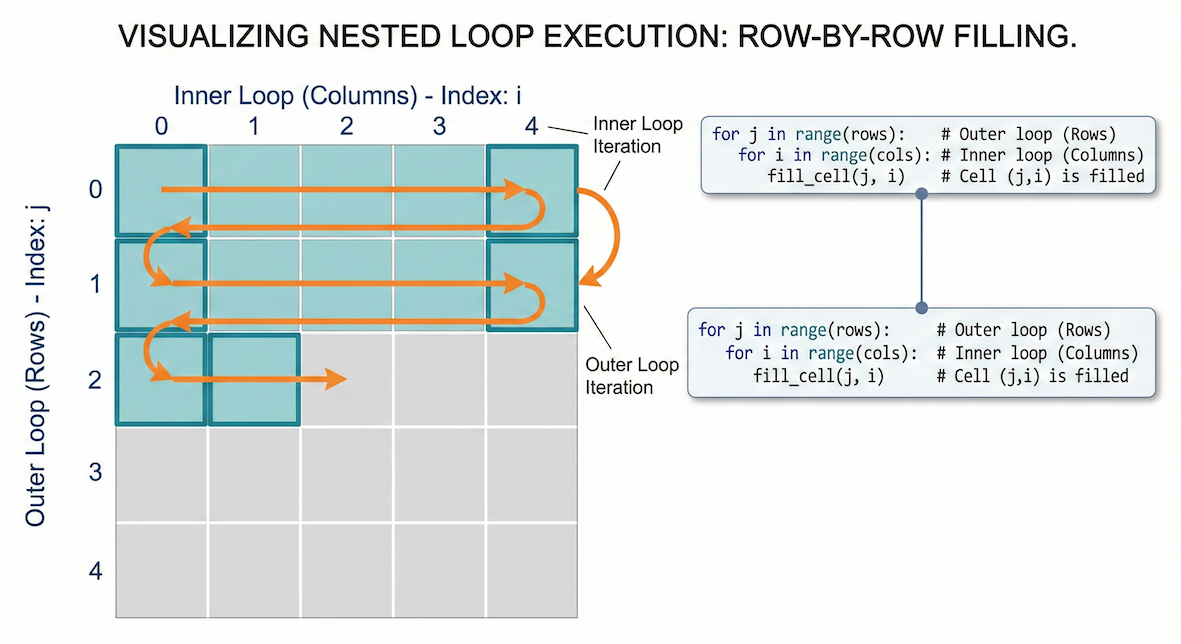
The outer loop locks into a row, while the inner loop runs through all the columns. Once a row is finished, the outer loop moves down one step and the inner loop starts over.
Every cell represents one execution of the inner loop body. This is incredibly useful in spatial data science for working with coordinate pairs (x, y) or raster pixels!
Interactive Explorer: Nested Loop Visualizer.
Click "Step Forward" to see exactly how Python processes the inner loop completely before advancing the outer loop. This row-by-row execution is identical to how image pixels and coordinate grids are processed! For improved visibility of the explorer, follow this link.
Concept Check: The Daily Station Processing
You have a list of 5 weather stations and a list of 365 days. You write a nested loop to calculate the daily average temperature for each station (outer loop: stations, inner loop: days). How many times will the inner temperature calculation run?
A) 365 times
B) 5 times
C) 1825 times
Check your understanding
Answer: C Nested loops act as a multiplier. The outer loop runs 5 times (once for each station), and for each of those stations, the inner loop runs 365 times (once for each day). 5 multiplied by 365 equals 1825 total executions.
6. Exercises
These exercises help you practise the core idea of repetition using loops.
Focus on understanding what happens, not on writing the shortest code.
Exercise 1: Looping over values
You are given a list of elevations (in meters):
elevations = [450, 1200, 890, 2300]Write a
forloop that prints each elevation.Run the code and observe the output.
How many times does the loop body execute?
Sample solution
for elevation in elevations:
    print(elevation)
The loop runs four times, once for each value in the list.
Key idea: The loop adapts automatically to the number of values.
Exercise 2: Repeating with range()
Write a loop that prints the numbers 1 to 5. Use range() to control the number of repetitions.
Write the loop.
Explain why the stop value is not printed.
Sample solution
for i in range(1, 6):
    print(i)
The loop stops before reaching 6.
Key idea:
range(start, stop) includes the start value but excludes the stop value.
Exercise 3: Looping with index values
You are given two related lists:
cities = ["Quito", "La Paz", "Asunción"]
countries = ["Ecuador", "Bolivia", "Paraguay"]
Use an index-based loop to print each city together with its country.
Why does looping directly over
citiesnot work in this case?
Sample solution
for i in range(len(cities)):
    print(cities[i], "is in", countries[i])
Looping directly over cities gives you the city names,
but not the matching position in the countries list.
Key idea: Indices allow coordination between multiple lists.
Exercise 4: Nested loops and grids
You are given x and y coordinates:
x_coords = [3, 4, 5]
y_coords = [8, 9]
Write a nested loop that prints all
(x, y)coordinate pairs.How many times does the inner loop run in total?
Sample solution
for x in x_coords:
    for y in y_coords:
        print(x, y)
The inner loop runs six times in total.
Key idea:
The total number of repetitions is
len(x_coords) × len(y_coords).
Exercise 5: Predict before you run
Without running the code, predict the output:
values = [10, 20, 30]

for v in values:
    print(v)
print(v)
What is printed by the loop?
What is printed by the final
print(v)?
Sample solution
The loop prints:
10
20
30
The final print(v) prints:
30Key idea: The loop variable still exists after the loop and holds the last value.
7. Summary
In this section, you learned how Python expresses repetition using loops.
Key ideas
A loop processes values one at a time
The loop variable holds one value per iteration
forloops are used to iterate over collectionsrange()controls repetition when no list is involvedIndex-based loops allow access to positions and related lists
Nested loops combine repetition across multiple dimensions
What comes next
So far, all loops have repeated the same action.
Next, we will introduce conditions, which allow loops to behave differently for different values. Repetition is about to become decision-aware.