
So far, you have learned how to store values and collections of values. You can define variables, work with lists, and access individual elements.
However, writing useful spatial programs requires more than just storing data. It requires processing data systematically.
This section explains why automation is necessary before you learn how to implement it.
1. The Limits of Manual Code
Programming becomes powerful when code can scale beyond a single value.
To understand why, let’s ask a new kind of question:
What if the same operation must be applied to many values?
Consider a simple list of major cities:
cities = ["Lagos", "Nairobi", "Dhaka", "São Paulo"]
Suppose you want to display each city. One option is to access each element manually using its index:
print(cities[0])
print(cities[1])
print(cities[2])
print(cities[3])
This works, but only as long as the list stays exactly the same.
Why this approach does not scale
Manual repetition quickly becomes a problem. Issues appear when:
the list grows longer (imagine 500 cities!)
the order of cities changes
a city is added or removed
For example, if you add one more city to the data:
cities.append("Kinshasa")
Your code will still only print the first four cities. You would have to manually type print(cities[4]) to fix it. The real issue here is not indexing; the issue is manual repetition.
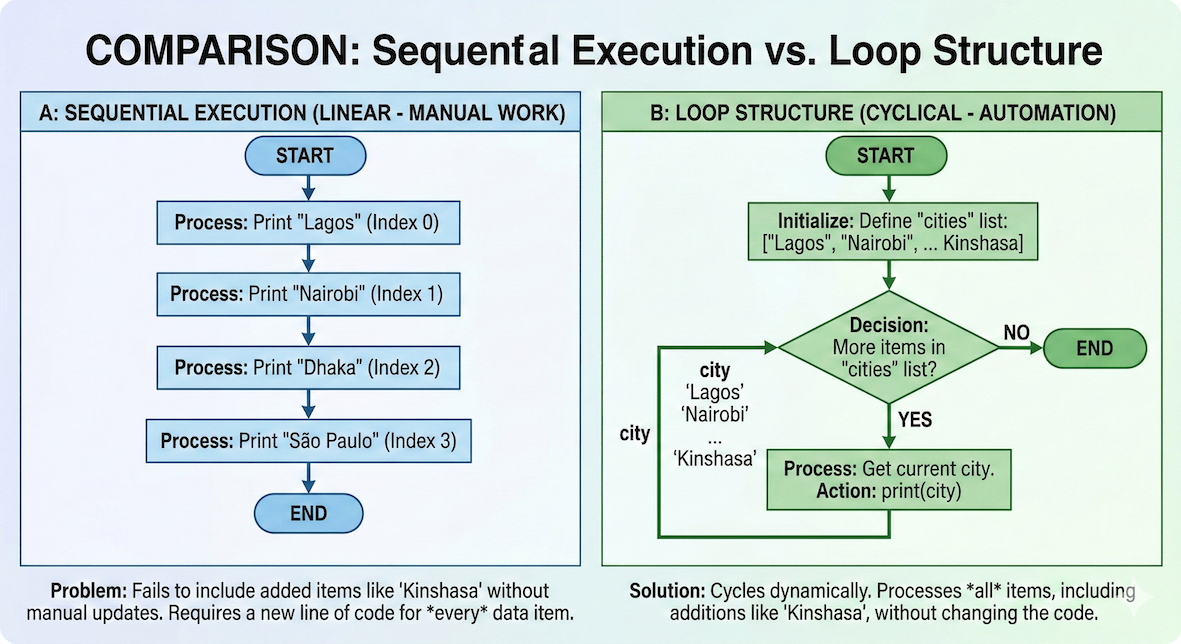
Sequential execution requires writing a new line for every step. A loop reuses the same line of code by cycling through the data until it reaches the end.
2. The Solution: Looping
What we really want to express to the computer is not:
“Print city 0, then print city 1, then print city 2…”
but rather:
“For each city in this collection, print its name.”
This idea is called iteration (or looping). Instead of repeating code yourself, you write the instruction once and let the computer repeat the work for you.
Here is a sneak peek of what that looks like in Python:
for city in cities:
    print(city)
3. Making Loops Smarter with Decisions
Repetition alone is incredibly useful, but in real-world spatial data science, you rarely want to treat every single value exactly the same way.
Imagine you want to loop through a massive list of cities, but you only want to:
print the city if its population is over 1 million
classify it differently if it is coastal vs. inland
skip the entry entirely if its coordinates are missing
Now the program must not only repeat actions, but also decide what to do for each value. This is where conditions become important.
From Values to Logic
Every decision has the same basic shape:
check a condition
choose what happens next
This introduces another core idea:
Code can branch based on conditions.
This is how programs react to data instead of just processing it blindly.
4. Repetition & Decisions Go Together
In real workflows, repetition and decisions are often combined.
Typical patterns include:
go through many values
decide something about each one
Examples from geospatial and environmental work include:
checking each coordinate for validity
classifying cities by region
filtering measurements based on thresholds
Repetition handles how many times. Decisions handle what to do.
5. Concept Check
Before learning the actual Python syntax for loops, pause and reflect on the concept.
Task
You are given a list of river names:
rivers = ["Nile", "Congo", "Zambezi", "Niger"]
Answer the following without writing code.
If you used manual indexing, how many
print()statements would you need?What would happen to that manual code if one more river were added to the list?
If you used a loop, would the code need to change if the list grows?
Write down short answers in your own words.
Sample solution
Four
print()statements, one for each river.The new river would be ignored unless you manually typed a fifth
print()statement.No, the exact same loop would automatically process the new river.
Key insight: A loop adapts to the size of the data. Manual code does not.
What Comes Next
Next, we will:
express repetition using
forloopsunderstand how indentation defines what gets repeated inside the loop
see how loop variables change step by step
connect loops to lists, indices, and simple spatial data
Once this mental model of repetition is in place, we will add conditions so your loops can behave dynamically!