
Chapter Relevance
Lab Relevance: ★☆☆ (Rather common pattern for processing spatial file paths, coordinate text strings, and table configurations cleanly)
Project Relevance: ★★☆ (Speeds up environmental feature selection profiles and reduces long multi-line pipeline setups)
Foundation: ★★☆ (An elegant syntax shorthand optimization tool, though standard loops are logically sufficient)
Time to Read: 6 minutes
In a nutshell: Compress standard append boilerplate operations into direct single-line extractions without sacrificing code execution velocity.
Skip this if: You can accurately trace where filtering gates position relative to iteration blocks inside structural bracket list declarations.
List comprehension does not introduce new logic to Python. It simply repackages patterns you already understand into a shorter, and often clearer, form.
1. Why list comprehension exists
From boilerplate to patterns
So far, whenever you needed to create a new list based on an old list, you used the standard “append pattern”:
Create an empty list
Start a
forloopApply a condition or transformation
Append the new value to the list
values = [1, 2, 3, 4, 5]
even_values = []

for v in values:
    if v % 2 == 0:
        even_values.append(v)
This pattern is correct, explicit, and used constantly. List comprehension exists specifically because this pattern is so common that Python created a shortcut for it.
A refinement, not a replacement
List comprehension:
does not replace
forloops entirelydoes not introduce new computational behavior
simply shortens a well-understood pattern
You should always be able to rewrite a list comprehension as a normal for loop, and vice versa.
2. The basic structure
One loop in one expression
The simplest form of a list comprehension squashes the loop and the append action into a single line wrapped in square brackets [].
[new_value for item in collection]
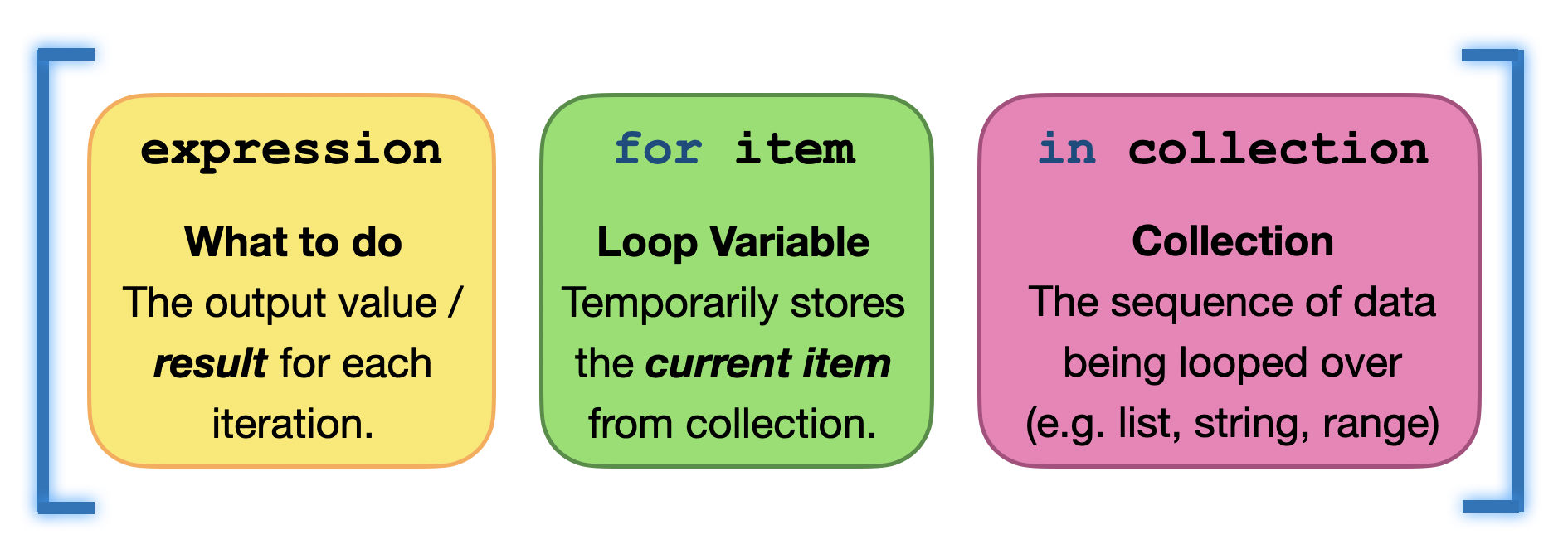
Every list comprehension requires these three core parts wrapped in square brackets: the output expression, the loop variable, and the collection to iterate over.
Example:
values = [2, 4, 6]
squared = [v**2 for v in values]
squared
[4, 16, 36]To read this easily, read the middle first, then the left:
“For every
vinvalues, takev ** 2and put it in a new list.”
Relation to a for loop
The following two blocks do the exact same thing:
# Standard Loop
cubed = []
for v in values:
    cubed.append(v**3)
cubed
[8, 64, 216]# List Comprehension
cubed = [v**3 for v in values]
cubed
[8, 64, 216]The logic is identical. Only the form is different.
3. Filtering values with conditions
Adding an if clause at the end
List comprehensions can also include a condition to filter out unwanted data. When filtering, the if statement goes at the very end of the expression.
[new_value for item in collection if condition]
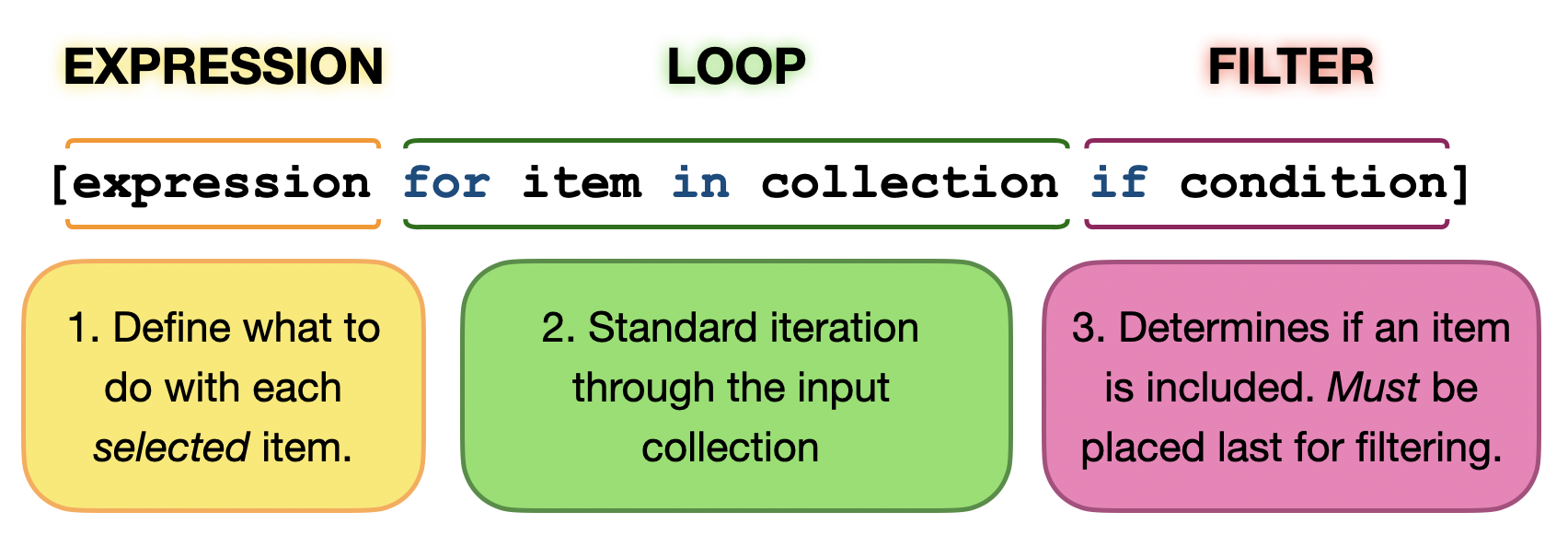
When filtering data, the if condition always acts as a gatekeeper at the very end of the expression.
Example:
values = [1, 2, 3, 4, 5]
even_values = [v for v in values if v % 2 == 0]
even_values
[2, 4]Only values that satisfy the condition (v % 2 == 0) are allowed into the new list.
Example: Valid environmental measurements
temperatures = [3, -5, 7, 42, 9]
valid = [t for t in temperatures if -20 <= t <= 40]
valid
[3, -5, 7, 9]This expresses a data quality filter cleanly in just one line.
4. Transforming values
Changing values while building the list
The “expression” part at the front of the list comprehension doesn’t just have to be the variable itself; it can be a mathematical transformation.
values = [1, 2, 3]
doubled = [v * 2 for v in values]
doubled
[2, 4, 6]Example: Unit conversion
temperatures_c = [0, 5, 10, 15]
temperatures_k = [t + 273.15 for t in temperatures_c]
temperatures_k
[273.15, 278.15, 283.15, 288.15]This is a clean, Pythonic way to express a systematic transformation of spatial or environmental data.
5. If–else inside list comprehension
Conditional transformation (Choosing between two values)
Sometimes you don’t want to drop a value completely (filtering), but rather change it based on a condition.
If you need an if-else decision, the syntax changes. The entire if-else block must move to the beginning of the comprehension, before the for loop.
[value_if_true if condition else value_if_false for item in collection]
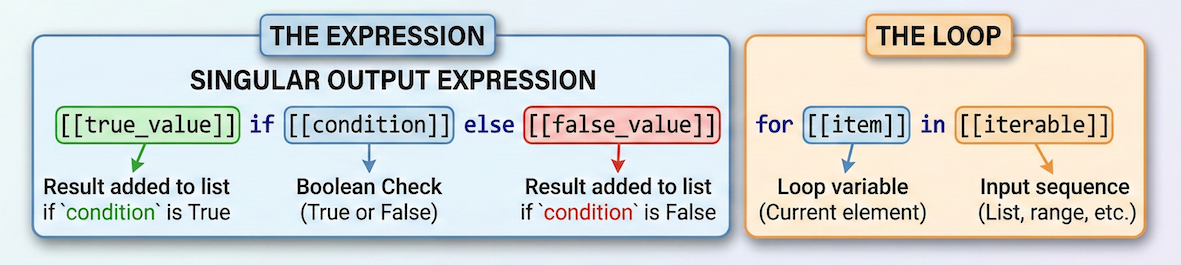
When transforming data conditionally, the entire if-else logic becomes the “output expression” and must be placed at the very beginning of the brackets.
Example:
values = [3, -1, 5, -2]
labels = ["valid" if v >= 0 else "invalid" for v in values]
labels
['valid', 'invalid', 'valid', 'invalid']Read this as:
“Put ‘valid’ if
vis >= 0, else put ‘invalid’... do this for everyvinvalues.”
Interactive Explorer: List Comprehension Syntax Mapper.
Toggle between the data filtering and conditional mapping tabs to observe how Python translates multi-line boilerplate loops into a single-line list comprehension. Run the pipeline animation to trace how raw spatial inputs are processed, highlighting which values are accepted, rejected, or conditionally transformed. For improved visibility of the explorer, follow this link.
Readability rule
The syntax for if-else inside a list comprehension can get visually messy very quickly.
Shorter code is not better if it is harder to understand. If a list comprehension becomes too long or complex, rewrite it as a standard for loop!
Concept Check: The Syntax Shift Barrier
Suppose you are refactoring a loop that cleans up an environmental logger list by applying the following rule: Keep positive readings unchanged, but clip negative entries straight to 0.
# Raw loop template
clipped = []
for val in tracking:
    if val >= 0:
        clipped.append(val)
    else:
        clipped.append(0)
Which syntax layout maps this conditional transformation logic accurately into a single-line list comprehension framework?
A) clipped = [val if val >= 0 else 0 for val in tracking]
B) clipped = [val for val in tracking if val >= 0 else 0]
C) clipped = [val for val in tracking if val >= 0]
Check your understanding
Answer: A Because this operation relies on an if-else choice to modify elements rather than dropping them, the entire conditional sequence must sit at the beginning of the collection expression wrapper as a transformed block output selector. Option A represents invalid syntax, while Option C drops values entirely instead of substituting them with 0.
6. When to use list comprehension
Good use cases
List comprehensions work beautifully when:
building a new list from an old one
applying a simple mathematical transformation
filtering values based on a single condition
the logic fits comfortably and readably on one line
When not to use it
Avoid list comprehension when:
the logic involves complex nested loops
you need multiple
elifconditionsyou are updating external variables or printing
readability suffers
In those cases, stick to a normal for loop.
7. Exercises
The following exercises help you practice reading, writing, and deciding when list comprehension is appropriate.
Focus on clarity first, compactness second.
Exercise 1: Rewrite a loop as list comprehension
You are given the following loop:
rainfall = [0, 5, 12, 0, 8, 20]
non_zero = []

for r in rainfall:
    if r > 0:
        non_zero.append(r)
Rewrite this using one list comprehension.
Sample solution
rainfall = [0, 5, 12, 0, 8, 20]
non_zero = [r for r in rainfall if r > 0]
Explanation:
the loop iterates over values
the condition filters values
the result is a new list
Exercise 2: Transform values with context
You are working with elevation values in meters:
elevation_m = [450, 1200, 50, 3200]
Create a new list that converts these values to kilometres and rounds them to one decimal place.
You can use Python’s built-in round() function for this, which takes the number to round and the desired number of decimal places (e.g., round(value, 1)).
Sample solution
elevation_m = [450, 1200, 50, 3200]
elevation_km = [round(e / 1000, 1) for e in elevation_m]
Explanation:
the expression transforms each value
the loop structure is implicit
the result is clean and readable
Exercise 3: Classify measurements
Given temperature measurements:
temperatures = [-5, 3, 18, -12, 25]
Create a list of labels:
"cold"for values below0"warm"for values0or above
Use one list comprehension with if–else.
Sample solution
temperatures = [-5, 3, 18, -12, 25]
labels = ["cold" if t < 0 else "warm" for t in temperatures]
Explanation:
the condition decides the output value
every input value produces exactly one label
8. Summary
Key ideas
List comprehension is a compact loop pattern used strictly for building new lists.
It combines looping, filtering, and transformation into one line.
The
ifgoes at the end when filtering data.The
if-elsegoes at the beginning when transforming data conditionally.It improves clarity only when used carefully. If it is hard to read, use a standard loop.
Choosing the right loop
for loop           → “Repeat an action for each value.”
while loop         → “Repeat an action until a condition changes.”
list comprehension → “Build a new list from existing data.”
What comes next
In the upcoming practical exercises, you will combine everything from this module to:
process small environmental datasets using loops and conditions
detect invalid values and thresholds
write clean, Pythonic data structures for later analysis