
Chapter Relevance
Lab Relevance: ★★★ (A critical bottleneck; you absolutely cannot complete the mathematical calculations in Part 6: Manhattan distance or Part 7: Euclidean distance without this.)
Project Relevance: ★★★ (Core methodology for calculating spectral anomalies in project 3 and deriving environmental indices like NDVI in project 4.)
Foundation: ★★★ (The fundamental grammar of programming logic.)
Time to Read: 25 minutes
In a nutshell: Operators act as Python’s calculator and logic engine, allowing you to combine static variables into dynamic mathematical equations and boolean filters.
Skip this if: You are completely comfortable using advanced arithmetic (**, //, %), update operators (+=), and compound boolean logic (and, or, not).
So far, you have learned how to store values in variables, how to name them clearly, and how Python distinguishes between different data types.
In this chapter, we focus on how values interact. We start with simple calculations, then build up to comparisons, logic, and module-based mathematical expressions.
1. Expressions as Calculations
An expression is a combination of values (operands) and operators that produces a result.
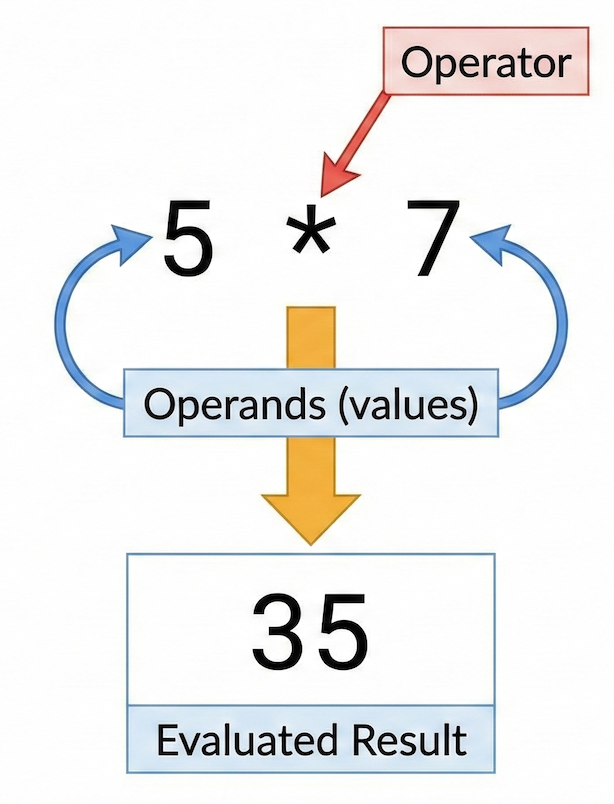
The anatomy of a Python expression: operators combine operands to evaluate to a single new value.
Think of an expression as a question you ask Python: “What is the result of this calculation right now?”
# Python evaluates this expression and returns 35
5 * 7
35An important idea is that expressions are evaluated when you run the cell, not when you type them. If you change a variable and run the cell again, Python recalculates the result using the newest values in memory.
2. Arithmetic Operators
Arithmetic operators allow you to perform calculations with numeric values. They are used inside expressions to combine values and produce new results.
At this stage, we focus only on numeric operations.
Basic Arithmetic
Python supports the common arithmetic operators you already know.
2 + 2
45 - 3
24 * 6
2410 / 2
5.0Each expression is evaluated when the cell is executed and returns a numeric result.
Using Variables as Operands
Arithmetic operators do not only work with literal numbers. They also work with variables that store numbers.
x = 7
y = 3
x + y
10x * y
21Here, x and y are operands.
An operand is simply a value or a variable that an operator acts on.
Exponentiation
Python uses `` to raise a value to a power.
2**3
8This means two to the power of three.
Optional but Useful Operators
Some additional arithmetic operators are useful in practice.
7 % 3
1The modulus operator returns the remainder of a division.
7 // 3
2Floor division returns the number of whole divisions.
You will encounter these operators later in loops, indexing, and data processing.
Overview of Arithmetic Operators
| Operator | Meaning | Example | Result | Useful for... |
|---|---|---|---|---|
+ | Addition | 2 + 3 | 5 | Combining distances |
- | Subtraction | 5 - 2 | 3 | Finding elevation differences |
* | Multiplication | 4 * 6 | 24 | Scaling coordinates |
/ | Division | 10 / 2 | 5.0 | Calculating average speeds |
** | Exponentiation | 2 ** 3 | 8 | Squaring values (e.g., ) |
% | Modulus (Remainder) | 7 % 2 | 1 | Finding even/odd numbers |
// | Floor division | 7 // 2 | 3 | Counting whole segments |
Interactive Explorer: Modulus & Floor Division Visualizer.
Adjust the total number of items and the group size to visualize how standard division, floor division (//), and the modulus operator (%) split values into full groups and leftover remnants. For improved visibility of the explorer, follow this link.
3. Assignment and Update Operators
So far, we have used expressions to compute values. Now we look at how those results are stored and updated using assignment operators.
This section connects operators back to variables.
Assignment with =
The assignment operator = stores the result of an expression in a variable.
x = 5
Here, Python:
evaluates the expression on the right
stores the resulting value
assigns it to the variable name on the left
Assignment itself does not produce output. It only changes what value a variable refers to.
Assignment Stores Results
You can assign the result of any expression.
y = 2 + 3
y
5The expression 2 + 3 is evaluated first.
Only the resulting value is stored.
Python does not remember how the value was computed.
Update Operators as Shorthand
Python provides update operators that combine calculation and assignment.
x += 3
This is a shorter way of writing:
x = x + 3
Other common update operators follow the same pattern.
x -= 1
x *= 2
Each update:
evaluates the expression
replaces the old value
stores the new value in the variable
What Actually Changes
An important mental model is this:
Variables do not remember previous values.
After reassignment, the old value is gone.
speed = 50
speed = 80
After the second line, speed refers only to 80.
The value 50 is no longer stored anywhere.
4. Comparison Operators
Comparison operators allow you to compare values. Instead of producing numbers, comparisons produce logical boolean results: True or False.
These operators are essential for filtering spatial data (e.g., “find all cities with a population greater than 100,000”).
| Operator | Meaning | Example | Result |
|---|---|---|---|
== | Equal to (Note the double equals!) | 3 == 3 | True |
!= | Not equal to | 3 != 5 | True |
> | Greater than | 5 > 3 | True |
< | Less than | 2 < 1 | False |
>= | Greater than or equal to | 5 >= 5 | True |
<= | Less than or equal to | 4 <= 3 | False |
Data Types Matter: Comparisons depend heavily on data types. 5 == "5" will evaluate to False because an integer is never equal to a string!
Comparison operators are used to control program flow, filter data and make decisions based on conditions.
5. Logical Operators
Logical operators allow you to combine multiple comparison results into a single True or False answer.
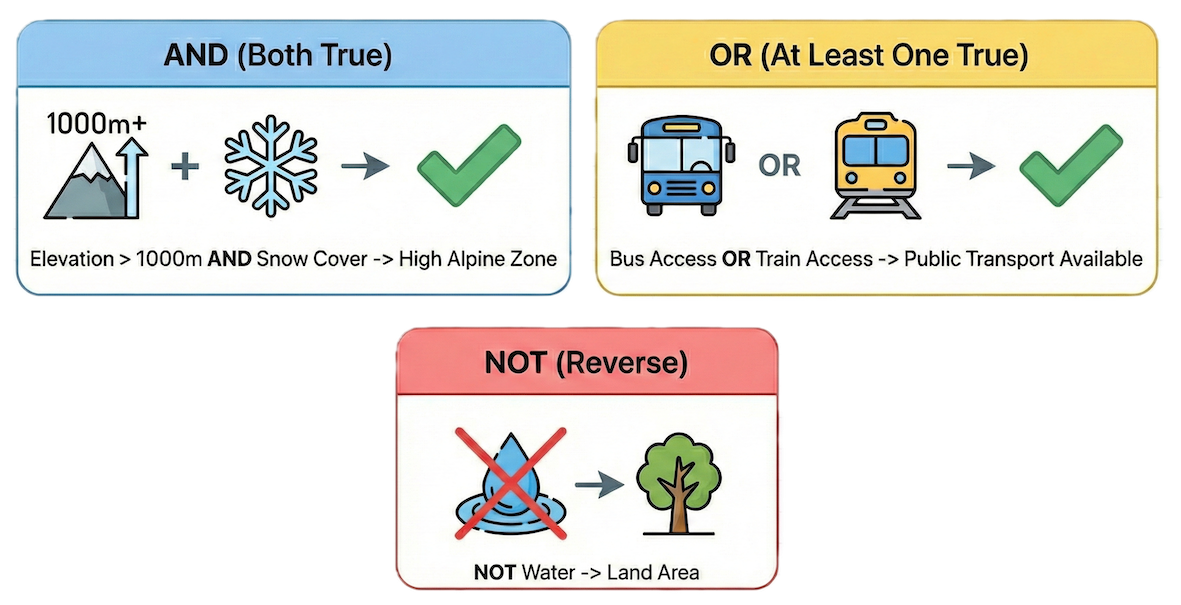
Visualizing logical operators: and requires all conditions to be true, or requires at least one, and not reverses the condition.
Python provides three logical operators:
and: ReturnsTrueonly if both conditions are true.
x = 7
(x > 5) and (x < 10)  # Returns True because 7 is between 5 and 10
Trueor: ReturnsTrueif at least one condition is true.
(x < 5) or (x > 6) # Returns True because 7 > 6
Truenot: Reverses the boolean value.
not (x == 7) # Returns False, because x IS 7
FalseLogical operators allow you to express complex reasoning in code. Instead of asking one question, you can combine several and get a single, definitive answer.
Interactive Explorer: Logical Operator Simulator.
Toggle the input states between True and False and switch the operator to see exactly how and, or, and not logic gates process combinations to output a final Boolean result. For improved visibility of the explorer, follow this link.
6. Operator Behaviour & Data Types
Operators do not behave the same way for all data types. What an operator does depends entirely on what kind of values it is applied to.
When applied to numbers (int, float), the + and * operators perform standard arithmetic. But look what happens when we apply them to strings (str):
# Concatenation: Joins strings together
"Hot" + "Cold"  # Returns "HotCold"

# Repetition: Multiplies the string
"Hot" * 3  # Returns "HotHotHot"
3 * "Hot"  # Returns "HotHotHot"
'HotHotHot'If you try to mix incompatible data types, the operation will fail:
2 + "Hot" # Raises a TypeError!
---------------------------------------------------------------------------
TypeError                                 Traceback (most recent call last)
Cell In[24], line 1
----> 1 2 + "Hot"        # Raises a TypeError!
      2

TypeError: unsupported operand type(s) for +: 'int' and 'str'
This is not a bug; it is Python protecting you from an undefined operation. If an operation fails, check your data types!
Concept Check: The Logic Puzzle
You are analyzing a dataset of trees and want to filter for old oak trees. You write the following expression to check a specific tree:
tree_type = "Oak"
tree_age = 120

is_old_oak = (tree_type == "Oak") and (tree_age > 100) or (tree_age < 0)
What will be the final evaluated boolean value of is_old_oak, and why?
A) False, because you cannot mix strings and integers in an and statement.
B) TypeError, because tree_age < 0 is mathematically impossible.
C) True, because the first two conditions evaluate to True combined by and, and the or condition is ignored since the first part is already True.
Check your understanding
Answer: C
Expressions evaluate step-by-step. (tree_type == "Oak") is True. (tree_age > 100) is True. So True and True resolves to True. The second half is or (tree_age < 0). True or False ultimately resolves to True. Logical operators do not care about the underlying data types, only whether the comparison itself evaluates to a boolean!
7. Using Functions in Expressions
Expressions can also include functions. Functions take an input, perform a complex calculation behind the scenes, and return a value that you can use mathematically.
To access advanced mathematical functions, we must import the math module (a built-in library of extra Python tools).
import math

# Functions return values that can be used inside expressions
diagonal = math.sqrt(16) + 2
print(diagonal)  # Returns 6.0
6.0
Modules also provide useful constants, which do not require parentheses because they are stored values, not functions:
area = math.pi * (radius**2)
8. Inspecting Expression Results
When expressions become complex, it is helpful to inspect intermediate results to ensure your logic is correct.
You can use the print() function to combine text and expression results for highly readable debugging output:
distance = 150
time = 2

# We can perform the expression directly inside the print statement!
print("The average speed is", distance / time, "km/h")
The average speed is 75.0 km/h
Well-formatted output makes checking your work significantly easier and is a fundamental debugging habit.
9. Short Exercises
Exercise 1: Expressions as Calculations
Focus: Understanding expressions and execution
Task:
Write three different arithmetic expressions (one addition, one multiplication, one exponentiation).
Run each expression in its own code cell.
Change one number in the code and do not re-run the cell yet. Does the output change automatically?
# Do the exercise here
Sample solution (click to expand)
2 + 3        # addition
4 * 5        # multiplication
2 ** 3       # exponentiation
Changing the code has no effect until the cell is run again. Python does not remember the formula, it only evaluates the cell on command.
Exercise 2: Operators, Variables, and Data Types
Focus: Variables, arithmetic, comparisons
Task: Given the following variables:
distance_km = 180
time_hours = 2.5
Compute the average speed in km/h and store it in a new variable.
Create a boolean variable that checks whether the speed is greater than 70 km/h.
Print a readable message that includes both the speed and the boolean result.
Sample solution (click to expand)
# Compute average speed
speed_kmh = distance_km / time_hours

# Comparison produces a boolean
speed_above_70 = speed_kmh > 70

# Print a readable message
print("The average speed is", speed_kmh, "km/h. Speed above 70 km/h:", speed_above_70)
Exercise 3: Combining Comparisons, Logic, and Functions
Focus: Logical operators, modules, nested expressions
Task:
Import the
mathmodule.Define a variable
angle_deg = 30.Convert the angle to radians (Formula:
angle * math.pi / 180).Compute the sine of the angle using
math.sin().Use logical operators to check if the sine value is both greater than 0 and less than 1.
# Do the exercise here
Sample solution (click to expand)
import math

angle_deg = 30
angle_rad = angle_deg * math.pi / 180

sin_value = math.sin(angle_rad)

# Combine conditions using 'and'
valid_range = (sin_value > 0) and (sin_value < 1)

print("Sine value:", sin_value, "| Is valid:", valid_range)
10. Summary
After completing this chapter, you should understand that:
Expressions combine values and operators to produce a single result.
Expressions are evaluated when code is executed.
Arithmetic operators (
+,-,*,/, ``,%,//) act as a calculator.Comparison operators (
==,>,<=) always produce boolean values (TrueorFalse).Logical operators (
and,or,not) combine boolean conditions to build complex reasoning.Operator behavior changes depending on data types (e.g.,
+adds numbers but joins strings).
Looking Ahead
Expressions are the foundation for making decisions in code. In the next chapter, we will take a deeper dive into Strings. Strings behave uniquely, especially when combined, sliced, or formatted. Isolating these behaviors early helps keep numeric reasoning clear while building your confidence with text handling.