
Chapter Relevance
Lab Relevance: ★★☆ (Required to understand float conversion behavior and accurately answer the conceptual question in Part 3: Expressions and data types.)
Project Relevance: ★★★ (Vital for distinguishing between textual categories and numeric IDs in project 1, or parsing raw string outputs from JSON web data in project 2.)
Foundation: ★★★ (An important core programming concept that explains why certain syntax combinations crash.)
Time to Read: 20 minutes
In a nutshell: Data types define how Python interprets the values you store, dictating what mathematical or logical operations are allowed and explaining why certain errors occur.
Skip this if: You already know the difference between int, float, str, and bool, and know how to use type() to cast variables and debug TypeErrors.
In this chapter, you will learn how Python classifies values, how to inspect their data types, and how data types explain both successful operations and common errors.
Understanding data types is essential for debugging and for writing code that behaves predictably. These ideas will form a foundation for calculations, comparisons, and logical decisions later in the course.
1. What Is a Data Type?
A data type describes what kind of value a variable stores. It also defines how that value behaves when Python uses it in expressions or calculations.
Every variable in Python has a data type, even if you do not specify it explicitly. The data type controls two important things:
which operations are allowed
how Python interprets an expression
This explains why some lines of code work as expected while others fail, even if the syntax looks correct. Think of the data type as the role of a value. The same symbol can behave very differently depending on what type of value it represents.
For example, text behaves differently from numbers:
weather_forecast = "Hot"
Here, the variable stores text, not a number. Because of this, Python will treat the value as a word rather than something that can be used in mathematical calculations.
You do not need to memorize all data types yet. The key idea is this:
Variables store values. Data types define how those values behave.
In the next chapters, we will look at common data types and see how Python reacts when we combine them.
2. The Four Basic Data Types in Python
Python provides several data types, but we begin with the four basic types that store single values.
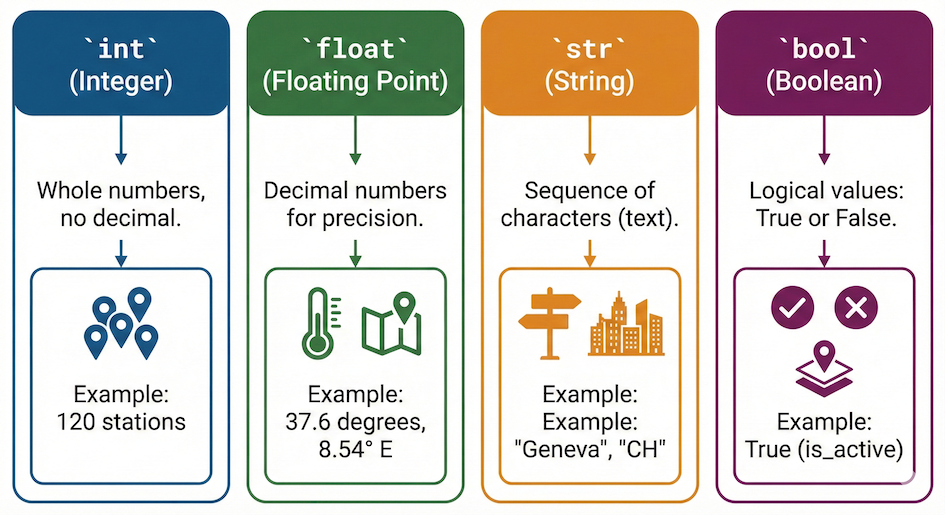
The four primitive data types in Python with common spatial examples.
| Data type name | Description | Example |
|---|---|---|
int | Whole integer values | 4 |
float | Decimal values | 3.1415 |
str | Character strings | "Hot" |
bool | True or false values | True |
These types are often called primitive data types. They represent individual values rather than collections of values. At this stage, your goal is to recognize them when you see them in code.
2.1 Integers (int)
Integers are whole numbers. They do not contain a decimal point. They are commonly used for:
counts (e.g., number of weather stations)
indices
IDs
num_points = 120
The value 120 is a whole number, so Python assigns it the data type int.
2.2 Floating Point Numbers (float)
Floating point numbers represent decimal values. They can store numbers with a fractional part. Typical uses include:
measurements
coordinates
temperatures
temp_celsius = 37.6
Because the value contains a decimal point, Python interprets it as a float.
2.3 Strings (str)
Strings represent text data. They are always written inside quotation marks (single or double). Strings are often used for:
labels and names
categories
metadata and descriptions
weather_forecast = "Hot"
Even if a string contains numbers (like "120"), Python treats it as text, not as a mathematical value.
2.4 Booleans (bool)
Booleans represent logical values. They can only be exactly one of two values: True or False (notice the capital letters).
Typical uses include:
flags
yes or no states
on or off decisions
is_georeferenced = True
Booleans are especially important when making decisions in code, which you will explore later.
3. Checking Data Types with type()
When working with variables, it is often not obvious what data type a value has. This is especially true once values come from data files or complex calculations.
Python provides a simple diagnostic tool for this purpose: the type() function. It does not change a variable; it only inspects it.
type(weather_forecast)
strPython returns str. It tells us that weather_forecast is a string.
Now compare this with a numeric value:
type(temp_celsius)
floatPython returns float.
In many cases, the first step in debugging is to ask: What data type does this variable actually have? Understanding the data type often explains why an operation works, fails, or behaves in an unexpected way.
4. Mismatch of Data Types: TypeError
Not all operations are allowed for all data types. When Python encounters an operation that is not defined for the given types, it refuses to execute it.
Consider the following expression:
temp_celsius + weather_forecast
At first glance, this may look harmless. However, temp_celsius is a number (float), while weather_forecast is text (str). Python tries to interpret what the + operation should mean here and then stops, raising a TypeError.
This error tells you something important:
the operation is not defined for these data types together
numbers and strings behave differently
Python will not guess what you meant
A TypeError is not a mistake you should fear. It is Python being precise and protective. Think of it as Python saying: “I know what addition means for numbers. I know what it means for text. But I do not know what it means to add a number to text.”
5. What Works with Strings?
Before learning formal rules, it is useful to observe what Python actually does. Try these operations and observe the results.
Start by defining two string variables:
a = "Hot"
b = "Cold"
Add two strings
a + b
What happens?
Python merges the two texts together (called concatenation). The output is 'HotCold'.
Subtract two strings
a - b
What happens?
Python raises a TypeError. You can stick words together with +, but it makes no logical sense to subtract the word “Cold” from the word “Hot”.
Multiply a string by a number
a * 3
What happens?
Python repeats the string! The output is 'HotHotHot'.
Do not try to memorize rules. Instead, focus on patterns: some operations work, some do not, and Python is consistent in how it behaves.
6. Combining Different Data Types
Different data types are not automatically compatible, but they can often be made compatible.
Consider this realistic example of a temperature reading imported from a text file:
forecast_bahnhofstrasse = "39.0"
At first glance, this looks like a number. However, the quotation marks mean it is stored as text.
type(forecast_bahnhofstrasse) # Returns: str
strIf we want to compare this value mathematically with a temperature stored as a number, we must first check the data types involved. Inspection comes before fixing. Once you understand what each variable represents, you can make them compatible by explicitly converting one data type into another.
7. Converting Data Types (Type Casting)
Sometimes values have the right information but the wrong data type. In these cases, Python does not guess what you want to do. You must tell it explicitly. This is called type casting.
Type casting creates a new value with a different data type.
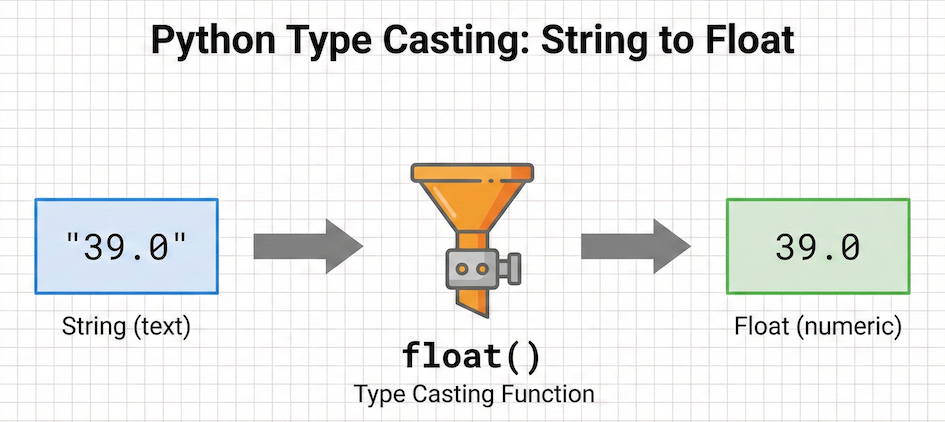
Type casting transforms a value from one data type to another, allowing you to turn string text into usable numeric data.
7.1 Converting to float()
To use our string "39.0" in calculations, we convert it explicitly:
forecast_high = float(forecast_bahnhofstrasse)
Now inspect the result:
type(forecast_high) # Returns: float
floatBecause the data types are now compatible, we can perform calculations:
forecast_high - temp_celsius
1.39999999999999867.2 Converting to int() and a Subtle Pitfall
You can also convert numeric values to integers:
temp_celsius_int = int(temp_celsius)
If the original value contains a decimal part, Python truncates it. It removes the decimal completely; it does not round.
For example, int(62.9) becomes 62, not 63.
This distinction matters heavily in spatial data:
truncation can silently reduce precision
small errors can accumulate
results may look plausible but be entirely wrong
Type conversion should always be a conscious decision. Ask yourself: Is losing the decimal part acceptable here?
8. When Conversion Fails: ValueError
Type conversion only works when the content of a value makes sense for the requested data type.
Consider this example:
float("Cold")
Here, we ask Python to convert a string into a floating point number. Python attempts the conversion and stops, raising a ValueError.
A ValueError tells you that the conversion itself is a valid idea, but the actual content does not make sense. Only strings that contain numeric content, such as "77.0" or "-12", can be converted to numeric types.
Think of a ValueError as Python saying: “I understand you want a float. But I cannot magically turn the letters C-o-l-d into a number.”
Interactive Explorer: Python Data Types & Conversions.
Use the "Operations Simulator" to see why adding two strings differs from adding two integers, and trigger a TypeError by mixing incompatible types. Use the "Type Casting Simulator" to force values into new types, watching out for ValueErrors and the silent truncation of decimals. For improved visibility of the explorer, follow this link.
Concept Check: Decoding the Error
You are building a script to calculate elevation changes. You read a value from a messy text file, storing it as start_elevation = "1425.5". Because you only care about whole meters, you attempt to run the following code:
clean_elevation = int(start_elevation)
Python immediately crashes and displays an error. Based on what you just learned, what kind of error is this, and why did it happen?
A) TypeError, because int() only accepts floats, not strings.
B) ValueError, because the string contains a decimal point, meaning its internal contents are invalid for a direct int() conversion.
C) SyntaxError, because the variable is missing quotation marks.
Check your understanding
Answer: B
It is a ValueError. The idea of converting a string to an integer is allowed (which is why it is not a TypeError), but the contents of this specific string ("1425.5") confuse Python because integers cannot contain decimals. To fix this, you would first need to convert the string to a decimal using float("1425.5"), and then you could convert that float into an integer using int().
9. Short Exercises
These exercises build on each other. Focus on understanding what Python does and why.
Exercise 1: Recognizing Data Types
Consider the following variables:
a = 25
b = 25.0
c = "25"
d = False
For each variable, write down what data type you expect.
Use
type()to check your answers.Identify which variables look similar but behave differently.
Sample solution (click to expand)
type(a)   # int (whole number)
type(b)   # float (includes a decimal point)
type(c)   # str (enclosed in quotation marks)
type(d)   # bool (logical state)
Variables a, b, and c may look similar to a human, but they behave completely differently in Python because their data types dictate their behavior.
Exercise 2: Inspection Before Fixing
You are given two variables:
temp_celsius = 37.6
forecast_bahnhofstrasse = "39.0"
Check the data type of each variable.
Predict what will happen when you run:
forecast_bahnhofstrasse - temp_celsiusRun the code and observe the error. Explain why Python refuses this operation.
Sample solution (click to expand)
Checking data types:
type(temp_celsius)              # float
type(forecast_bahnhofstrasse)   # str
Python raises a TypeError. It refuses this operation because subtraction is not defined between text and a number. Even though "39.0" looks like a number, it is stored as text.
Exercise 3: Making Values Compatible
Continue with the variables from Exercise 2.
Convert
forecast_bahnhofstrasseinto a numeric value and subtracttemp_celsiusfrom it.Convert
temp_celsiusto an integer and inspect the result.Compare the values before and after conversion. Why could this difference matter in spatial analysis?
# Do the exercise here
Sample solution (click to expand)
Converting the string to a numeric value makes the math work:
forecast_bahnhof = float(forecast_bahnhofstrasse)
forecast_bahnhof - temp_celsius
Converting the temperature to an integer truncates the data:
temp_celsius_int = int(temp_celsius)
print(temp_celsius)      # 37.6
print(temp_celsius_int)  # 37
This matters in spatial analysis because truncation destroys precision. A coordinate truncated from 47.37 to 47 would move a point by several kilometers!
10. Summary
At this point, you should understand the following core ideas:
Every variable has a data type. Python assigns it based on the stored value.
Data types control allowed operations. They determine how Python interprets expressions and why combinations (like adding strings) work differently than math.
Use
type()to diagnose problems. When something behaves unexpectedly, checking the data type is your first step.TypeErrorvsValueError. ATypeErrormeans the types don’t mix. AValueErrormeans the data type is right, but the contents inside don’t make sense for the operation.Explicit conversion (casting). Functions like
float()andint()allow you to convert values, but be aware of pitfalls like truncation.
What Comes Next
So far, you have focused on what values are and how Python understands them.
The next step is to focus on what you can do with those values.
In the next chapter, you will build on this foundation by applying data types in more complex expressions and operations. Understanding operators and expressions will let you move from storing values to doing things with values, which is the core of programming.