
Chapter Relevance
Lab Relevance: ★☆☆ (Directly addressed in Part 1, Task 2 when renaming variables z, g, and l, but poor naming will not actually stop your math from executing.)
Project Relevance: ★★☆ (Crucial for scoring well on the “Readability” and “Documentation” assessment criteria across projects 1, 2, 3, and 4.)
Foundation: ★★☆ (A core industry best practice that separates amateur scripts from professional software.)
Time to Read: 10 minutes
In a nutshell: Choosing clear, descriptive, and consistent variable names prevents logic bugs and keeps your code readable for both your collaborators and your future self.
Skip this if: You inherently know Python’s reserved keywords and routinely use descriptive snake_case naming conventions.
In this chapter, you will learn how to choose clear and meaningful variable names in Python. Good naming makes your code easier to read, debug, and share, even months after you first wrote it.
1. Why Variable Names Matter
Variable names are primarily for people, not for the interpreter.
Python only cares that a name is valid. Humans care whether the name explains what a value represents.
Consider these two variables:
x = 42.36
latitude = 42.36
Both store the same value. Only one clearly communicates what that value means.
Code is usually read many more times than it is written. Good variable names reduce mental effort and make your intentions clear.
2. What Python Allows as Variable Names
Before thinking about style, it helps to know what Python technically allows.
A valid identifier (variable name):
starts with a letter or an underscore
can contain letters, numbers, and underscores
is case sensitive (e.g.,
Dataanddataare two different variables)cannot start with a number
cannot contain special characters or spaces
Examples of valid names:
num_points = 120
_point_count = 120
station_id2 = "101533"
Examples of invalid names:
# 2points = 120      # ERROR: starts with a number
# station-id = 42    # ERROR: contains a special character (hyphen acts as minus)
# total$sum = 10     # ERROR: contains a special character
3. Reserved Words and Built-in Names
Some words are reserved by Python and cannot be used as variable names.
These include keywords such as for, if, else, True, and while. Using them would confuse Python’s core logic, so it will throw a SyntaxError.
You can inspect the full list of reserved keywords:
import keyword

print(keyword.kwlist)
['False', 'None', 'True', 'and', 'as', 'assert', 'async', 'await', 'break', 'class', 'continue', 'def', 'del', 'elif', 'else', 'except', 'finally', 'for', 'from', 'global', 'if', 'import', 'in', 'is', 'lambda', 'nonlocal', 'not', 'or', 'pass', 'raise', 'return', 'try', 'while', 'with', 'yield']
In addition, avoid using the names of built-in functions such as print, list, str, or type.
If you write print = 10, Python will actually let you do it! But you will overwrite the built-in print function, and print("Hello") will no longer work for the rest of your script.
4. What Makes a Good Variable Name
A good variable name should be:
clear and concise
descriptive without being overly long
written in English (the global standard for coding)
unambiguous
Compare these examples:
s = "101533"
finnishmeteorologicalinstituteobservationstationidentificationnumber = "101533"
fmi_station_id = "101533"
The first is too vague. The second is technically descriptive but exhausting to read. The third strikes a perfect balance.
5. Naming Conventions in This Course
Python supports different naming styles. What matters most is consistency.
This course (and the Python industry standard) uses snake_case for variables. This is not just a course rule; it is the official style recommended by the Python community (known as PEP 8).
Snake case uses entirely lowercase letters, with words separated by underscores to simulate spaces:
temp_celsius = 20.0
fmi_station_id = "101533"
coordinate_system = "WGS 84"
You will encounter other styles in different programming languages or older code. You don’t need to rewrite existing code, but in your own work, stick to one convention.
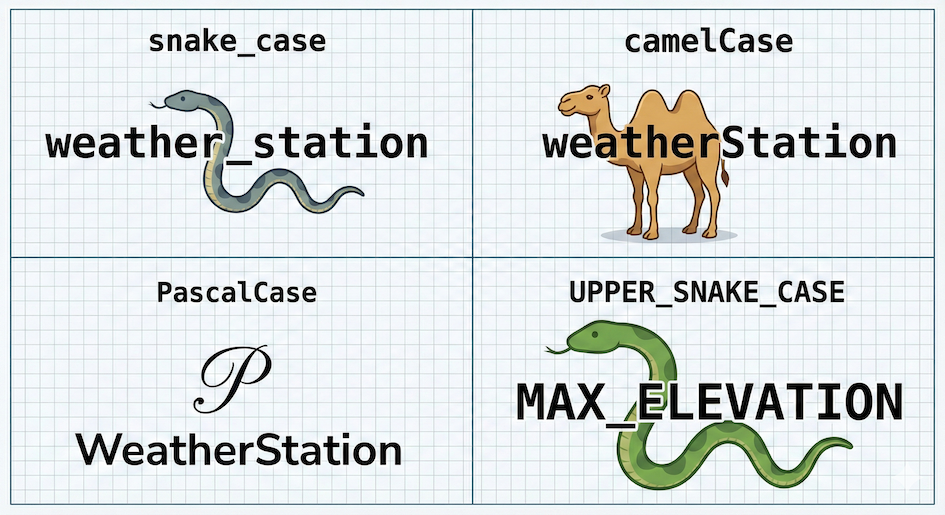
Visual for different programming naming conventions.
| Convention | Style example | Commonly used in Python for |
|---|---|---|
| snake_case | weather_station | variables, functions, arguments |
| camelCase | weatherStation | rare in Python (common in JavaScript/Java) |
| PascalCase | WeatherStation | classes and advanced data structures |
| UPPER_SNAKE_CASE | MAX_ELEVATION | constants (values that never change) |
Interactive Explorer: Python Variable Name Validator.
Type different variable names into the text field to see if they are valid in Python, if they clash with reserved keywords, and which stylistic convention they belong to. Try typing a reserved word like True, an invalid name like 2nd_place, or a valid but poorly styled name like myVariableName. For improved visibility of the explorer, follow this link.
6. Good and Poor Naming Examples
Good examples
latitude = 55.6761
longitude = 12.5683
elevation_meters = 14.0
city_name = "Copenhagen"
population = 809314
These names are clear, descriptive, and leave no room for confusion.
Poor examples
x = 55.6761  # too generic, what is x?
data = "Copenhagen"  # too vague, everything is data
temp = 25.6  # ambiguous (temperature? temporary?)
l = [
    55.68,
    12.57,
]  # DANGEROUS: the lowercase letter 'l' looks exactly like the number '1' or capital 'I' in many fonts!
Concept Check: The Right Name for the Job
You are writing a script to analyze wind speeds collected from a local sensor network. You need a variable to store the maximum wind speed recorded during a storm. Which of the following is the best variable name?
A) max_spd
B) maximum_wind_speed_recorded_during_the_storm_event_in_kmh
C) MaxWindSpeed
D) max_wind_speed_kmh
Check your understanding
Answer: D Option D is written in the standard snake_case, is clearly descriptive, and includes the unit of measurement (kmh). Option A is too cryptic, Option B is exhaustively long, and Option C uses PascalCase (which should be reserved for classes, not variables).
7. Short Exercise
Look at the following variables. They contain geographic data for the city of Bern, but their names are terrible:
a = 46.948
b = 7.447
c = "urban"
d = "EPSG:2056"
e = 542
Task: Rename them so that their meaning becomes immediately clear. Focus on choosing snake_case names that would still make sense if you looked at the code again in six months.
Sample solution
Here is one way to improve these variable names:
latitude = 46.948
longitude = 7.447
land_cover_type = "urban"
crs = "EPSG:2056"          # crs stands for Coordinate Reference System
elevation_meters = 542
Notice how elevation_meters is much safer than just elevation, as it prevents someone from accidentally assuming the value is in feet!
---

## 8. Summary

After this chapter, you should understand that:

* Python allows many variable names, but not all are good choices.
* Good variable names improve readability, prevent bugs, and help your future self.
* Reserved words (`if`, `for`) and built-in names (`print`, `list`) must be avoided.
* This course (and the Python industry standard) uses `snake_case` for variables.

---

### What Comes Next

Variable names describe **what a value represents**.
In the next chapter, we will look at **{term}`data types <Data type>`**, which describe **what kind of value** it is (text, numbers, decimals) and what operations you can perform on it.

Together, good naming and an understanding of data types form the basis for clear and reliable code.