
Chapter Relevance
Lab Relevance: ★★☆ (Essential baseline for all subsequent spatial data manipulation labs)
Project Relevance: ★★☆ (DataFrames will be the primary data container for projects 1 and 2)
Foundation: ★★★ (The shift to OOP and Pandas logic is a critical learning threshold in Python)
Time to Read: 10 minutes
In a nutshell: Master the mental shift from standard Python functions to Pandas’ object-oriented data structures, enabling powerful tabular data manipulation.
Skip this if: You are already highly proficient with Pandas DataFrames, Series, Indexes, and object-oriented dot notation.
Before diving into any spatial analysis, we need to adjust how we think about data in Python. Up until now, you have been using procedural programming: storing data in basic lists or dictionaries, and then passing that data into separate functions.
Pandas introduces an Object Oriented Programming approach. In Pandas, data structures are not just passive containers; they are powerful objects that contain both your data and the tools needed to manipulate it.
1. Series vs. DataFrames
To understand Pandas, you only need to understand two new data structures, which have direct equivalents to the basic Python you already know.
Series: You can think of a Pandas Series as a clever, super charged Python list. It holds a one dimensional sequence of values.
DataFrame: A DataFrame is a two dimensional structure for storing tabular data with rows and columns. You can think of a DataFrame as a programmable spreadsheet. Under the hood, a DataFrame is essentially a dictionary of Series, where each column is a single Series sharing the same index.
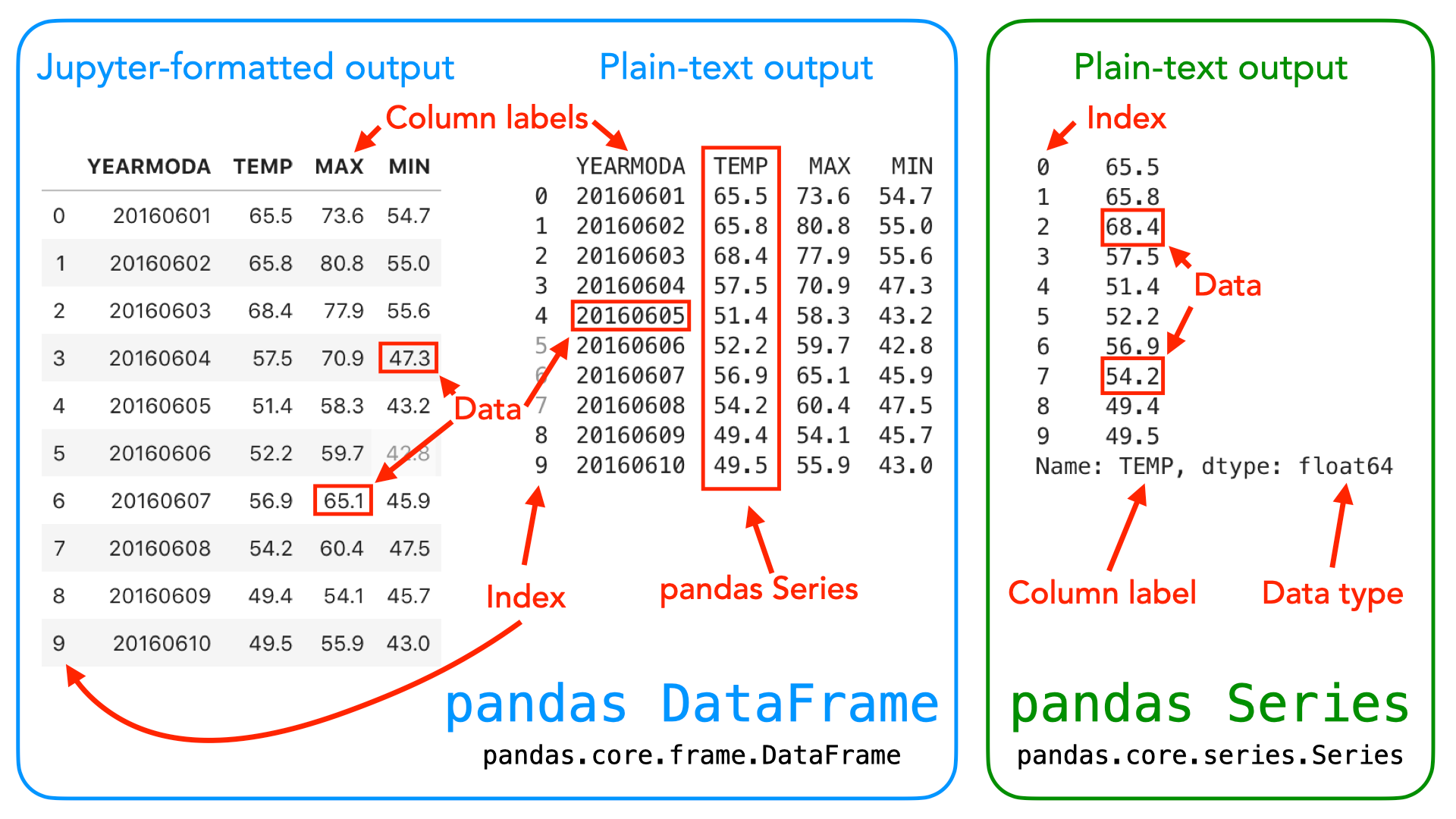
*Illustration of the Pandas DataFrame and Series data structures. A DataFrame is a two dimensional data structure used for storing and manipulating table like data. A Series is a one dimensional data structure used for storing a sequence of values. Source: Geopython*
import pandas as pd

# Creating a Series (like a list)
cities = pd.Series(["Zurich", "Geneva", "Bern", "Basel"])

# Creating a DataFrame (like a dictionary of lists)
data = pd.DataFrame({"City": cities, "Population": [415000, 201000, 133000, 177000]})

print(data)
     City  Population
0  Zurich      415000
1  Geneva      201000
2    Bern      133000
3   Basel      177000
2. Objects and Methods
Because Pandas is Object Oriented, you will notice a major syntax shift in how you write code.
In standard Python, if you want to know how many items are in a list, you pass the list into an external function:
len(my_list)
In Pandas, the DataFrame object owns its tools. These built in tools are called methods. Instead of passing the DataFrame into a function, you ask the DataFrame to perform an action on itself using dot notation.
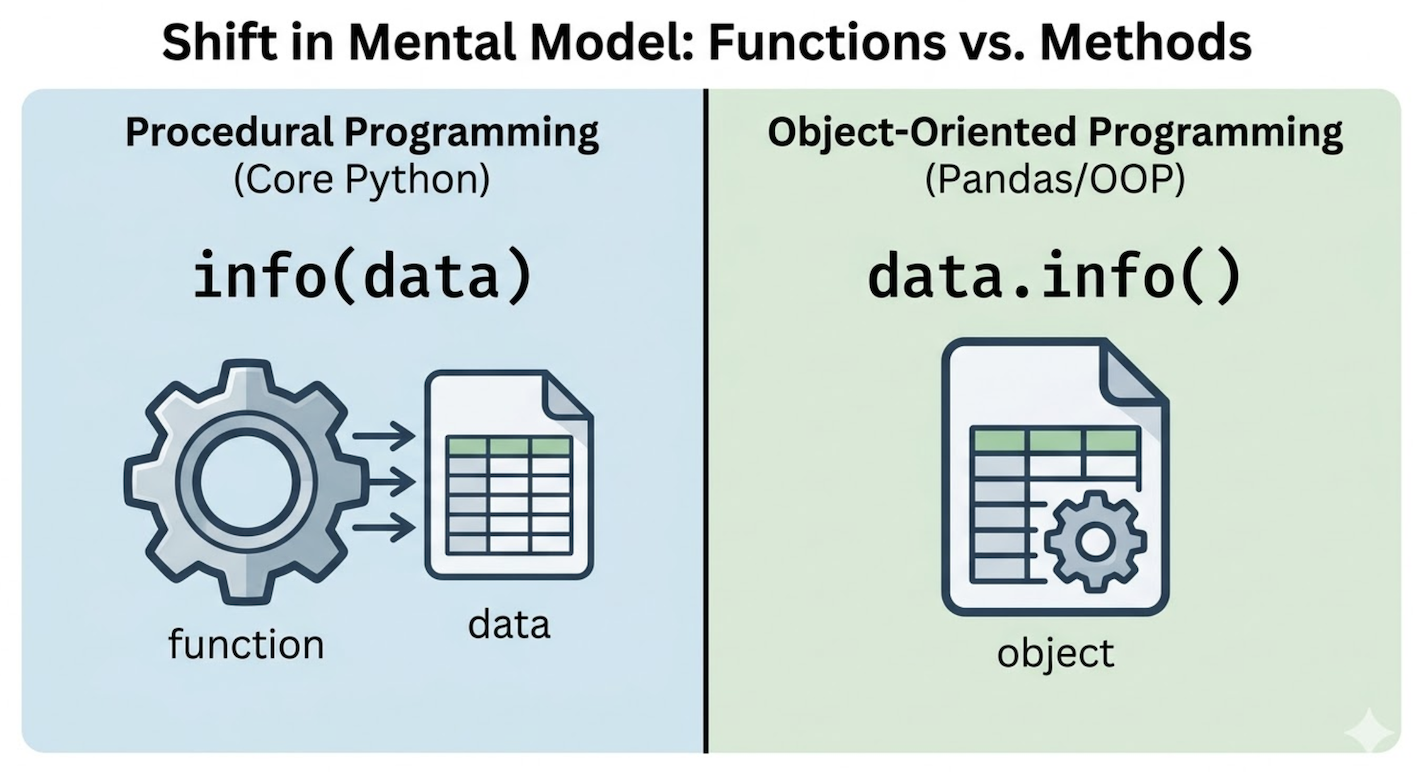
Mental shift: Procedural programming passes data into an external tool (e.g., function(data)). Object Oriented programming asks the data to use its own internal tool (e.g., data.method()).
For example, to get a technical summary of your data, you use the .info() method:
data.info()
<class 'pandas.DataFrame'>
RangeIndex: 4 entries, 0 to 3
Data columns (total 2 columns):
 #   Column      Non-Null Count  Dtype
---  ------      --------------  -----
 0   City        4 non-null      str
 1   Population  4 non-null      int64
dtypes: int64(1), str(1)
memory usage: 217.0 bytes
| Column | Non-Null Count | Dtype |
|---|---|---|
| City | 4 non-null | object |
| Population | 4 non-null | int64 |
You are effectively telling Python: “Hey data object, run your own internal info() tool.” This mental shift, typing df.info() instead of info(df), is the core to mastering Pandas.
Interactive Explorer: Procedural vs Object-Oriented Syntax.
Compare how data is processed in standard Python versus Pandas. In procedural Python (left), you throw data into an external function machine. In Pandas OOP (right), you use dot notation to tell the DataFrame object to trigger its own internal tools. For improved visibility of the explorer, follow this link.
3. The Pandas Index
If you look at the printed DataFrame from the first section, you will notice a column of numbers on the far left (0, 1, 2, 3) that we did not create. This is the Index.
In standard Python lists, positions are strictly sequential integers (0, 1, 2). While a Pandas DataFrame also defaults to a numbered index, its index is actually a set of row labels.
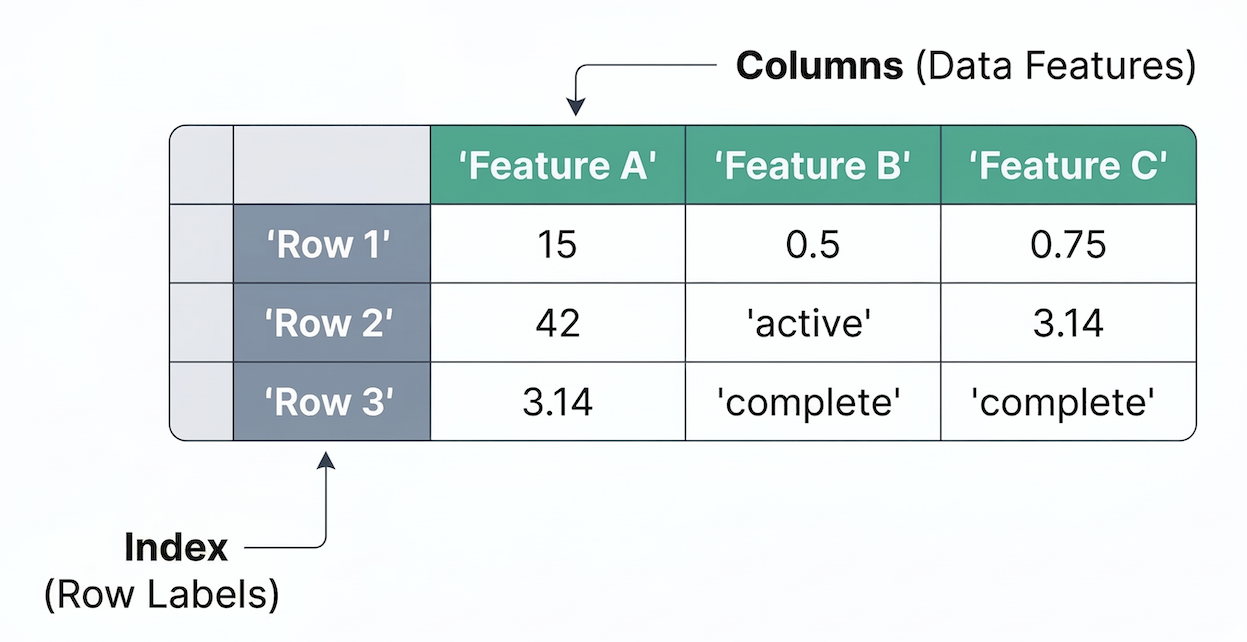
The anatomy of a DataFrame: The Index provides row labels (vertical), while the Columns hold the actual data features (horizontal).
The index does not have to be a simple sequence of numbers. You can assign names, dates, or unique IDs as the index.
# Setting a custom text index instead of numbers
data = data.set_index("City")
print(data)
        Population
City
Zurich      415000
Geneva      201000
Bern        133000
Basel       177000
Table 2:Output of data after setting a custom Index
| City (Index) | Population |
|---|---|
| Zurich | 415000 |
| Geneva | 201000 |
| Bern | 133000 |
| Basel | 177000 |
By labeling rows, Pandas allows you to instantly extract data based on meaningful identifiers (like extracting a row labeled “Zurich”) instead of having to remember that Zurich was at position 0.
4. Data Types (dtypes)
When working with basic Python, you are used to data types like integers (int), decimal numbers (float), and text strings (str).
Pandas uses slightly different terminology for its data types, referred to as dtypes. Because Pandas is built on top of a high performance math library called NumPy, its dtypes reflect precise computer memory allocations. As you saw in the .info() output table above, Pandas assigned specific dtypes to our columns:
int64: A 64 bit integer (same as Pythonint).float64: A 64 bit decimal number (same as Pythonfloat).object: Typically represents text strings, or a mix of different types (comparable to Pythonstr).datetime64: A special type strictly for dates and times.
Whenever you load a new dataset, checking the dtypes is usually your very first step to ensure numbers were not accidentally imported as text.
Concept Check: The Contaminated Column
Imagine you load a CSV file where a “Population” column accidentally contains a missing value typed out as the word "Unknown", while the rest of the rows are normal numbers (e.g., 415000). If you check the dtypes of this DataFrame, what dtype will Pandas assign to the “Population” column?
A) int64
B) float64
C) object
D) datetime64
Check your understanding
Answer: C
A single Pandas Series (column) can only have one overarching data type. If Pandas sees even a single text string (like “Unknown”) mixed in with thousands of numbers, it must downgrade the entire column to the object dtype to accommodate the text. This is why checking your dtypes is so important; if a numeric column shows up as an object, your data requires cleaning!
5. Exercise: Mental Model Check
Let us test your new mental model. Look at the code snippet below and identify the structural components.
import pandas as pd

weather_data = pd.read_csv("data.csv")
average_temp = weather_data["temperature"].mean()
Answer the following questions:
What data structure is
weather_data?What data structure is
weather_data["temperature"]?If a DataFrame acts like a dictionary of Series, what are the “keys” of that dictionary?
Is
.mean()a standard Python function or a Pandas method?
# Write your code here
Sample solution
weather_datais a DataFrame. It is a two dimensional table loaded from the CSV file.weather_data["temperature"]is a Series. Extracting a single column from a DataFrame always returns a one dimensional Series.The column names. Just like
my_dictionary["key"]extracts a value,weather_data["temperature"]uses the column name as a key to extract the entire Series..mean()is a Pandas method. Notice the dot notation: we are asking the Series object to calculate its own average.
6. Summary: The OOP Data Shift
In this section, you learned how to shift your mindset from procedural Python to the Object Oriented logic of Pandas.
Key takeaways
A DataFrame is a programmable table, and each column inside it is a Series.
Instead of passing data into external functions, you trigger built in methods using dot notation.
Every DataFrame has an Index, which acts as a collection of row labels rather than just sequential positions.
Pandas uses optimized dtypes like
float64andobjectinstead of native Python types.
With this mental model in place, you are ready to start loading and analyzing real world datasets!