
Chapter Relevance
Lab Relevance: ★★★ (Required for turning real-world address data into mappable coordinates in assignments)
Project Relevance: ★☆☆ (Some spatial projects start with point-of-interest address lists that must be geocoded)
Foundation: ★★☆ (A valuable spatial data processing step, relying on external API services)
Time to Read: 10 minutes
In a nutshell: Learn how to automatically translate physical addresses into mappable coordinates, and convert coordinates back into human-readable locations using the geopy library.
Skip this if: You already know how to use the geopy library to forward and reverse geocode data using Nominatim and handle missing data (None) safely.
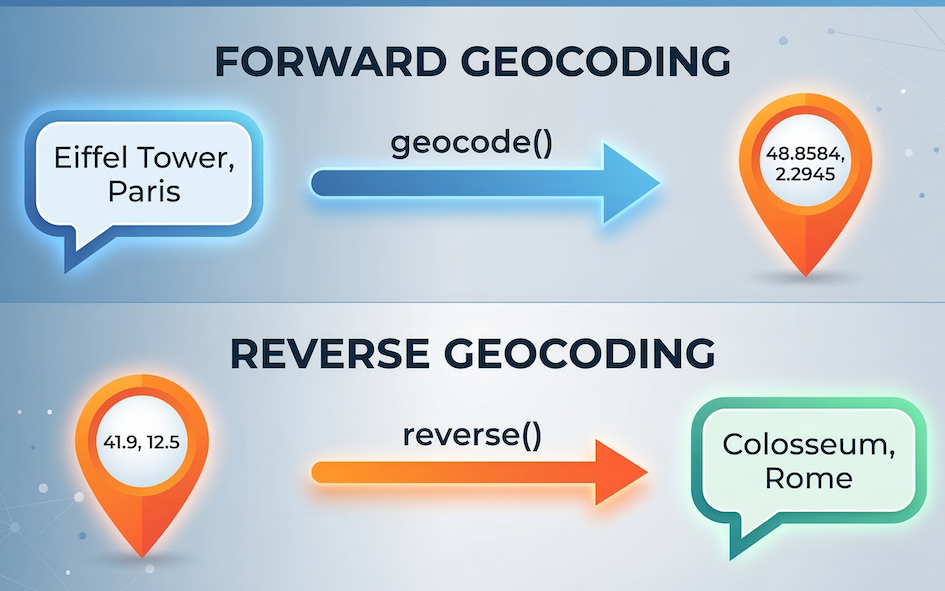
Geocoding is the essential bridge in spatial data science, translating between the human world of names and addresses and the computer world of geometry and coordinates.
In the previous section, we used coordinates to fetch weather data from an API. In the real world, however, you may not receive a dataset that is perfectly formatted with latitudes and longitudes. Instead, you may get a list of street addresses, city names, or famous landmarks.
In this section, you will learn how to convert place names into geographic coordinates so you can map them, and how to do the exact reverse.
1. What is geocoding?
Geocoding is the process of transforming a text description of a location (like “42 Rue du Languedoc, 31000 Toulouse, France”) into a spatial representation (like latitude: 43.5983, longitude: 1.4457).
Under the hood, geocoding relies heavily on the Web APIs we just learned about. When you ask a program to geocode an address, it sends a request to a massive database of geographic data (like Google Maps or OpenStreetMap). The server searches its database, finds the matching coordinates, and sends the geometry back to you.
2. Geocoding with geopy
In the “Third Party Modules” section, we already installed and used the geopy library to calculate the distance between two points. Now, we will use another powerful tool hidden inside that same package: the geocoder.
While we could write custom requests code to query a geocoding API manually, geopy acts as a unified wrapper for dozens of different geocoding services, making the process incredibly smooth. Today, we will use it to access Nominatim, which is the free geocoding service powered by OpenStreetMap data.
To get started, we import the Nominatim tool from geopy.geocoders.
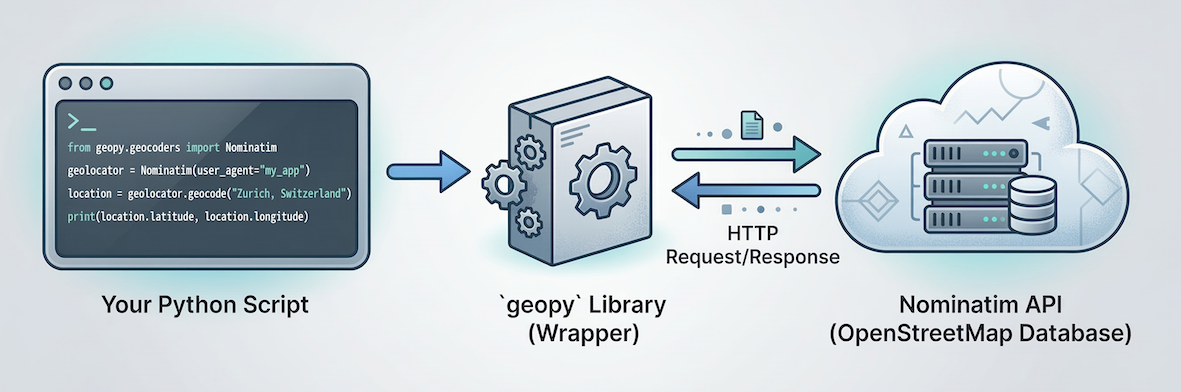
The geopy library acts as a helpful intermediary. Your Python code talks to geopy, which handles the complex work of sending requests to the Nominatim (OpenStreetMap) API server over the internet and parsing the response.
from geopy.geocoders import Nominatim
To use Nominatim, we first need to initialize our geocoder. OpenStreetMap requires us to provide a user_agent, which is simply a custom name identifying our application so they know who is making the requests.
# Initialize the geocoder with a *unique* custom app name
geolocator = Nominatim(user_agent="sds_course_YOUR_UNIQUE_ID_HERE")
3. Forward geocoding
Forward geocoding is the standard process of going from text to coordinates. We can pass an address or landmark directly to the .geocode() method.
# Ask Nominatim to find the Eiffel Tower
location = geolocator.geocode("Eiffel Tower, Paris")

# Check if a location was successfully found
if location:
    print("Address found:")
    print(location.address)

    print("\nCoordinates:")
    print(f"Latitude: {location.latitude}")
    print(f"Longitude: {location.longitude}")
else:
    print("Location not found.")
Address found:
Tour Eiffel, 5, Avenue Anatole France, Quartier du Gros-Caillou, Paris 7e Arrondissement, Paris, Île-de-France, France métropolitaine, 75007, France

Coordinates:
Latitude: 48.8582599
Longitude: 2.2945006
Notice that Nominatim returns the full, officially formatted address alongside the exact latitude and longitude.
Concept Check: The Missing City
Imagine you try to geocode a fictional or highly misspelled place:
location = geolocator.geocode("City of Atlantis")
If you try to run print(location.latitude) on the very next line without using an if location: check, what will happen?
A) Python prints 0.0.
B) Python crashes with an AttributeError.
C) Python prints None.
Check your understanding
Answer: B
When Nominatim cannot find a matching location, it does not crash on the .geocode() line. Instead, it quietly returns a special Python value called None (meaning “nothing”). If you try to extract a latitude from None, Python throws an AttributeError because “nothing” doesn’t have a latitude! This is why you must always use an if location: check before trying to extract coordinates.
4. Reverse geocoding
Sometimes you have a GPS coordinate and you need to know what physical address it corresponds to. This is called reverse geocoding.
Using the exact same geolocator we initialized above, we can use the .reverse() method. We pass the coordinates as a single string formatted as "latitude, longitude".
# A mysterious coordinate in Rome
mystery_coordinate = "41.8775, 12.4736"

# Perform reverse geocoding
location = geolocator.reverse(mystery_coordinate)

print("What is located at this coordinate?")
print(location.address)
What is located at this coordinate?
CasaManco, 66c, Via Aldo Manuzio, Testaccio, Municipio Roma I, Roma, Roma Capitale, Lazio, 00153, Italia
Concept Check: Choosing the Right Tool
You have a CSV file exported from your smartwatch tracking your morning run as a series of GPS points. If you want to automatically determine the names of the streets you ran on, which method should you use?
A) .geocode() (Forward Geocoding)
B) .reverse() (Reverse Geocoding)
C) Neither, you must manually calculate distances using the math module.
Check your understanding
Answer: B A smartwatch GPX track is pure coordinate data. If you want to know which streets you ran on, you must reverse-geocode the points to translate the abstract spatial coordinates back into human-readable text.
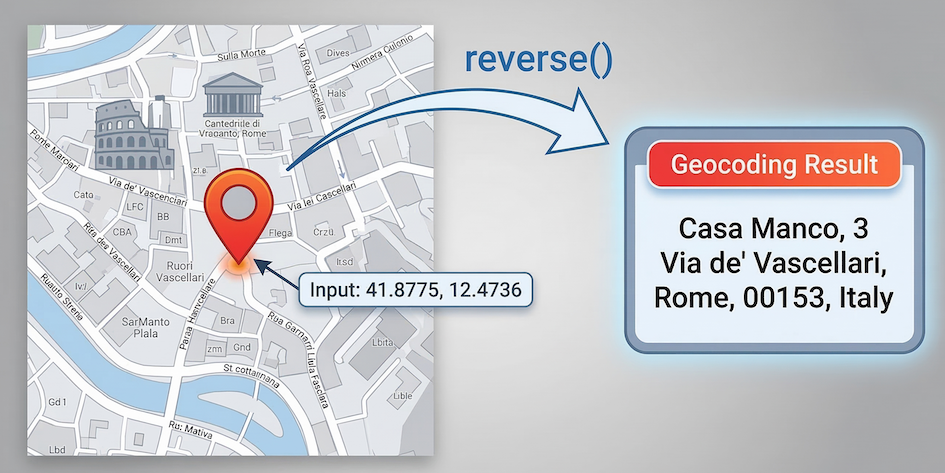
Reverse geocoding takes abstract mathematical coordinates (41.8775, 12.4736) and retrieves the rich, human-readable address data associated with that precise location.
Just like that, geopy asks OpenStreetMap what exists at those exact coordinates, revealing a great pizza restaurant called “Casa Manco”!
Interactive Explorer: Geocoding Visualizer.
Toggle between Forward and Reverse geocoding to see how data flows between your Python code and the Nominatim API server. Try running "The Bad Address" simulation to visualize why forgetting to check if the server returned a valid location results in a sudden Python crash. For improved visibility of the explorer, follow this link.
5. API etiquette and rate limiting
Because geopy is using Web APIs in the background, all the rules regarding rate limiting from the previous section still apply.
Nominatim is a free service, but it has very strict usage policies. They limit users to 1 request per second. If you try to geocode a list of 100 addresses instantly using a loop, OpenStreetMap will permanently block your access.
Whenever you need to geocode more than one address, you must use the time.sleep() function. Since we are using a loop, this is also a perfect opportunity to bring back the tqdm progress bar we learned about recently!
import time
from tqdm import tqdm

places = [
    "Kyiv-Pechersk Lavra, Ukraine",
    "Cu Chi Tunnel, Vietnam",
    "Mount Kilimanjaro, Tanzania",
]

# Wrap the list in tqdm() for a progress bar
for place in tqdm(places):
    loc = geolocator.geocode(place)

    if loc:
        print(f"\n{place} is located at {loc.latitude}, {loc.longitude}")

    # Crucial: sleep for 1 second to respect Nominatim's strict rules
    time.sleep(1)
0%| | 0/3 [00:00<?, ?it/s]
Kyiv-Pechersk Lavra, Ukraine is located at 50.4341524, 30.5586506
33%|███▎ | 1/3 [00:01<00:02, 1.11s/it]
Cu Chi Tunnel, Vietnam is located at 11.1432528, 106.4632107
67%|██████▋ | 2/3 [00:02<00:01, 1.33s/it]
Mount Kilimanjaro, Tanzania is located at -3.3811721, 37.3344225
100%|██████████| 3/3 [00:03<00:00, 1.28s/it]
6. Exercises
Practice translating text to geometry and back again with these exercises.
Exercise 1: Find your hometown
Use forward geocoding to find the coordinates of your hometown or current university campus.
Initialize a
Nominatimgeolocator with a uniqueuser_agent.Use
.geocode()to search for your chosen place.Print the resulting
latitudeandlongitude.
# Write your code here
Sample solution
from geopy.geocoders import Nominatim

# Remember to pick a unique user_agent!
geolocator = Nominatim(user_agent="sds_exercise_YOUR_ID")

# Replace with your own location
my_location = geolocator.geocode("UZH-Y25, Suisse")

if my_location:
    print(f"Lat: {my_location.latitude}, Lon: {my_location.longitude}")
else:
    print("Location not found.")
Key idea:
If your search returns an error or None, try making your text string more specific by adding the city or country name.
Exercise 2: Geocoding accident hotspots
You are given a list of coordinates representing prominent traffic accidents in Athens, Greece. To plan effective countermeasures (like installing new warning signs or improving road markings), the city planners need human-readable street addresses, not just GPS coordinates.
Write a loop to reverse-geocode them to find out exactly where these accidents occurred.
Loop through the
accident_coordslist.For each coordinate string, use
.reverse()to find the location.Print the full address so the safety team knows where to go.
Add a
time.sleep(1)command to respect Nominatim’s strict API limits.
import time
from geopy.geocoders import Nominatim

# Remember to pick a unique user_agent!
geolocator = Nominatim(user_agent="athens_safety_YOUR_ID")

# Coordinates of major accidents in Athens
accident_coords = [
    "37.9720, 23.7320",
    "37.98417, 23.72778",
    "37.976584, 23.725916",
    "37.98611, 23.72139",
    "37.99306, 23.72944",
    "37.99639, 23.72250",
    "37.98861, 23.72639",
    "37.976885, 23.740801",
    "37.986509, 23.734728",
    "38.002451, 23.733580",
]

# Your loop goes here
Sample solution
import time
from geopy.geocoders import Nominatim

geolocator = Nominatim(user_agent="athens_safety_YOUR_ID")

accident_coords = [
    "37.9720, 23.7320",
    "37.98417, 23.72778",
    "37.976584, 23.725916",
    "37.98611, 23.72139",
    "37.99306, 23.72944",
    "37.99639, 23.72250",
    "37.98861, 23.72639",
    "37.976885, 23.740801",
    "37.986509, 23.734728",
    "38.002451, 23.733580"
]

for coordinate in accident_coords:
    # Look up the address for the given coordinates
    location = geolocator.reverse(coordinate)

    if location:
        full_address = location.address
        print(f"Install road safety signs at: {full_address}\n")

    # Pause for 1 second to respect the server limits
    time.sleep(1)
Key idea: Reverse geocoding is incredibly useful for enriching raw spatial data (like GPS tracks or accident reports) with human-readable context (like street names and intersections), turning abstract numbers into actionable information for city planners or emergency responders.
7. Summary
In this section, you learned how to convert human language into geographic coordinates using community tools.
Key ideas
Forward geocoding transforms addresses and place names into latitude and longitude coordinates.
Reverse geocoding transforms coordinate pairs into physical street addresses.
We can reuse the
geopylibrary as a helpful wrapper around major geocoding APIs like Nominatim.Because geocoding relies on public servers, you must respect rate limits by using
time.sleep()inside your loops.
You now possess the foundational skills to fetch live data from the internet and translate raw addresses into mappable coordinates. Next, we will start introducing tools designed to handle this data in bulk.
What comes next?
You now have all the core tools to connect Python to the real world. In the upcoming Practical, you will put these skills to the test by building an automated logistics pipeline for a European delivery company. You will combine geopy and the requests module to translate addresses, calculate live driving routes, and fetch real-time weather forecasts—chaining multiple Web APIs together in a single, rate-limited loop!