
Chapter Relevance
Lab Relevance: ★☆☆ (Helpful for keeping your spatial analysis scripts organized and readable)
Project Relevance: ★★☆ (Needed for building scalable, maintainable tools for your final projects)
Foundation: ★★★ (An important core programming concept)
Time to Read: 5 minutes
In a nutshell: Learn why packaging your code into functions saves you from the nightmare of copying, pasting, and manually fixing the same formulas over and over.
Skip this if: You already understand the D.R.Y. principle and the conceptual difference between hardcoded logic and reusable functions.
So far, you have built a strong foundation in Python.
You know how to store information in variables and lists.
You know how to repeat tasks using loops.
You know how to let your program decide what to do using if statements.
However, writing larger, more complex spatial programs requires a new tool. It requires packaging your logic so it can be reused.
This section explains why functions are necessary before you learn how to write them.
1. The Limits of Copy-Paste Code
Programming becomes truly powerful when you stop solving the same problem twice.
Imagine you are working with spatial data, and you need to calculate the straight-line distance between two coordinates—Point A () and Point B (). The mathematical formula for this is:
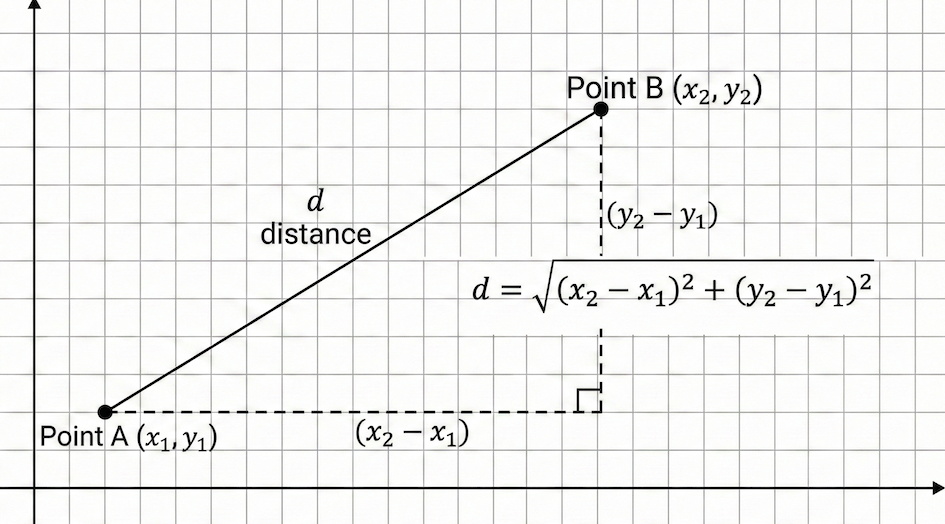
Visual of Euclidean distance on a 2D plane. The good old Pythagoras.
In Python, you might write this calculation manually:
# Calculating distance between Point A and Point B
distance = ((x2 - x1)**2 + (y2 - y1)**2)**0.5
This works perfectly for a single calculation. But what happens when your project grows?
Why manual formulas do not scale
If you rely on writing out the formula every time you need it, you will quickly run into issues.
Ask yourself:
What if we need to compute distances 50 times across different parts of our script? Copying and pasting that line 50 times creates cluttered, hard-to-read code.
What if the formula needs to change? Suppose you realize you need to use a different method that accounts for Earth’s curvature. You would have to hunt down and update all 50 copied lines, risking a mistake on every single one.
What if a colleague wants to reuse your logic? They would have to dig through your script, find the math, and copy it into theirs.
2. Write Once, Use Anywhere
What we really want to express is not:
“Calculate the math using these exact four variables right here.”
but rather:
“Here is a reliable tool for calculating distance. Give it any four coordinates, and it will give you the answer.”
This idea is called reusing logic, and it is done using a function.
Instead of repeating the math, you package it into a self-contained block:
def euclidean_distance(x1, y1, x2, y2):
    return ((x2 - x1) ** 2 + (y2 - y1) ** 2) ** 0.5
Now, whenever you or anyone else needs to find a distance, you simply call its name:
# The complex math is hidden away, leaving clean, readable code
dist_ab = euclidean_distance(10, 20, 15, 25)
dist_cd = euclidean_distance(100, 50, -10, 40)
Whether you calculate distance once or ten thousand times, the logic lives in exactly one place. If you need to fix or upgrade the formula, you only change it once inside the function definition.
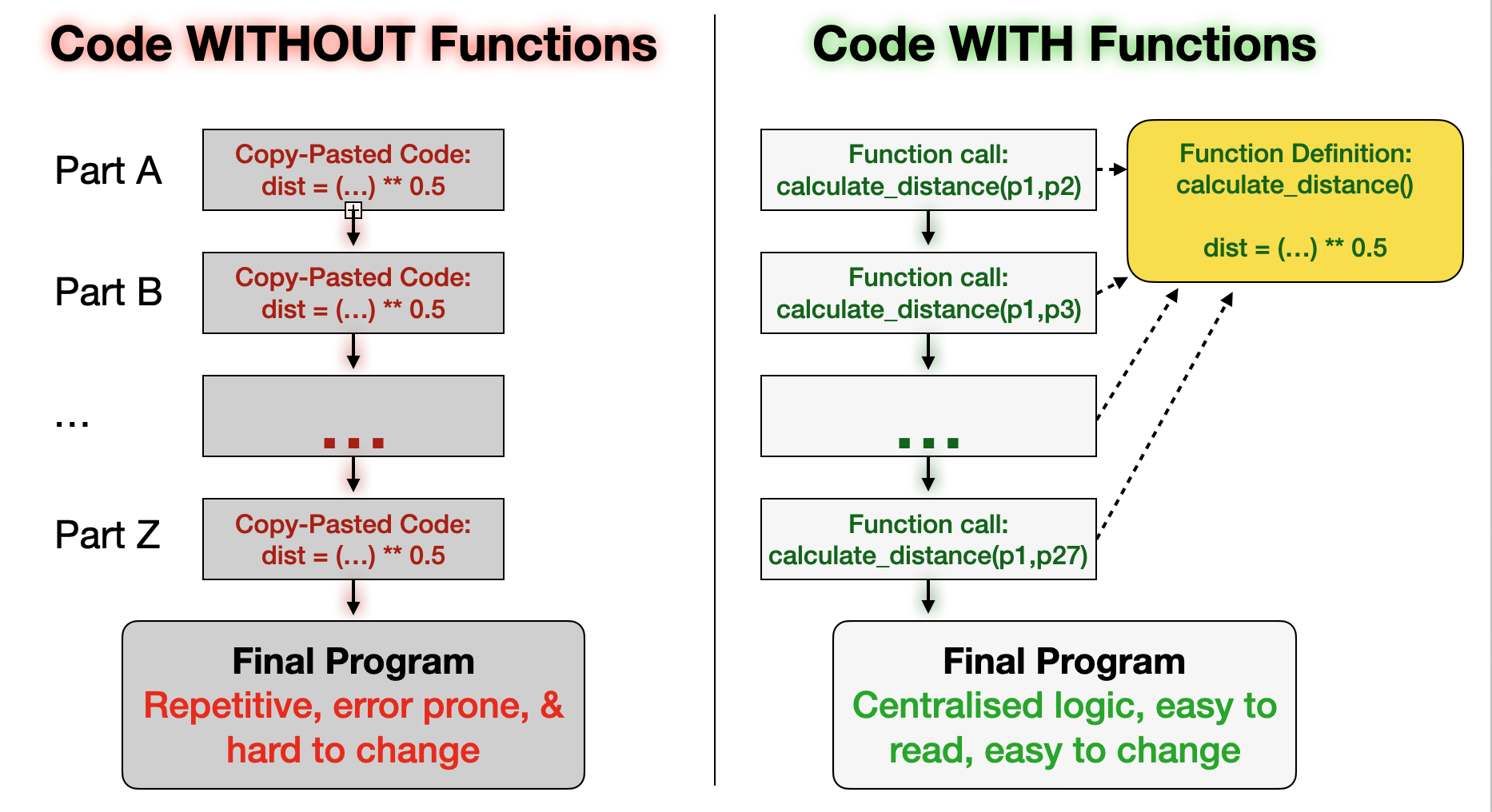
Visual why functions are structurally superior to copy-pasting code.
Interactive Explorer: The D.R.Y. Principle Visualizer.
Click through the simulation to experience the difference between copying and pasting code versus calling a function. Notice how fixing a math error requires tedious manual labor in the copy-paste scenario, but fixes itself instantly everywhere when using a function. For improved visibility of the explorer, follow this link.
3. Concept Check
Before diving into the syntax of def, return, and arguments, pause and reflect on the concept.
Task
You are writing a script to process air quality sensor data. You have a complex formula that converts raw voltage readings from the sensors into standard Particulate Matter (PM2.5) values.
Answer the following without writing code.
If you just copy and paste the formula every time a new sensor reading comes in, what happens if you discover a slight calibration error in your math?
If you wrap the formula in a function called
calculate_pm25(), how many places in your code do you need to update to fix the calibration error?How does using a function change the readability of your main script?
Write down short answers in your own words, or think of suitable ones.
# Write your code here
Sample solution
You would have to manually find and fix the formula everywhere you pasted it, which is tedious and error-prone.
Exactly one place: inside the function definition.
It makes the script much easier to read. Instead of looking at complex math operations, you just see a clear, descriptive action like
calculate_pm25().
What Comes Next
Next, we will:
Learn how to define your own functions using the
defkeyword.Understand how to pass data into functions using parameters.
Discover how to get data back out of functions using
return.
Once you understand how to build functions, you will have mastered the final foundational tool needed to write professional, scalable Python programs.