
Learning objectives
After completing this practical, you will be able to:
define and name variables clearly
choose appropriate data types for spatial attributes
group related values using lists and dictionaries
perform simple numeric expressions on spatial data
calculate Manhattan and Euclidean distances using coordinates
store computed results in a structured and reusable way
Practical storyline
In this practical, you will gradually build a small spatial data model for three Swiss cities (Zurich, Lugano, Geneva).
You will start with single variables, then group values into lists, and finally organise everything into dictionaries, ending with distance calculations between cities.
This mirrors how spatial data handling evolves in real projects.
Part 1 – Single-value variables
Single variables store exactly one value. They are useful for names, labels, and individual measurements.
Code
# City names
z = "Zurich"
g = "Geneva"
l = "Lugano"

print(z, g, l)
Zurich Geneva Lugano
Tasks
Change the order of the printed city names.
The variable names
z,g, andlare poor choices. Rename them to better follow the descriptive naming conventions learned earlier in this chapter.Add a short comment explaining what each variable represents.
# Write your code here
Part 2 – Variables and formatted output
Variables can also store numeric values, which can be combined with text to create human-readable output.
Code
# Approximate travel distances (km)
dist_zurich_geneva = 280
dist_zurich_lugano = 205
dist_geneva_lugano = 370

# Old-style concatenation
print("The distance from " + z + " to " + g + " is " + str(dist_zurich_geneva) + " km")
The distance from Zurich to Geneva is 280 km
Tasks
Modify the print statement to show the distance from Zurich to Lugano.
Rewrite the print statement using a modern f-string for better readability.
# Write your code here
Part 3 – Expressions and data types
Numeric variables can be combined using operators to perform calculations.
Code
x = 2
y = x**2
z_val = y**0.5

print(f"{x} squared is {y} and the square root of {y} is {z_val}")
print(
    f"{x} is of type {type(x)}, {y} is of type {type(y)}, and {z_val} is of type {type(z_val)}"
)
2 squared is 4 and the square root of 4 is 2.0
2 is of type <class 'int'>, 4 is of type <class 'int'>, and 2.0 is of type <class 'float'>
Tasks
Change the value of
xand rerun the cell.Observe how the data types change.
Explain (in a comment) why the square root results in a
floatdata type even if the answer is a whole number.
# Write your code here
Part 4 – Coordinates as lists
Some values naturally belong together, such as coordinates. Lists are a great way to group them.
Code
# CH1903+ coordinates (example values)
zurich_coords = [26, 12]
geneva_coords = [25, 11]
lugano_coords = [27, 10]

# Access individual coordinate values using indexing
print("Zurich x:", zurich_coords[0])
print("Zurich y:", zurich_coords[1])
Zurich x: 26
Zurich y: 12
Tasks
Replace the example coordinates above with real Swiss CH1903+ values by looking them up on map.geo.admin.ch.
Add a comment explaining why a list (or a tuple) is a suitable data structure for coordinates.
# Write your code here
Part 5 – Organising cities
Dictionaries allow us to link keys (names) to values (coordinates), making our data much easier to query.
Code
cities = {"Zurich": zurich_coords, "Geneva": geneva_coords, "Lugano": lugano_coords}

print(cities)

# Show what is stored in our keys and values
print(cities.keys())
print(cities.values())

# Retrieve coordinates from the dictionary
cz = cities["Zurich"]
cg = cities["Geneva"]
cl = cities["Lugano"]
{'Zurich': [26, 12], 'Geneva': [25, 11], 'Lugano': [27, 10]}
dict_keys(['Zurich', 'Geneva', 'Lugano'])
dict_values([[26, 12], [25, 11], [27, 10]])
Tasks
Print the coordinates of Geneva explicitly using the dictionary.
Explain (in a comment) why dictionaries are more flexible and powerful than storing individual variables for every city.
# Write your code here
Part 6 – Manhattan distance
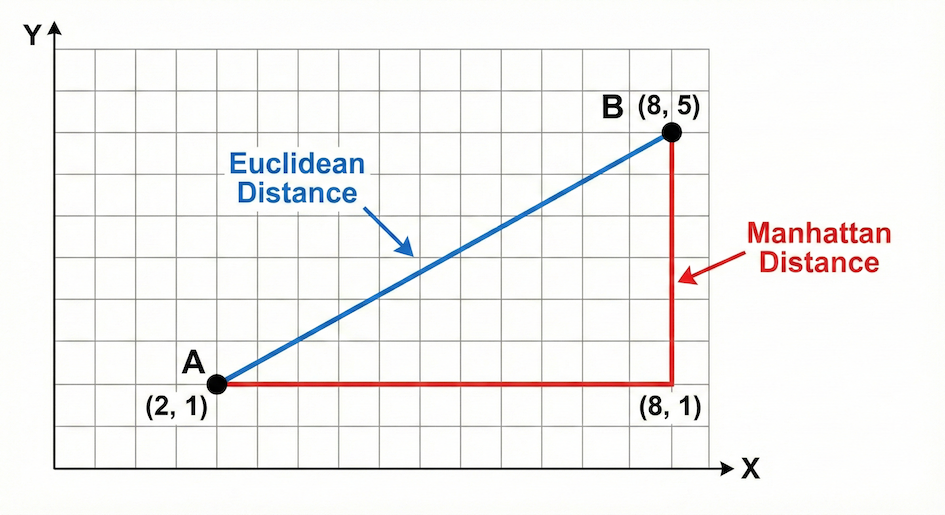
Euclidean distance represents the shortest straight-line path between two points, while Manhattan distance calculates the distance strictly along a grid.
The Manhattan distance measures distance by strictly following a grid (like walking city blocks). The formula is the sum of the absolute differences of their Cartesian coordinates:
Mathematical Trick: To calculate the absolute value (removing any negative signs) using only basic operators, we square the difference (which forces it to be positive), and then take the square root (
** 0.5). Later in the course, we will learn a simpler built-in function for this!
Code
# Manhattan distance: Zurich – Lugano

dx = cz[0] - cl[0]
dx = dx**2
dx = dx**0.5  # Square root to get absolute value

dy = cz[1] - cl[1]
dy = dy**2
dy = dy**0.5  # Square root to get absolute value

manhattan_zl = dx + dy

print(f"Manhattan distance from Zurich to Lugano is {manhattan_zl}")
Manhattan distance from Zurich to Lugano is 3.0
Tasks
Calculate the Manhattan distance between Zurich & Geneva, and Lugano & Geneva.
Store the results in appropriately named new variables.
# Write your code here
Part 7 – Euclidean distance
The Euclidean distance calculates the straight-line distance between two points using the Pythagorean theorem:
Code
# Euclidean distance: Zurich – Lugano

dx = cz[0] - cl[0]
dy = cz[1] - cl[1]

euclidean_zl = (dx**2 + dy**2) ** 0.5

print(f"Euclidean distance from Zurich to Lugano is {euclidean_zl}")
Euclidean distance from Zurich to Lugano is 2.23606797749979
Tasks
Compute the Euclidean distance between Zurich & Geneva, and Lugano & Geneva.
Print both Manhattan and Euclidean distances clearly using f-strings. Which one is always shorter?
# Write your code here
Part 8 – Storing distance results
Computed values are also data and should be stored systematically so we can look them up later.
Code
distances = {"Zurich_Lugano": {"manhattan": manhattan_zl, "euclidean": euclidean_zl}}

print(distances)
{'Zurich_Lugano': {'manhattan': 3.0, 'euclidean': 2.23606797749979}}
Tasks
Extend this dictionary to include the distances for Zurich–Geneva.
Add the distances for Lugano–Geneva.
Inspect the structure and explain (in a comment) how this resembles an attribute table in GIS.
# Write your code here
Reflection
Take a moment to review what you’ve built. Answer briefly in comments or markdown:
Why are lists (or tuples) suitable for coordinates?
Why are dictionaries useful for spatial data?
Which step helped you most to understand how Python executes mathematical distance calculations?
# Write your code here
Optional challenge
Design a single comprehensive dictionary that stores:
city name
coordinates
distances to other cities
You do not need to automate anything yet. Focus solely on structure and clarity. How would you design the “perfect” data structure to hold all this information?
# Write your code here
What Comes Next
So far, you have learned how to store and access multiple values. But calculating the distances between just three cities manually took a lot of typing. Imagine doing this for 1,000 cities!
The next step is to process collections automatically. Next, you will learn about loops and conditional logic, which allow your code to:
work through collections element by element
make decisions based on values and conditions
apply the same operation to massive datasets in a structured way