Our amazing team of instructors consists of the following people (in alphabetical order). We will support you on your learning path during the lab exercises and on Teams.







Contact
Questions about course content or exercises
For questions related to the course material (e.g. “How do I resolve problem X in task Y?”), please use the respective Microsoft Teams channel. This way helps everyone benefit from the discussion.
To help us support you efficiently, always include:
a brief description of the problem
the exact error message (if any)
code snippet or a screenshot
a Colab or GitHub link (when applicable)
Personal or administrative questions
For personal matters or course-related questions specific to SDS210, please contact the module coordinator: hendrik
Office hours (during the semester): Tuesdays and Wednesdays, 14:00–15:00 in room Y25-K-12
MS Teams
Teams is the central communication platform for this course. It is used to:
share announcements and course information
ask and answer questions
submit the final project report
How to access Teams using the access code?
On the Teams page, you will find the ‘Join or Create Team’ button in the top right-hand corner.
Clicking this button opens a new menu where you can paste the access code.
You will then be added to the team automatically.

How to sign in using the access code.
This short video shows you how to access Teams using the access code.
To ensure consistent communication, OLAT is used only to provide this course syllabus. All other course-related communication takes place on MS Teams. Please ensure that Teams notifications for channels and assignments are on (via profile settings).
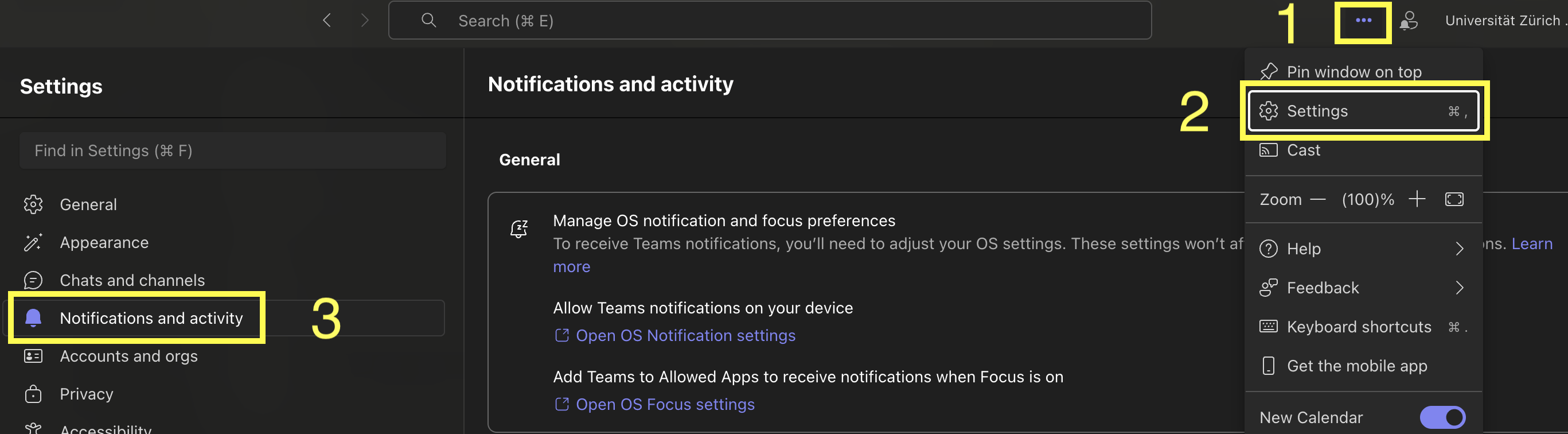
Teams notifications settings.
If you need help outside of lab hours, please post your question in the appropriate lab channel on Teams. All students are encouraged to respond and help where possible. This shared discussion space benefits everyone and reduces duplicate questions.