
Learning objectives
After completing this practical, you will be able to:
geocode real world addresses into coordinate pairs using
geopyestablish a geodesic distance baseline for spatial comparisons
fetch live routing data from the OpenRouteService API using
requestsparse JSON responses to extract driving distances and travel times
automate API queries safely using loops,
tqdm, andtime.sleep()
Practical storyline
In previous practicals, you built tools to calculate the distance between cities. However, calculating the mathematical distance across a sphere assumes you can fly like a bird. In reality, mountains, lakes, oceans, and road networks force us to take longer paths.
Imagine you are building a logistics tool for a long haul European delivery company. Your task is to geocode customer locations, establish the absolute shortest path (the geodesic distance), and then use a Web API to query the actual driving distance. Finally, you will automate this process for a list of international deliveries, ensuring you respect the server’s rate limits.
Part 1 - Geocoding the locations
Before we can calculate distances or query APIs, we need exact coordinates. Your delivery truck starts at a warehouse in Bern, Switzerland, and the first delivery is to a science museum in Trento, Italy.
Code
from geopy.geocoders import Nominatim

# Initialize the geocoder with a unique app name.
# Review the Geocoding section to learn more about the user_agent parameter.
geolocator = Nominatim(user_agent="sds_euro_logistics_YOUR_ID")

origin_address = "Spitalgasse 47-51, 3001 Bern, Switzerland"
dest_address = "Corso del Lavoro e della Scienza, 3, 38122 Trento TN, Italy"
Tasks
Geocode the
origin_addressanddest_address. Extract their latitudes and longitudes into two tuples namedorigin_coordsanddest_coords. (see previous section on Geocoding)Print the coordinates and verify them on a map service (like Google Maps or OpenStreetMap) to ensure they are correct.
Change the destination address to a real street address of your choice anywhere in the world and geocode it.
Print the full official address returned by Nominatim for your new destination using the
.addressattribute to ensure it found the correct place.
Sample solution
# 1. Geocode addresses
origin_loc = geolocator.geocode(origin_address)
dest_loc = geolocator.geocode(dest_address)

# Extract coordinates as (latitude, longitude) tuples
origin_coords = (origin_loc.latitude, origin_loc.longitude)
dest_coords = (dest_loc.latitude, dest_loc.longitude)

# 2. Print coordinates
print(f"Origin: {origin_coords}")
print(f"Destination: {dest_coords}")

# 3. Change the destination address
dest_address = "Buckingham Palace, London, UK"
dest_loc = geolocator.geocode(dest_address)
dest_coords = (dest_loc.latitude, dest_loc.longitude)
print(f"\nNew Destination Coordinates: {dest_coords}")

# 4. Print the full official address
print(f"Official Address: {dest_loc.address}")
Key idea: Nominatim standardizes the output, often returning a highly detailed, hierarchical address that includes the postal code, city, and country, even if your input was just a landmark name.
Part 2 - The geodesic baseline
To understand how much the road network bends and curves around the Alps, we first need to know the absolute shortest possible path between our two points (origin_coords and dest_coords).
Code
from geopy import distance
Tasks
Calculate the geodesic distance between your origin and your newly chosen destination.
Store the result in a variable called
baseline_kmso we can compare it later.Print the result.
Sample solution
# 1 & 2. Calculate and store the geodesic baseline
baseline_km = distance.geodesic(origin_coords, dest_coords).km

# 3. Print the result
print(f"The geodesic baseline is {baseline_km:.1f} km")
Key idea:
Storing the result in a well named variable like baseline_km allows you to easily reuse this metric in later calculations without repeating the math.
Part 3 - Setting up OpenRouteService
Now we want the real world driving distance. For this, we will use the OpenRouteService (ORS) API. Because calculating road routes across entire countries is computationally heavy, ORS requires a personal API key to track usage.
Task: Get your API Key
Visit the HeiGIT Sign Up page to create a free account for OpenRouteService.
Once logged in, you can find your Basic Key at the top of the page.
Copy the long string of characters and numbers and paste it into the variable below as a string.
# Paste your personal API key inside the quotes
ORS_API_KEY = "replace_this_with_your_actual_key"
Part 4 - Querying the driving route
With our key ready, we can construct a request to the ORS directions endpoint. The API requires the coordinates to be formatted in longitude, latitude order, which is the exact reverse of what geopy gives us!
Code
import requests

# Build the parameters dictionary
# Note: ORS requires coords as "longitude,latitude"
parameters = {
    "api_key": ORS_API_KEY,
    "start": f"{origin_coords[1]},{origin_coords[0]}",
    "end": f"{dest_coords[1]},{dest_coords[0]}",
}

# Define the API endpoint for car driving directions
api_url = "https://api.openrouteservice.org/v2/directions/driving-car"

# Send the request
response = requests.get(api_url, params=parameters)
Tasks
Write an
ifstatement to check if theresponse.status_codewas successful (code 200).Inside the statement, convert the JSON response into a Python dictionary.
Extract the
summarydictionary by navigating through the JSON hierarchy (data['features'][0]['properties']['summary']).Calculate the driving distance in kilometers and the estimated time in hours and minutes. Print them nicely.
Calculate and print the detour factor: the driving distance divided by the geodesic baseline distance from Part 2. A detour factor of 1.0 means a perfectly straight road; 1.5 means you have to drive 50% further than the straight line distance.
![A diagram illustrating nested boxes representing a JSON structure. An arrow traces the path from the root 'data' object, through 'features[0]', 'properties', to the 'summary' dictionary containing distance and duration.](/sds210-jb/build/20_ors_json_navigati-db3e9ae07dab5c089f7a66ccb7d05fb3.png)
Mental model for navigating the deep hierarchy of the OpenRouteService JSON response to find the summary statistics.
Sample solution
# 1. Check if successful
if response.status_code == 200:

    # 2. Convert to dictionary
    data = response.json()

    # 3. Extract the summary dictionary
    summary = data['features'][0]['properties']['summary']

    # 4. Calculate and print distance and time
    driving_km = summary['distance'] / 1000
    duration_seconds = summary['duration']

    hours = int(duration_seconds // 3600)               # floor division → gives only whole hours
    minutes = int((duration_seconds % 3600) // 60)      # modulo → remainder after division

    print(f"Driving distance: {driving_km:.1f} km")
    print(f"Estimated time: {hours} h {minutes} min")

    # 5. Calculate and print the detour factor
    detour_factor = driving_km / baseline_km
    print(f"Detour factor: {detour_factor:.2f}")

else:
    print("Request failed.")
    print("Reason:", response.text)
Key idea: A high detour factor in mountainous regions like the Alps indicates a very complex road network full of switchbacks and detours around impassable terrain.
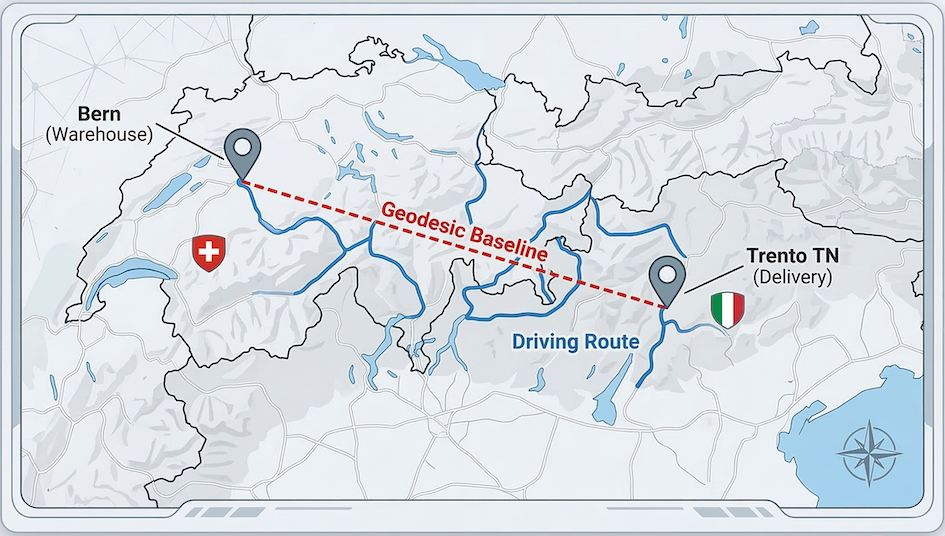
Visualization comparing the absolute shortest path (geodesic dotted line) with the actual road network route (solid blue line) from Bern to Trento. This route involves teleporting and a drunken GPS navigator, who ultimately wants to go sailing. But you can probably see that the complex terrain of the Alps forces a detour, resulting in a high detour factor.
Part 5 - Fetching live weather for the driver
Before dispatching the driver across international borders, it is good practice to check the current weather at the destination. We can do this using the Open-Meteo API, which does not require a key.
Tasks
Build a
parametersdictionary containing thelatitudeandlongitudeof your destination, along with"current_weather": "true".Write a
requests.get()call to the Open-Meteo API (https://api.open-meteo.com/v1/forecast) passing in your parameters.Parse the JSON response to extract and print the current temperature.
# Write your weather fetching code here
Sample solution
import requests

meteo_url = "https://api.open-meteo.com/v1/forecast"

# 1. Build parameters using the destination coordinates
weather_params = {
    "latitude": dest_coords[0],
    "longitude": dest_coords[1],
    "current_weather": "true"
}

# 2. Make the request
weather_response = requests.get(meteo_url, params=weather_params)

if weather_response.status_code == 200:
    weather_data = weather_response.json()

    # 3. Extract the temperature
    temp = weather_data["current_weather"]["temperature"]
    print(f"Current temperature at destination: {temp}°C")
else:
    print("Failed to fetch weather data.")
Key idea:
By reusing the exact same variables (dest_coords) across different APIs, you can build a seamless automated workflow that fetches multiple distinct types of data for a single location.
Part 6 - Automating the logistics pipeline
Now it is time to put everything together. The delivery company has given you a list of coordinates for long haul deliveries starting from Bern and heading to various corners of Europe.
You need to query the ORS API for the driving distance and travel time, and the Open-Meteo API for the destination’s current weather. Because you are querying external APIs inside a loop, you must use rate limiting to avoid getting your account temporarily blocked.
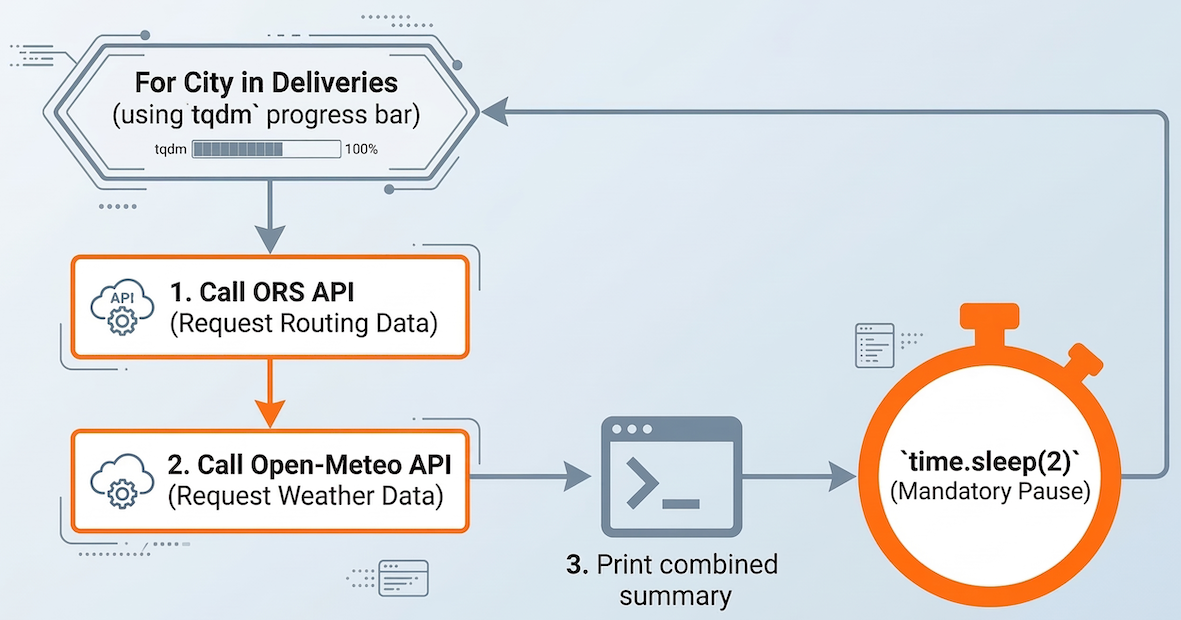
Logic flow for an automated logistics pipeline: Chaining two distinct API requests (Routing and Weather) inside a loop, utilizing rate limiting to avoid server overload.
Code
# A list of international delivery destination coordinates (lat, lon)
deliveries = {
    "Prague": (50.0755, 14.4378),
    "Ljubljana": (46.0569, 14.5058),
    "Girona": (41.9794, 2.8214),
    "Plymouth": (50.3755, -4.1427),
    "Quimper": (47.9975, -4.0979),
    "Odense": (55.4038, 10.4024),
}

# The origin is always Bern
origin_lon = 7.4474
origin_lat = 46.9480
start_string = f"{origin_lon},{origin_lat}"
Tasks
Import
time,tqdm, andrequests.Write a
forloop that iterates over thedeliveriesdictionary (using.items()). Wrap the dictionary items intqdm()to show a progress bar.Inside the loop, build the parameters and make a
requests.get()call to the ORS API to get the route.Extract the driving distance in kilometers and calculate the travel time in hours and minutes.
Make a second
requests.get()call inside the same loop to the Open-Meteo API using the destination’s coordinates to fetch the current weather.Extract the temperature from the weather response.
Print a summary line for the city that includes the driving distance, the estimated travel time, and the current weather.
Crucial step: Add
time.sleep(2)at the end of the loop to ensure you stay well within the ORS limit of 40 requests per minute.
Sample solution
import time
from tqdm import tqdm
import requests

# Define API endpoints
ors_url = 'https://api.openrouteservice.org/v2/directions/driving-car'
meteo_url = "https://api.open-meteo.com/v1/forecast"

# 2. Iterate over the dictionary using tqdm
for city, coords in tqdm(deliveries.items()):

    # --- 3. Route Request (ORS) ---
    end_string = f"{coords[1]},{coords[0]}"
    route_params = {
        'api_key': ORS_API_KEY,
        'start': start_string,
        'end': end_string
    }

    route_response = requests.get(ors_url, params=route_params)

    if route_response.status_code == 200:
        route_data = route_response.json()

        # 4. Extract distance and calculate time
        summary = route_data['features'][0]['properties']['summary']
        distance_km = summary['distance'] / 1000
        duration_sec = summary['duration']

        hours = int(duration_sec // 3600)
        minutes = int((duration_sec % 3600) // 60)

        # --- 5. Weather Request (Open-Meteo) ---
        weather_params = {
            "latitude": coords[0],
            "longitude": coords[1],
            "current_weather": "true"
        }
        weather_response = requests.get(meteo_url, params=weather_params)

        if weather_response.status_code == 200:
            weather_data = weather_response.json()

            # 6. Extract temperature
            temp = weather_data["current_weather"]["temperature"]

            # 7. Print the final combined summary
            print(f"\nDelivery to {city}:")
            print(f"  Drive: {distance_km:.1f} km ({hours}h {minutes}m)")
            print(f"  Current Weather: {temp}°C")

        else:
            print(f"\nFailed to fetch weather for {city}.")

    else:
        print(f"\nFailed to calculate route for {city}.")

    # 8. Rate limit the loop (2 seconds is safe for both APIs)
    time.sleep(2)
Key idea: This is the core of spatial automation. A well constructed loop with robust error handling and rate limiting allows you to seamlessly chain multiple API queries together, aggregating completely different types of data (routing geometry and meteorological data) into a single, unified dataset while you step away from the computer.
Reflection
Take a moment to review what you have built. Answer briefly in comments or markdown:
Look at your detour factor from Part 4 (Bern to Trento). Why is the driving distance across the Alps so much longer than the geodesic distance?
Consider the route to Plymouth (UK) or Odense (Denmark). How do you think a driving routing API handles crossing large bodies of water?
What would happen if you ran your loop in Part 6 on a list of 500 deliveries without including
time.sleep(2)?
# Write your reflections here.
Sample solution
The Alps: Mountainous terrain requires roads to follow valleys, weave through switchbacks, and detour toward major tunnels, drastically increasing the actual travel distance compared to a straight line.
Bodies of water: Routing engines like ORS utilize ferry network data mapped in OpenStreetMap, or major infrastructure like the Eurotunnel (trains that carry cars), treating them as connected parts of the road network.
Missing
time.sleep(2): Your code would fire dozens of requests per second. The ORS server would likely block your IP address and return an HTTP 429 “Too Many Requests” error, crashing your script before it finished computing the routes.