
1. Motivation
This page is the practical core of the lesson: a single function call takes you from a directory of labeled tiles to a trained, evaluated model. Understanding its parameters means you can adapt this workflow directly to your own project’s data later.
2. Core idea
train_image_classifier handles the full pipeline in one call: it scans the ImageFolder directory, performs a stratified train/validation/test split, builds the model, runs the training loop, and saves the best checkpoint.
Training an image classifier means adjusting model parameters so that predicted labels become closer to reference labels in the Training Set.
The practical workflow is:
load labelled images
→ split into train, validation and test data
→ create model
→ train for several epochs
→ save checkpoint
→ inspect training history
The example uses ResNet-50 with ImageNet pre-training. This is a sensible first baseline for many classification tasks.
3. Workflow
A. Import training functions
import matplotlib.pyplot as plt

from geoai.recognize import (
    train_image_classifier,
    plot_training_history,
)

import os
from pathlib import Path
from geoai.utils import download_file

DATA_DIR = Path("data/raw")
DATA_DIR.mkdir(parents=True, exist_ok=True)

url = "https://data.source.coop/giuz/sds320/L05/data/EuroSAT-RGB.zip"
data_dir = download_file(url, output_path=str(DATA_DIR / Path(url).name))
B. Train a ResNet-50 classifier
The train_image_classifier() function handles the main steps: scanning the directory, creating train/validation/test splits, constructing the model, running the training loop and saving the best checkpoint.
# Runtime: ~16 mins
# Hardware: Apple M3 Pro (18 GB RAM, MPS GPU acceleration)

result = train_image_classifier(
    data_dir=data_dir,
    model_name="resnet50",
    num_epochs=5,
    batch_size=32,
    learning_rate=1e-3,
    image_size=64,
    in_channels=3,
    pretrained=True,
    output_dir="image_recognition_output/resnet50",
    num_workers=4,
    seed=42,
)
Warning: You are sending unauthenticated requests to the HF Hub. Please set a HF_TOKEN to enable higher rate limits and faster downloads.
GPU available: True (mps), used: True
TPU available: False, using: 0 TPU cores
💡 Tip: For seamless cloud logging and experiment tracking, try installing [litlogger](https://pypi.org/project/litlogger/) to enable LitLogger, which logs metrics and artifacts automatically to the Lightning Experiments platform.
Metric val_acc improved. New best score: 0.938
Epoch 0, global step 540: 'val_acc' reached 0.93843 (best 0.93843), saving model to '/Users/wulf/Documents/Documents_work/SDS/02_teaching/01_courses/SDS320/26HS_SDS320/06_jupyter_book/sds320-jb/book/04_lessons/L05/image_recognition_output/resnet50/models/resnet50_epoch=00_val_acc=0.9384.ckpt' as top 1
Metric val_acc improved by 0.013 >= min_delta = 0.0. New best score: 0.952
Epoch 1, global step 1080: 'val_acc' reached 0.95162 (best 0.95162), saving model to '/Users/wulf/Documents/Documents_work/SDS/02_teaching/01_courses/SDS320/26HS_SDS320/06_jupyter_book/sds320-jb/book/04_lessons/L05/image_recognition_output/resnet50/models/resnet50_epoch=01_val_acc=0.9516.ckpt' as top 1
Epoch 2, global step 1620: 'val_acc' was not in top 1
Epoch 3, global step 2160: 'val_acc' was not in top 1
Epoch 4, global step 2700: 'val_acc' was not in top 1
`Trainer.fit` stopped: `max_epochs=5` reached.
Key parameters:
| Parameter | Meaning |
|---|---|
data_dir | Root folder of the ImageFolder dataset. |
model_name | Architecture name, here resnet50. |
num_epochs | Number of full passes through the training data. |
batch_size | Number of images processed together. |
learning_rate | Step size used during optimisation. |
image_size | Input image size expected by the model. |
in_channels | Number of input channels; EuroSAT RGB has 3. |
pretrained | Whether to start from pre-trained weights. |
output_dir | Folder for logs and checkpoints. |
seed | Random seed for reproducibility. |
C. Know what the result contains
train_image_classifier returns a dictionary with the trained model, the class_names, the checkpoint_path, and the already-split train_dataset, val_dataset, and test_dataset objects, everything the next page needs for evaluation.
D. Plot training history
Training curves help you check whether the model is learning and whether it may be Overfitting.
fig = plot_training_history("image_recognition_output/resnet50/models")
plt.show()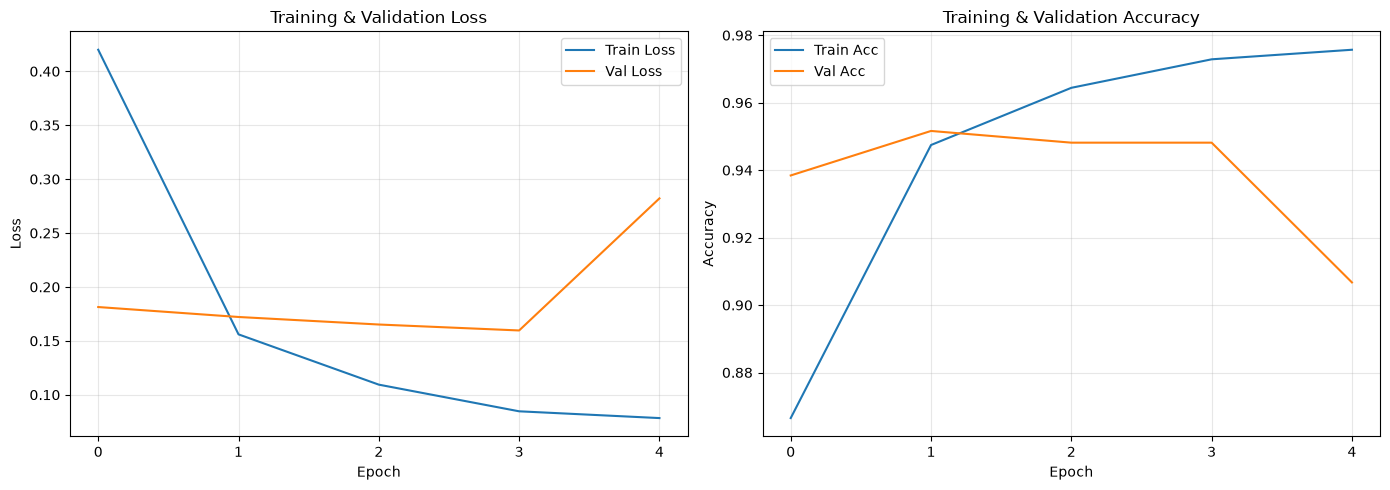
Look for:
training and validation accuracy increasing,
training and validation loss decreasing,
validation loss not diverging strongly from training loss,
signs that more epochs may or may not help.
4. Python reactivation
The dictionary that train_image_classifier returns is an ordinary Python dictionary, the same pattern you saw with stats in L04’s batch workflows. Accessing result["model"] or result["class_names"] is exactly the same operation you have used throughout this course.
5. Common pitfalls
Mismatched
image_sizeorin_channels. These must match your actual data; a mismatch usually produces a clear error, but double-check them against the dataset you explored on the previous page.Assuming 5 epochs always suffices. Treat it as a starting point and adjust based on the training curves, not as a fixed rule for every dataset.
Skipping the
seedargument. Without a fixed seed, your train/validation/test split changes every run, which makes it impossible to compare experiments fairly, a problem the comparison page depends on you avoiding.
6. Mini task
Before running it, predict what would change if you swapped model_name="resnet50" for model_name="efficientnet_b0" while keeping every other argument identical. Then, if you have time, run it and check your prediction.
Sample solution
Prediction: training should run somewhat faster per epoch, since EfficientNet-B0 has roughly a fifth the parameters of ResNet-50, and final accuracy should land in a similar range, since both architectures tend to perform comparably on EuroSAT after fine-tuning. Memory use during training should also be lower. Running it typically confirms this: similar accuracy, faster wall-clock training time.
Further experimenting
Image Recognition with EuroSAT Dataset (opengeoai.org) — the official worked example this page’s workflow is based on, useful as a reference for the full
geoai.recognizeAPI and its parameters.
7. Key takeaways
train_image_classifiercombines dataset splitting, model construction, training, and checkpointing in one call.Key hyperparameters are
model_name,pretrained,num_epochs,batch_size,learning_rate,image_size,in_channels,output_dir, andseed.freeze_backbone=Trueoffers a faster, lighter-weight alternative to full fine-tuning for small datasets.Training and validation curves, not a fixed epoch count, are the right way to judge whether training has converged or started overfitting.