
1. Motivation
A single accuracy number is easy to report and easy to misread. A model can post a respectable overall accuracy while consistently failing on one class you actually care about. This page gives you the tools to catch that.
2. Core idea
Aggregate accuracy tells you how often a model is right on average; per-class metrics and a confusion matrix tell you where and how it is wrong.
A good evaluation combines:
overall performance,
per-class metrics,
raw confusion matrix,
normalised confusion matrix,
visual inspection of predictions.
3. Workflow
Previous code
This page assumes that result is the trained ResNet-50 output from the previous page.
# Import training functions and data

from geoai.recognize import train_image_classifier
import os
from pathlib import Path
from geoai.utils import download_file
import matplotlib.pyplot as plt
from geoai.recognize import (
    train_image_classifier,
    plot_training_history,
)

DATA_DIR = Path("data/raw")
DATA_DIR.mkdir(parents=True, exist_ok=True)

url = "https://data.source.coop/giuz/sds320/L05/data/EuroSAT-RGB.zip"
data_dir = download_file(url, output_path=str(DATA_DIR / Path(url).name))
# Train a ResNet-50 classifier (~15 min)

result = train_image_classifier(
    data_dir=data_dir,
    model_name="resnet50",
    num_epochs=5,
    batch_size=32,
    learning_rate=1e-3,
    image_size=64,
    in_channels=3,
    pretrained=True,
    output_dir="image_recognition_output/resnet50",
    num_workers=4,
    seed=42,
)
GPU available: True (mps), used: True
TPU available: False, using: 0 TPU cores
💡 Tip: For seamless cloud logging and experiment tracking, try installing [litlogger](https://pypi.org/project/litlogger/) to enable LitLogger, which logs metrics and artifacts automatically to the Lightning Experiments platform.
Metric val_acc improved. New best score: 0.948
Epoch 0, global step 540: 'val_acc' reached 0.94815 (best 0.94815), saving model to '/Users/wulf/Documents/Documents_work/SDS/02_teaching/01_courses/SDS320/26HS_SDS320/06_jupyter_book/sds320-jb/book/04_lessons/L05/image_recognition_output/resnet50/models/resnet50_epoch=00_val_acc=0.9481.ckpt' as top 1
Epoch 1, global step 1080: 'val_acc' was not in top 1
Metric val_acc improved by 0.005 >= min_delta = 0.0. New best score: 0.953
Epoch 2, global step 1620: 'val_acc' reached 0.95301 (best 0.95301), saving model to '/Users/wulf/Documents/Documents_work/SDS/02_teaching/01_courses/SDS320/26HS_SDS320/06_jupyter_book/sds320-jb/book/04_lessons/L05/image_recognition_output/resnet50/models/resnet50_epoch=02_val_acc=0.9530.ckpt' as top 1
Epoch 3, global step 2160: 'val_acc' was not in top 1
Metric val_acc improved by 0.003 >= min_delta = 0.0. New best score: 0.956
Epoch 4, global step 2700: 'val_acc' reached 0.95648 (best 0.95648), saving model to '/Users/wulf/Documents/Documents_work/SDS/02_teaching/01_courses/SDS320/26HS_SDS320/06_jupyter_book/sds320-jb/book/04_lessons/L05/image_recognition_output/resnet50/models/resnet50_epoch=04_val_acc=0.9565.ckpt' as top 1
`Trainer.fit` stopped: `max_epochs=5` reached.
# Plot training history

fig = plot_training_history("image_recognition_output/resnet50/models")
plt.show()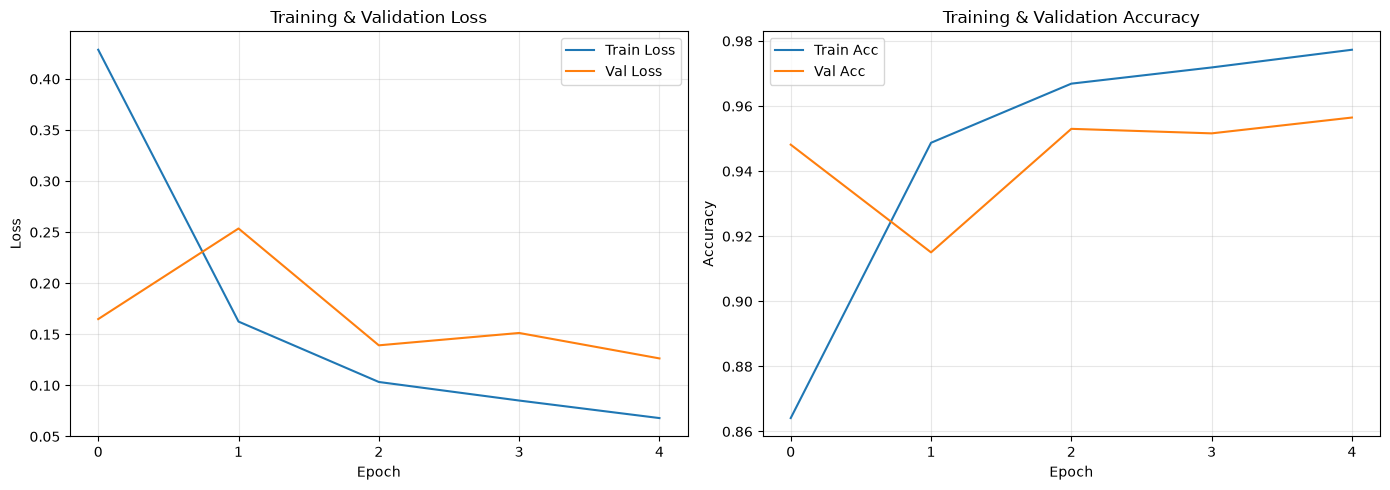
### A. Import evaluation functionsimport random
import matplotlib.pyplot as plt
from geoai.recognize import (
evaluate_classifier,
predict_images,
plot_confusion_matrix,
plot_predictions,
)B. Evaluate on the test set
evaluate_classifier runs the trained model on held-out test images it never saw during training or validation, and returns overall accuracy, a full classification report, and a confusion matrix array.
eval_result = evaluate_classifier(
    model=result["model"],
    dataset=result["test_dataset"],
    class_names=result["class_names"],
)The returned dictionary contains the overall accuracy, a classification report and a confusion matrix.
eval_result.keys()dict_keys(['accuracy', 'classification_report', 'confusion_matrix', 'per_class_accuracy'])C. Interpret per-class metrics
For each class, the classification report includes precision (of everything predicted as this class, what fraction actually is), recall (of everything that truly is this class, what fraction was correctly found), F1-score, the harmonic mean of the two, and support, simply the number of test images in that class.
| Metric | Question it answers |
|---|---|
| Precision | When the model predicts this class, how often is it correct? |
| Recall | Of all true examples of this class, how many did the model find? |
| F1-score | How well do precision and recall balance? |
| Support | How many test examples belong to this class? |
Use support when interpreting class-level results. A metric based on few examples is less stable than one based on many examples.
As a concrete example: if the test set contains 300 Forest tiles, the model correctly predicts Forest for 280 of them (recall = 280/300 ≈ 0.93), and also mislabels 10 HerbaceousVegetation tiles as Forest (precision = 280/290 ≈ 0.97). The F1-score works out to roughly 0.95, and the support is 300.
D. Plot the confusion matrix
A Confusion Matrix shows every combination of true class (rows) and predicted class (columns); diagonal cells are correct predictions, off-diagonal cells are errors. Raw counts show where the largest number of errors occurs.
fig = plot_confusion_matrix(
    eval_result["confusion_matrix"],
    result["class_names"],
)
plt.show()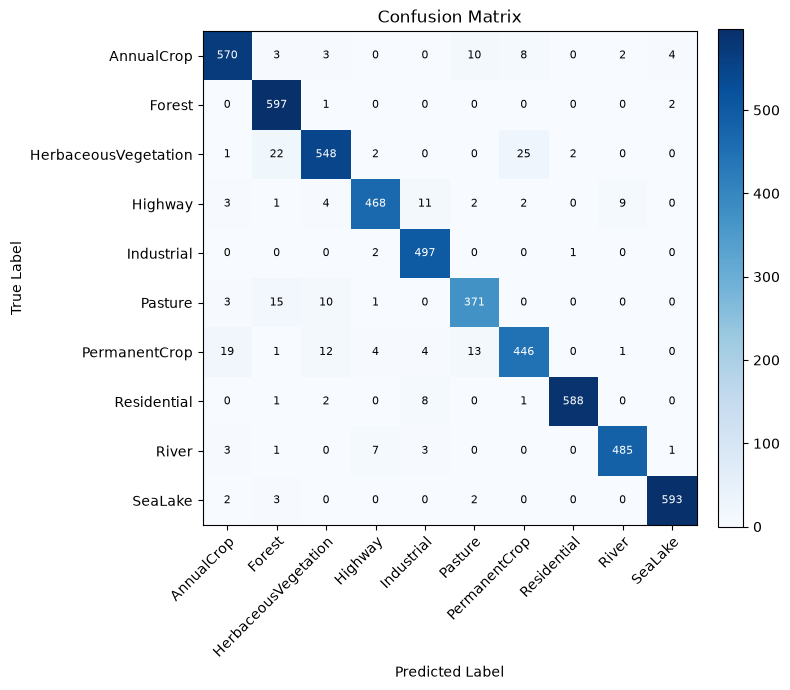
A normalized version (normalize=True) divides each row by its total, showing error rates instead, which is more informative when class sizes differ.
fig = plot_confusion_matrix(
    eval_result["confusion_matrix"],
    result["class_names"],
    normalize=True,
)
plt.show()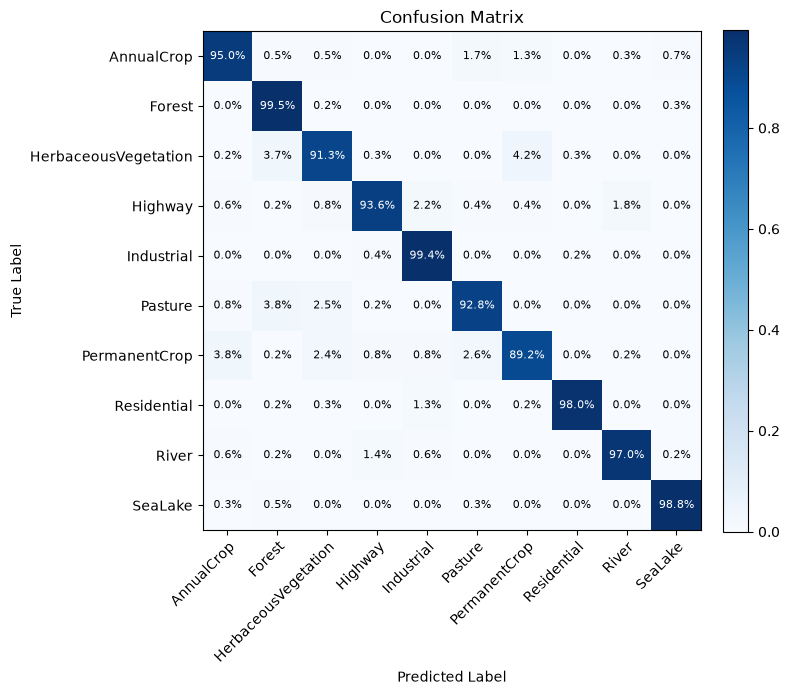
Look for off-diagonal hotspots: a bright cell at row AnnualCrop, column PermanentCrop means many annual-crop tiles were predicted as permanent crop, which fits the visual similarity you noticed between those two classes on the ImageFolder & EuroSAT page.
E. Visualise predictions
Numbers and matrices are useful, but seeing the actual tiles a model got wrong is often the fastest way to understand why. predict_images runs inference on a sample, and plot_predictions displays it with predicted and true labels side by side.
test_dataset = result["test_dataset"]
test_paths = test_dataset.image_paths
test_labels = test_dataset.labels

n_samples = min(10, len(test_paths))

rng = random.Random(43)
sample_indices = rng.sample(range(len(test_paths)), k=n_samples)
sample_paths = [test_paths[i] for i in sample_indices]
sample_labels = [test_labels[i] for i in sample_indices]

pred_result = predict_images(
    model=result["model"],
    image_paths=sample_paths,
    class_names=result["class_names"],
    image_size=64,
    in_channels=3,
)

fig = plot_predictions(
    image_paths=sample_paths,
    predictions=pred_result["predictions"],
    true_labels=sample_labels,
    class_names=result["class_names"],
    probabilities=pred_result["probabilities"],
)
plt.show()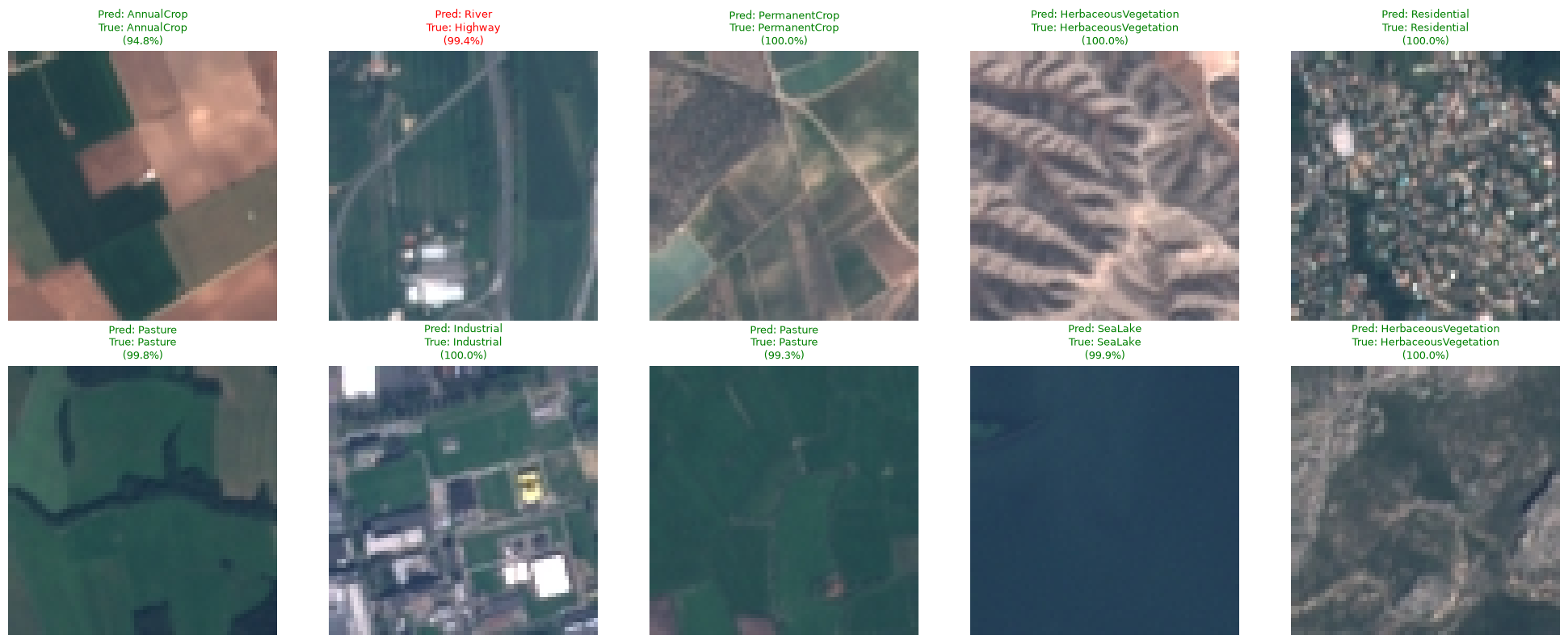
Correct predictions are typically shown with a green title, misclassifications in red, giving you a quick visual scan of successes and failures together.
4. Python activation
rng.sample(range(len(test_paths)), k=10) combines a fixed random seed with list indexing; fixing the seed here means your sample of inspected predictions is reproducible across runs, which matters if you want to compare the same tiles across two trained models later.
5. Common pitfalls
Reporting only overall accuracy. It can look strong while hiding a class the model handles badly; always check the per-class report too.
Only ever looking at the raw confusion matrix. Raw counts are dominated by class size; the normalized version is usually more informative for comparing how hard each class is.
Skipping visual inspection. Numbers tell you a class is confused; looking at the actual tiles often tells you why.
6. Mini task
Using the confusion matrix from your own trained model (or reasoning from the AnnualCrop/PermanentCrop example above if you have not trained one yet), name one class pair you would expect to be confused, and explain what about the classes themselves would cause it.
Sample solution
HerbaceousVegetation and Forest are a likely confused pair: both classes are dominated by green, textured vegetation at 64×64 pixels, and the boundary between “sparse tree cover” and “dense herbaceous vegetation” is genuinely ambiguous in some tiles, not just a model weakness. Checking a handful of the actual misclassified tiles with plot_predictions would confirm whether the confusion tracks this kind of visual ambiguity or points to something else, such as a labeling inconsistency in the source dataset.
7. Key takeaways
Overall accuracy can hide serious class-level problems; always check per-class precision, recall, and F1-score too.
A confusion matrix’s off-diagonal cells reveal exactly which classes get mixed up, and how often.
Normalized confusion matrices show error rates rather than raw counts, which is more informative when class sizes differ.
Visualizing actual predicted images connects abstract metrics back to real tiles, and helps you judge whether a confusion is a modeling problem or a genuinely hard case.