
1. Motivation
geoai.recognize expects a specific, simple directory layout. Getting your own project’s data into that shape correctly, the first time, avoids a class of bugs where images are silently mislabeled or entire classes go missing from training.
2. Core idea
The ImageFolder convention organizes a classification dataset as one subdirectory per class; the directory name becomes the label, and no separate annotation file is needed.
3. Workflow
A. Understand the ImageFolder layout
dataset/
├── AnnualCrop/
│   ├── image_001.jpg
│   └── ...
├── Forest/
│   ├── image_001.jpg
│   └── ...
├── Residential/
│   ├── image_001.jpg
│   └── ...
└── ...
Every image inside a class’s subdirectory is treated as belonging to that class. This is widely supported across deep learning frameworks precisely because it needs no separate annotation file, the folder structure is the annotation.
B. Download the EuroSAT dataset
The EuroSAT RGB dataset is a well-known benchmark for land use and land cover classification, derived from Sentinel-2 imagery: 27,000 image patches at 64×64 pixels, organized into 10 classes (AnnualCrop, Forest, HerbaceousVegetation, Highway, Industrial, Pasture, PermanentCrop, Residential, River, SeaLake), each holding between 2,000 and 3,000 images.
import os
from pathlib import Path
from geoai.utils import download_file

DATA_DIR = Path("data/raw")
DATA_DIR.mkdir(parents=True, exist_ok=True)

url = "https://data.source.coop/giuz/sds320/L05/data/EuroSAT-RGB.zip"
data_dir = download_file(url, output_path=str(DATA_DIR / Path(url).name))

print(f"Dataset directory: {data_dir}")
print(f"Files: {sorted(os.listdir(data_dir))}")Dataset directory: data/raw/EuroSAT-RGB
Files: ['AnnualCrop', 'Forest', 'HerbaceousVegetation', 'Highway', 'Industrial', 'Pasture', 'PermanentCrop', 'README.md', 'Residential', 'River', 'SeaLake', 'label_map.json', 'push_to_hf.py', 'test.csv', 'train.csv', 'validation.csv']
C. Scan the dataset and count classes
load_image_dataset scans an ImageFolder directory and returns a dictionary with class_names, image_paths, labels, and class_to_idx. Checking the class counts before training tells you immediately whether your dataset is reasonably balanced.
from geoai.recognize import load_image_dataset

dataset_info = load_image_dataset(data_dir)
print(f"Classes ({len(dataset_info['class_names'])}): {dataset_info['class_names']}")
print(f"Total images: {len(dataset_info['image_paths'])}")
Classes (10): ['AnnualCrop', 'Forest', 'HerbaceousVegetation', 'Highway', 'Industrial', 'Pasture', 'PermanentCrop', 'Residential', 'River', 'SeaLake']
Total images: 27000
The returned dictionary contains:
| Key | Meaning |
|---|---|
class_names | Sorted list of class names from folder names. |
image_paths | Paths to all image files. |
labels | Integer label for each image. |
class_to_idx | Mapping from class name to integer label. |
D. Look at one sample image per class
Visualizing a representative image from every class confirms the download worked and builds intuition for what each category actually looks like. Pay attention to classes that already look visually similar; those are usually the ones a classifier confuses most often, a pattern you will revisit on the evaluation page.
import matplotlib.pyplot as plt
from PIL import Image

class_names = dataset_info["class_names"]
image_paths = dataset_info["image_paths"]
labels = dataset_info["labels"]
class_to_idx = dataset_info["class_to_idx"]

fig, axes = plt.subplots(2, 5, figsize=(16, 7))
for idx, class_name in enumerate(class_names):
    ax = axes[idx // 5, idx % 5]
    img_idx = labels.index(class_to_idx[class_name])  # first image of this class
    img = Image.open(image_paths[img_idx])
    ax.imshow(img)
    ax.set_title(class_name, fontsize=10)
    ax.axis("off")

plt.suptitle("Sample Image from Each Class")
plt.tight_layout()
plt.show()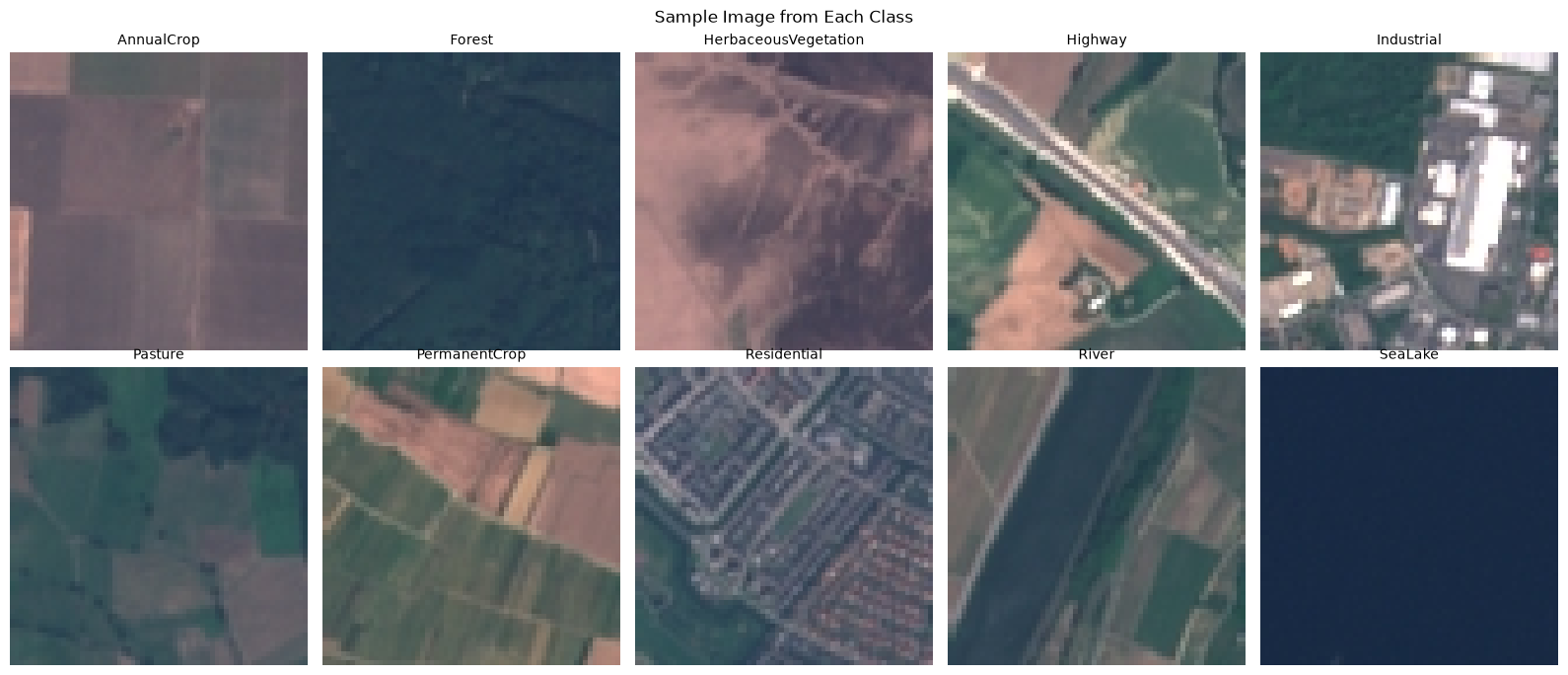
4. Python reactivation
labels.index(class_to_idx[class_name]) chains two familiar operations: dictionary lookup (class_to_idx[class_name]) and finding the first matching position in a list (.index(...)), both plain Python you may used in SDS210. Reading unfamiliar-looking code one call at a time like this is a useful habit whenever you meet a new library.
5. Common pitfalls
Inconsistent folder naming. A stray folder, a typo, or an unrelated subfolder inside your ImageFolder root becomes its own class, silently.
Mixed image sizes or modes going unnoticed. Check a sample of images, not just the folder structure, before training.
Severely imbalanced class folders. A class with far fewer images than the others will usually be harder for the model to learn well; check counts early, as in step C.
6. Mini task
Sketch the ImageFolder structure you would need for your own project’s classes (even if you have not created the actual images yet), and note which existing tiles, if any, from your L04 project transfer work you could reuse or relabel.
Sample solution
project_dataset/
├── Flooded/
│   └── ...
├── NotFlooded/
│   └── ...
The 256×256 tiles generated in L04 for a flood-mapping project could be reused directly here, if each tile can be assigned one dominant label (flooded or not) rather than needing the pixel-level mask that was generated alongside them. The mask tiles themselves would not be used for this classification framing, only the image tiles and a derived scene-level label.
7. Further reading
8. Key takeaways
The ImageFolder layout uses one subdirectory per class; the folder name is the label.
EuroSAT RGB provides 27,000 labeled 64×64 tiles across 10 land-use and land-cover classes, derived from Sentinel-2 imagery.
load_image_datasetscans an ImageFolder directory and reports class names, image paths, and label mappings.Visually inspecting one sample per class catches download problems early and previews which classes are likely to be confused later.