
1. Motivation
This is the page where the concepts from earlier in the lesson, bounding boxes, confidence scores, architecture choice, become an actual trained model. The geoai package deliberately hides a substantial amount of boilerplate (the training loop, the learning-rate scheduler, checkpoint saving) behind a small set of parameters, so your job is to understand what those parameters control well enough to make good choices for your own project data later.
2. Core idea
geoai.train_multiclass_detector() runs the complete training pipeline in one call: it loads images and COCO annotations, builds the detection model you specify, runs the training loop with a learning-rate schedule, and saves the best checkpoint based on validation performance. You provide the data locations and a handful of hyperparameters; the function returns the path to the saved model.
3. Workflow
A. Prepare the dataset
The following cells reproduce the setup from the previous page so that the key training variables are explicit.
import os

# Apple silicon only: run operations missing on MPS on the CPU instead
os.environ["PYTORCH_ENABLE_MPS_FALLBACK"] = "1"

import geoai
from pathlib import Path
DATA_DIR = Path("data/raw")
DATA_DIR.mkdir(parents=True, exist_ok=True)
url = "https://data.source.coop/giuz/sds320/L06/data/NWPU-VHR-10.zip"
data_dir = geoai.download_file(url, output_path=str(DATA_DIR / Path(url).name))
splits = geoai.prepare_nwpu_vhr10(
data_dir,
val_split=0.2,
seed=42,
)The fixed seed helps make the split reproducible.
B. Set the architecture information
# Runtime: ~4 h (~1 h in Colab using T4 GPU)
# Hardware: Apple M3 Pro (18 GB RAM, MPS GPU acceleration)

output_dir = "nwpu_output"

model_path = geoai.train_multiclass_detector(
    images_dir=splits["images_dir"],
    annotations_path=splits["train_annotations"],
    output_dir=output_dir,
    model_name="fasterrcnn_resnet50_fpn_v2",
    class_names=splits["class_names"],
    num_channels=3,
    batch_size=4,
    num_epochs=10,
    learning_rate=0.005,
    val_split=0.1,
    seed=42,
    pretrained=True,
    verbose=True,
)
[W1012 16:27:14.841815000 MPSFallback.mm:34] Warning: The operator 'torchvision::nms' is not currently supported on the MPS backend and will fall back to run on the CPU. This may have performance implications. (function operator())
Several arguments deserve explicit attention.
| Argument | Explanation |
|---|---|
output_dir | The output directory keeps checkpoints and training history separate from your raw data. This becomes particularly important in your own repository. |
model_name | Selects the detector architecture. The baseline uses Faster R-CNN. You could later test another supported architecture, but change one major modelling decision at a time. |
class_names | The class names need to correspond to the annotation category IDs expected by the workflow (splits["class_names"]). The list includes a background class at index 0. |
num_channels | This tells the model to expect standard RGB imagery; you would change this if working with multispectral chips. |
batch_size | The batch size controls how many training samples are processed together. Larger values usually require more accelerator memory. |
num_epochs | An Epoch is one full pass through the training data. Ten epochs provide a reasonable starting experiment for the benchmark workflow. More epochs are not automatically better: eventually the model may stop improving on unseen data or begin to Overfitting. |
learning_rate | The learning rate controls the size of parameter updates during optimisation. It is a Hyperparameter: it is chosen by you rather than learned directly from the data. 0.005 with a step-based schedule is a reasonable default for this architecture. |
val_split | This is an internal validation fraction used during training. Do not confuse it with the held-out validation/evaluation split created earlier by prepare_nwpu_vhr10. |
seed | A fixed random seed supports reproducibility. It does not make every GPU operation perfectly deterministic, but it removes an avoidable source of variation. |
pretrained | Initializes the backbone with ImageNet weights rather than random values, a form of transfer learning that generally speeds up training and improves results when your own labeled dataset is small. |
Note that num_epochs, batch_size, learning_rate and val_split are hyperparameters that can be adjusted to improve the model performance.
C. Run training and check the output
The function returns model_path, a string path to the saved best checkpoint on disk. You can pass this path directly to the evaluation and inference functions on the next two pages, so keep it around.
D. Plot the training history
geoai.plot_detection_training_history(
    history_path=os.path.join(output_dir, "training_history.pth"),
)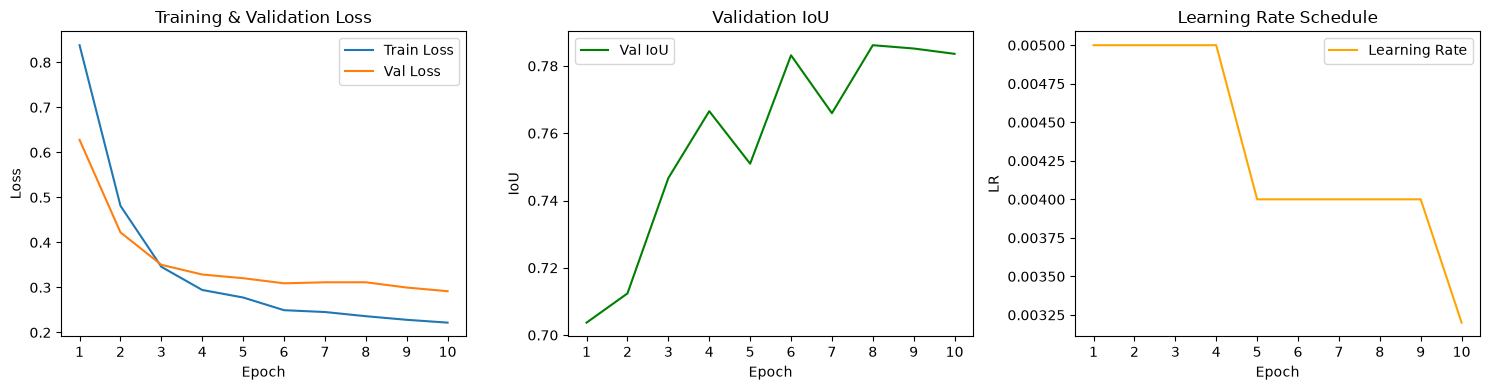
This produces three panels: training loss (should decrease and level off in a healthy run), validation IoU (should generally increase as box localization improves, though some fluctuation between epochs is normal), and the learning-rate schedule (showing when the scheduler reduced the rate during training). Reviewing these before moving on tells you whether training actually worked before you invest time in evaluation and inference.
4. Python reactivation
train_multiclass_detector() is called entirely with keyword arguments (images_dir=..., batch_size=4, and so on) rather than positional ones. This is a common pattern for functions with many parameters: it makes each call self-documenting and lets you reorder or omit arguments that have sensible defaults, at the cost of a longer line of code. os.path.join(output_dir, "training_history.pth") builds a file path by joining pieces, the same idea behind Pathlib, but using the older os.path module and plain strings instead of path objects.
5. Common pitfalls
Confusing the two
val_splitparameters, as described above. Keep clear in your own notes which split is for final evaluation and which is for monitoring training.Changing several hyperparameters at once when troubleshooting. If a run performs poorly, change one parameter at a time so you can tell what actually mattered, the same principle from the architecture-comparison page.
Reusing
output_diracross runs without noticing. Overwriting a previous run’s checkpoint and history file makes it hard to compare experiments later; use a distinctoutput_dirper configuration you want to keep.Skipping the training-history plot. A model can finish training without errors and still have failed to learn anything useful; the loss and validation IoU curves are your first check.
6. Mini task
Using the parameters above as a baseline, describe (in words, no need to actually retrain unless you have time) what you would expect to change if you set num_epochs=3 instead of 10, keeping everything else fixed. Would you expect training loss to be higher or lower than the 10-epoch run? What about validation IoU?
Sample solution
With only 3 epochs, the model has fewer opportunities to update its weights, so training loss would likely still be relatively high and validation IoU relatively low compared to the 10-epoch run, similar to looking at the leftmost points on the training-history curves rather than the rightmost ones. This does not necessarily mean 3 epochs is “wrong”: for a quick feasibility check on new project data, a short run is a reasonable first step before committing to a longer, more expensive training run.
7. Key takeaways
train_multiclass_detector()handles the full training pipeline: data loading, model construction, the training loop, and checkpoint saving.model_name,class_names, andpretrainedset up the architecture;num_epochs,batch_size,learning_rate,val_split, andseedcontrol how training proceeds.The
val_splitused here (internal validation during training) is separate from theval_splitused when preparing the dataset (final evaluation set); keep the two distinct.Always check the training-history plot before moving on to evaluation; a smooth-looking training run is not proof the model learned anything useful.
The returned
model_pathis what you will pass into evaluation and inference on the following pages.
Further reading
OpenGeoAI, “Multi-Class Object Detection with NWPU-VHR-10” — the full, runnable notebook this workflow is based on.
OpenGeoAI, “Train Object Detection Model” — a related
geoaiexample usingtrain_MaskRCNN_model()for a single-class detection task, useful if your project only needs to find one type of object rather than several.