
1. Motivation
A single satellite or aerial scene can span tens of thousands of pixels in each direction, while most deep learning models expect inputs of a few hundred pixels, commonly 256×256 or 512×512. Tiling, sometimes called “chipping,” slices these large scenes into pieces that actually fit into GPU memory and match your model’s expected input size.
2. Core idea
Tiling has two main parameters: tile size, the width and height of each chip, and stride, the step size between consecutive chips. When stride equals tile size, chips do not overlap; when stride is smaller, chips overlap.
Overlap is useful because objects near chip edges may otherwise be cut in half, which can confuse a model during training. The trade-off is that overlap creates more chips, uses more storage and takes more processing time.
3. Workflow
A. Choose tile size and stride
Use tile size and stride as project parameters.
| Overlap | Stride for 256 px tiles | Stride for 512 px tiles | Typical use |
|---|---|---|---|
| 0% | 256 | 512 | Simple classification or large uniform areas. |
| 25% | 192 | 384 | General-purpose tiling with moderate boundary issues. |
| 50% | 128 | 256 | Dense objects, buildings or small features. |
| 75% | 64 | 128 | Maximum coverage, but many more chips. |
For a first project prototype, start simple. Use a small area and a moderate overlap (e.g. 25%) before scaling up.
B. Generate tiles from one image
The export_geotiff_tiles() function can tile imagery, rasterise vector labels and save paired image-mask tiles in one workflow.
from pathlib import Path

import geoai

DATA_DIR = Path("data/raw")
DATA_DIR.mkdir(parents=True, exist_ok=True)

raster_url = "https://data.source.coop/giuz/sds320/L04/data/willisau_2024_swissimage_rgb_subset_05m.tif"
vector_url = "https://data.source.coop/giuz/sds320/L04/data/willisau_2024_swissbuildings3D_clip.geojson"

raster_path = geoai.download_file(
    raster_url, output_path=str(DATA_DIR / Path(raster_url).name)
)
vector_path = geoai.download_file(
    vector_url, output_path=str(DATA_DIR / Path(vector_url).name)
)
import matplotlib.cm as cm
import matplotlib.pyplot as plt
if not hasattr(cm, "get_cmap"):
cm.get_cmap = plt.get_cmap
tiles = geoai.export_geotiff_tiles(
in_raster=raster_path,
out_folder="output",
in_class_data=vector_path,
tile_size=512,
stride=384,
buffer_radius=0,
create_overview=True,
quiet=True,
)In this example:
tile_size=512creates 512 × 512 pixel chips,stride=384creates 25% overlap,create_overview=Truecreates an overview image showing tile boundaries,buffer_radius=0means polygon labels are not expanded,quiet=Truesuppresses the function’s per-tile progress output, so only the final result prints instead of a line for every chip generated.
C. Inspect image-mask pairs
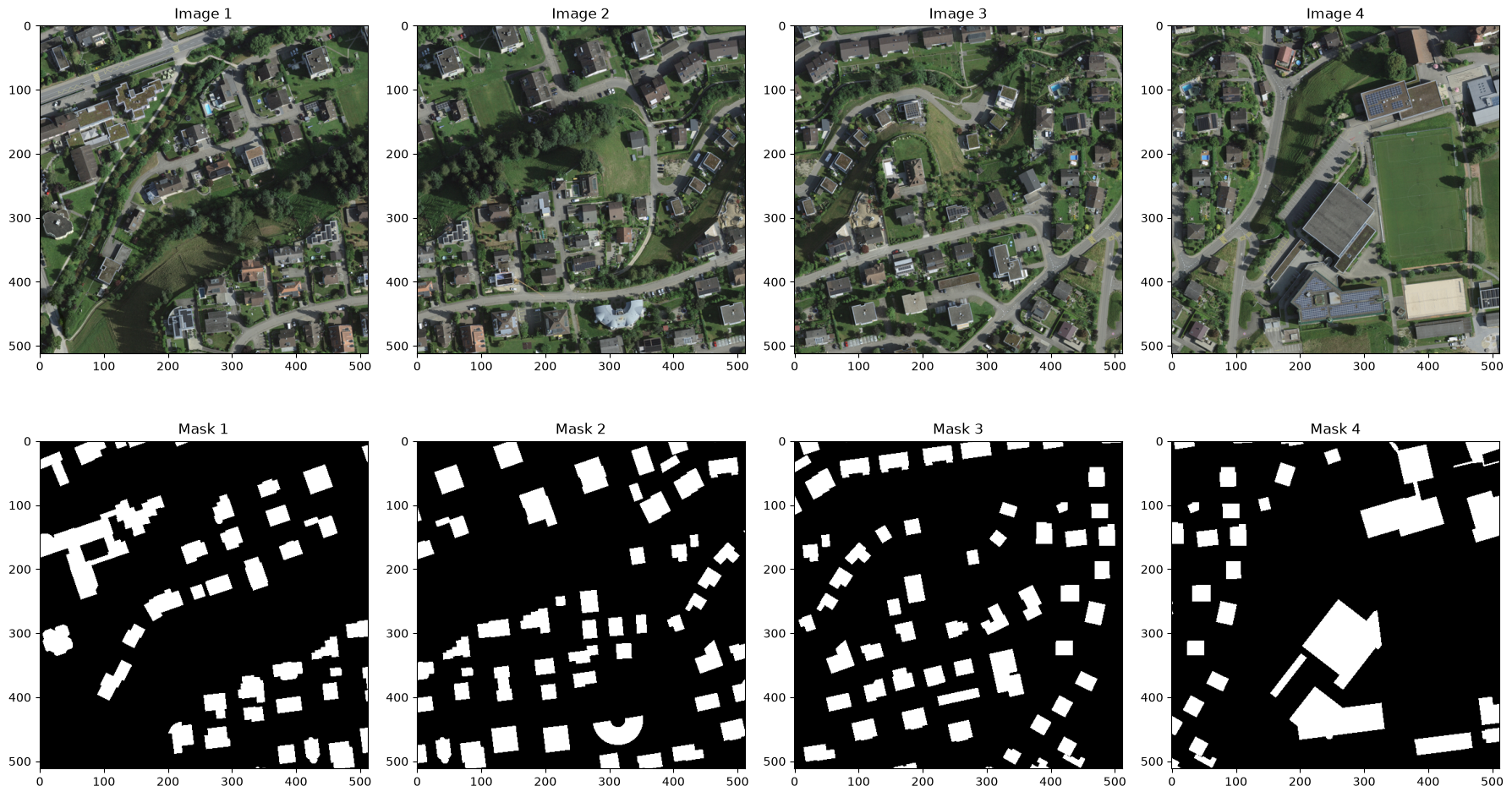
Before moving on, inspect the overview image and a handful of individual image/mask pairs to confirm that tiles were generated where you expect and that labels align correctly within each one.
geoai.view_image("output/overview.png", figsize=(18, 10))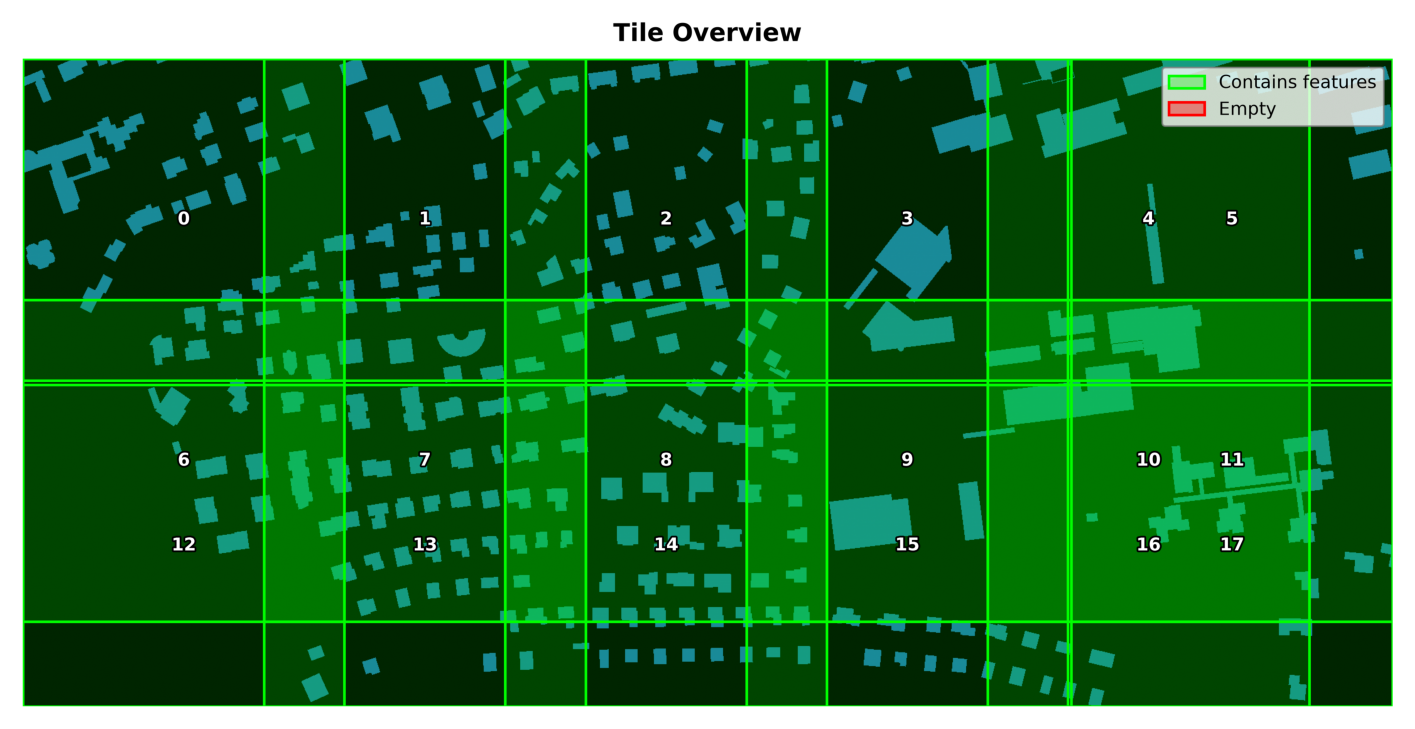
fig = geoai.display_training_tiles(
    output_dir="output",
    num_tiles=4,
    figsize=(18, 10),
)
4. Common pitfalls
| Pitfall | How to avoid it |
|---|---|
| Tile size is chosen randomly | Match it to model input size and feature size. |
| No overlap is used for boundary-sensitive objects | Use overlap when objects are often cut at tile edges. |
| Too much overlap creates too many files | Start with a small prototype and check chip count. |
| Overview image is ignored | Use it to check coverage and empty areas. |
| Image chips and masks do not match | Inspect several image-mask pairs before training. |
| Tiling parameters are not documented | Record tile size, stride, overlap and filtering choices. |
5. Mini task
Using your own image/mask pair (or the sample data here), generate tiles at two different overlap settings (for example, 0% and 50%) and compare the total tile counts.
Sample solution
tiles_0 = geoai.export_geotiff_tiles(
    in_raster=raster_path,
    out_folder="output_0pct",
    in_class_data=vector_path,
    tile_size=256,
    stride=256,
    quiet=True,
)
tiles_50 = geoai.export_geotiff_tiles(
    in_raster=raster_path,
    out_folder="output_50pct",
    in_class_data=vector_path,
    tile_size=256,
    stride=128,
    quiet=True,
)
The 50% overlap setting produces roughly four times as many tiles as the 0% setting, for the same source image. Inspecting a few tiles near the image edges shows that, with 0% overlap, a handful of buildings are cut cleanly in half at tile boundaries, while with 50% overlap those same buildings appear whole in at least one neighboring tile.
6. Key takeaways
Tiling turns large rasters into model-ready image chips.
Stride controls overlap between neighbouring chips.
Overlap helps with edge objects but increases storage and processing time.
The overview image checks spatial coverage.
Image-mask pair previews are a required quality check before training.
Useful links
GeoAI Video Tutorial - creating georeferenced image chips for deep learning